Free banner · consent settings
Set up your cookie banner and tracker controls
Visitors choose categories and can change their decision. The banner passes choices to analytics and advertising tags; strict opt-in blocks known trackers until consent.
The base banner is free. Strict blocking needs the first synchronous tag before analytics. Scans and logs have limits; the banner does not guarantee legal compliance.
- Four categories and settings that can be reopened
- Google Consent Mode v2 and vendor signals
- Start modes configured by your rules

What the guest sees — and what appears on your side
Guest screen

In your dashboard
Where the data goes An anonymous consent log in your account: categories and timestamp, without IP or full user agent
- categories: necessary, preferences, statistics and marketing
- 4
- per-region modes, from strict opt-in to a simple notice
- 5
- languages supported; a language pack is required, otherwise English is used
- 45
- for the base tier: banner, blocking in opt-in, Consent Mode and the log
- $0
How it works — for the visitor and for you
- 1
Your configured mode loads
In strict opt-in, known trackers and manually marked scripts wait for consent. Opt-out and other modes apply different start rules. Configure and test the mode on your site. For blocking before consent, put the separate consent tag first in head, without async or defer, before analytics. It cannot stop scripts already executed, server Set-Cookie or service workers.
- 2
They see the banner of their region
Region is inferred from IP with a time-zone fallback. It is an estimate, not proof of a visitor’s country; you configure opt-in/opt-out rules and exceptions.
- 3
They choose categories
Opt-in offers acceptance, rejection or category selection. In opt-out, GPC/DNT automatically rejects marketing; not every mode requires a prior decision.
- 4
The decision is applied and logged
Allowed scripts start, cookies of rejected categories are cleaned up, Google, Meta and Microsoft receive consent signals, and the decision goes into an anonymous log.
Set up in three steps
Create an account and add your site
Signup opens setup for the selected product. Have your domain and permission to insert code ready.
Configure and install
Follow your platform instructions. Blocking trackers before consent requires the early CMP script, not just the shared async tag.
Test your published site
Enable the widget and try the visitor action on the published page. Settings may appear after the cache refreshes.
The tag
<script src="https://cdn.cenaly.com/site/v1.js" data-domain="your-site.com" async></script>Shared widget tag. See the separate CMP instructions for blocking trackers before consent.
What the cookie banner takes off your hands
Block trackers instead of just warning about them
In strict opt-in, known trackers and manually marked scripts wait for consent. Opt-out and other modes apply different start rules. Configure and test the mode on your site. For blocking before consent, put the separate consent tag first in head, without async or defer, before analytics. It cannot stop scripts already executed, server Set-Cookie or service workers.
Ask by the rules of the region
Region is inferred from IP with a time-zone fallback. It is an estimate, not proof of a visitor’s country; you configure opt-in/opt-out rules and exceptions.
Don’t bother visitors with a pointless question
If enabled and the scan report contains only necessary cookies, the first layer can inform instead of asking. A scan reports what it found on scanned pages and in tested states. It does not prove that other trackers are absent; manually check dynamic elements, category settings and results.
Pass the visitor’s choice to your analytics
Consent Mode v2, GTM dataLayer events and UET, Meta and Clarity signals are sent. Tags must be configured to handle them; sending a signal does not verify your advertising-account setup.
Show the real cookie list
A scan reports what it found on scanned pages and in tested states. It does not prove that other trackers are absent; manually check dynamic elements, category settings and results.Discovered cookies can populate the declaration. AI classification is a paid AI-balance suggestion; review and save the result.
Keep the decisions and let people change them
Visitors can reopen settings and change their choice. A new prompt can appear after a policy-version change, choice expiry or browser-data clearing.A linked account has a log under its tier terms; the standalone WordPress plugin keeps no log.
Where it pays off
Visitors from the EU and the UK
In strict opt-in, known trackers and manually marked scripts wait for consent. Opt-out and other modes apply different start rules. Configure and test the mode on your site.
A site with Google Analytics and ads
Consent Mode v2 passes the consent state to vendors — the visitor’s choice reaches your tags instead of staying inside the banner.
Only strictly necessary cookies
If enabled and the scan report contains only necessary cookies, the first layer can inform instead of asking. A scan reports what it found on scanned pages and in tested states. It does not prove that other trackers are absent; manually check dynamic elements, category settings and results.
Embedded video and maps
In blocking mode, supported videos and maps can be replaced by a settings placeholder. Test each source your site uses.
A site on WordPress
The plugin installs the banner without touching your theme; linked to your account the site behaves like an ordinary location, consent log included.
Alcohol and 18+ products
An age question can precede the banner. It is the visitor’s own answer, not identity or document-based age verification, and does not permit restricted-product sales.
What it looks like in the product
Choosing categories
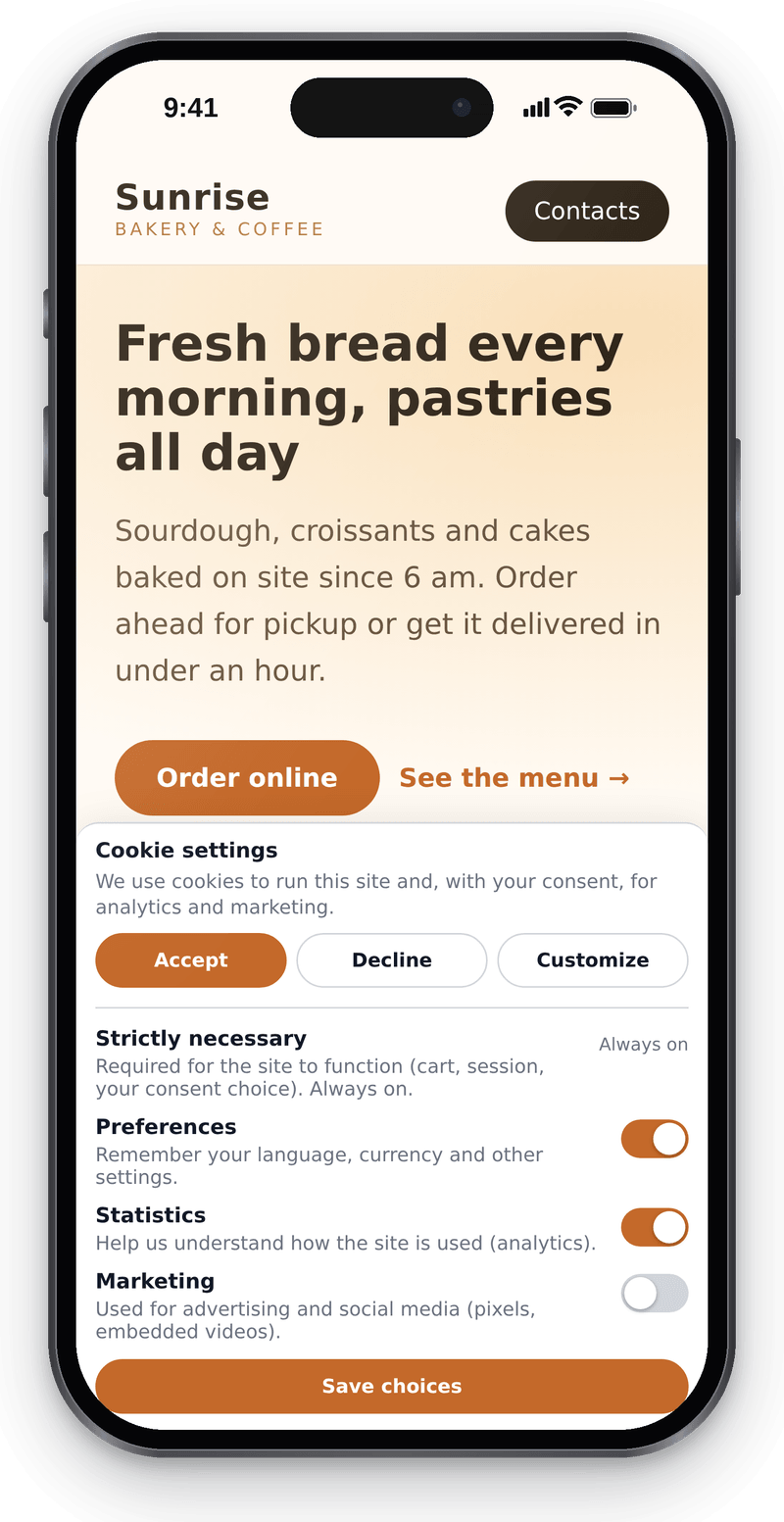
The visitor turns on only the categories they want

Settings in the dashboard
View full size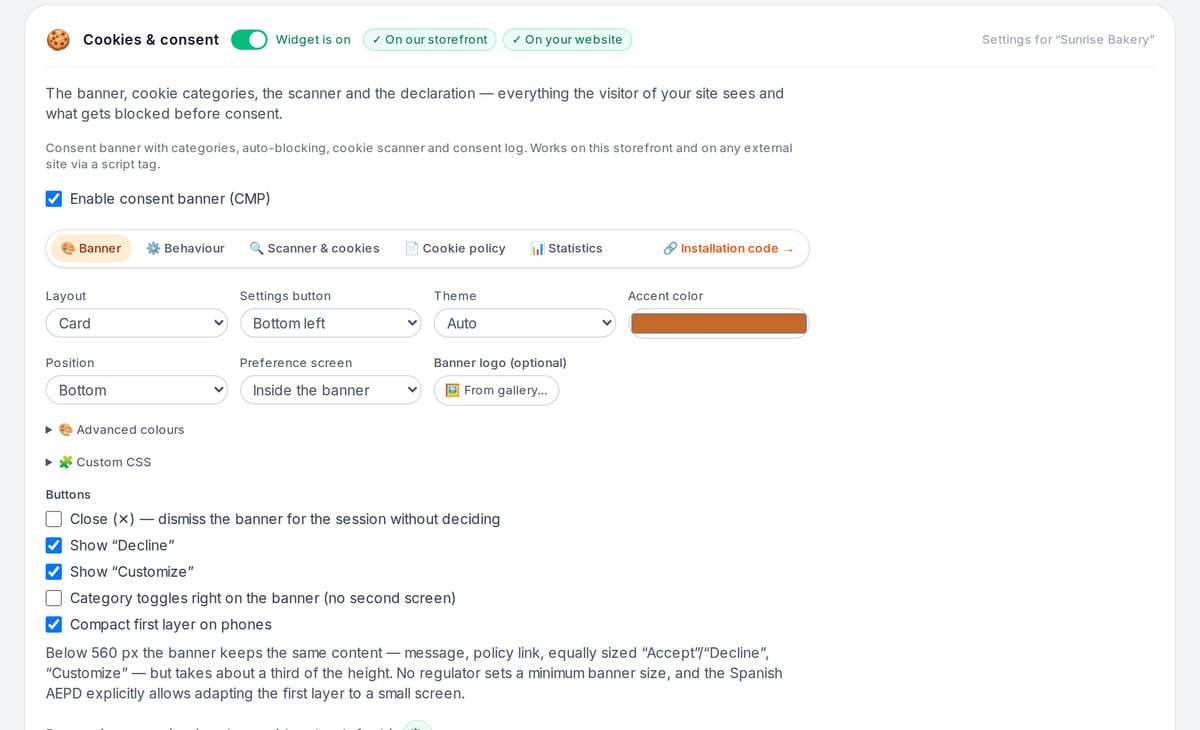
Website check
View full size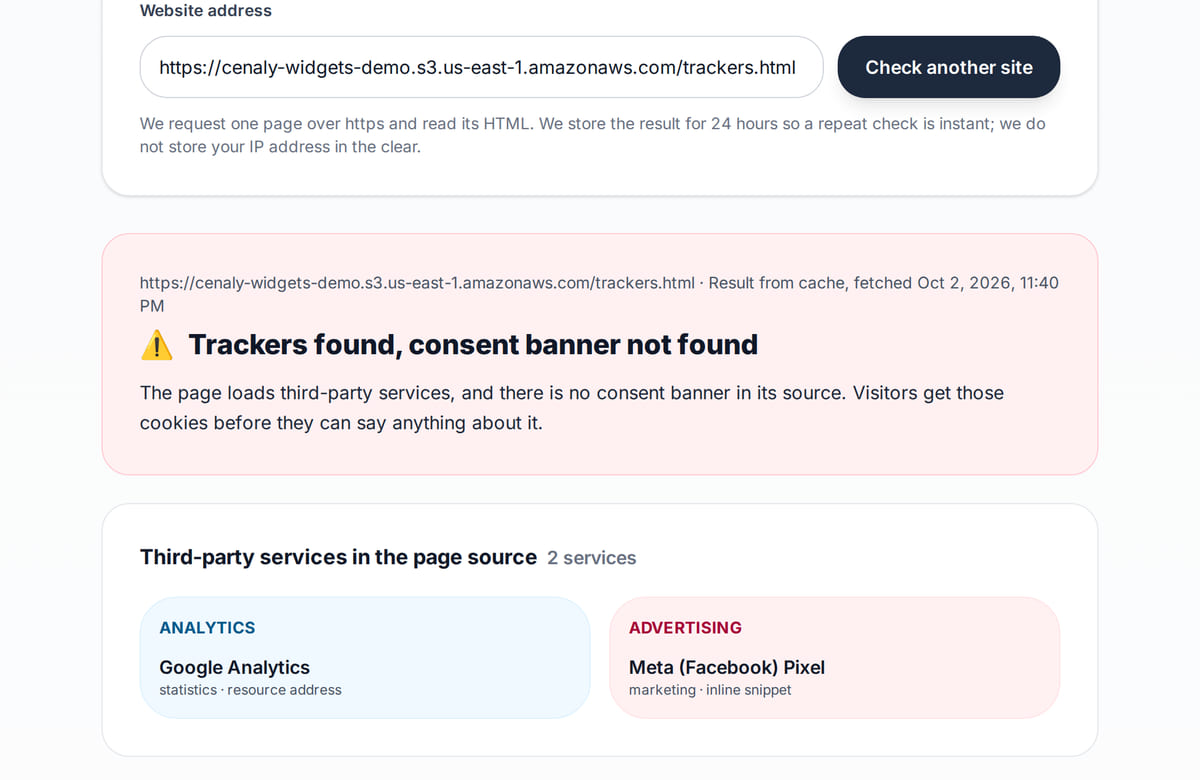
The tool shows which trackers the page loads


How it works in practice

Illustration. The visitor’s choice is applied and recorded in the consent log

How it looks on your site
Example interface. Customise colours, position and labels, then check your page on desktop and mobile.
On desktop
On mobile
On your side: The four categories and their descriptions are already written; the set of buttons, theme, position and logo are your settings. In the US mode the first layer becomes “Do Not Sell or Share My Personal Information” — also ready to go.
On desktop
On mobile
On your side: Visitors can reopen settings and change their choice. A new prompt can appear after a policy-version change, choice expiry or browser-data clearing.
Where it goes
Exact menu names and plan requirements, taken from each platform’s own help center.
Sites built with our website builder ship with the widgets already wired — nothing to paste.
Step-by-step guides per platform — in the help center →Pricing
Free
Free on sites built with our website builder
- The base tier is free: banner, known-tracker blocking in opt-in, four categories, per-region modes, Consent Mode v2 and the log
- Free tier includes a monthly scan of 10 pages and a 3-month consent log
- The paid add-on lifts the limits: weekly scans of up to 30 pages and a 12-month log; the price is in the extensions catalogue
- On sites built with our website builder the banner is enabled from the start
- We charge nothing per visitor or per domain: the paid tier lifts the limits on scanned pages and log depth — those are what we meter, not the number of sites
What is included and what costs extra
Basic versions of 9 of the 13 widgets are free. Table booking, popups, help and legal pages on external sites are extensions. Connected services can cost extra.
With and without
| Without the widget | With the widget | |
|---|---|---|
| When trackers start | ✕ The strip is there, but analytics and ads start along with the page | ✓ In strict opt-in, known trackers and manually marked scripts wait for consent. Opt-out and other modes apply different start rules. Configure and test the mode on your site. |
| Visitor’s region | ✕ The same banner is shown to the entire world | ✓ Region is inferred from IP with a time-zone fallback. It is an estimate, not proof of a visitor’s country; you configure opt-in/opt-out rules and exceptions. |
| Consent signals | ✕ The visitor’s choice stays inside the strip: no tag or vendor is told about it | ✓ Consent Mode v2, the dataLayer event for GTM, UET, Meta Pixel and Clarity all receive the consent state |
| Cookie list | ✕ The cookie list in the policy was typed by hand a long time ago | ✓ A scan reports what it found on scanned pages and in tested states. It does not prove that other trackers are absent; manually check dynamic elements, category settings and results. |
| History of decisions | ✕ There is nothing to show what the visitor chose, and when | ✓ An anonymous log keeps the choice and its timestamp — without IP or full user agent |
Honest about the limits
- Not intercepted: cookies set by your server via Set-Cookie, scripts that already ran before our tag, and service workers.
- For blocking before consent, put the separate consent tag first in head, without async or defer, before analytics. It cannot stop scripts already executed, server Set-Cookie or service workers.
- If the config is unreachable, the page is excluded or the banner is off, blocking is lifted entirely: we will not keep your site blocked because of a failure on our side.
- Free tier: a monthly scan of 10 pages and a 3-month consent log. Beyond that it is the paid add-on.
- This is not legal advice: the regional mode and the wording are your decisions, and the log itself guarantees nothing — edge cases are worth discussing with a lawyer.
- The age gate speaks four languages (English, Russian, Georgian, Turkish) with your own wording per language; a refusal is deliberately not remembered, so a reload asks again.
- In strict opt-in, known trackers and manually marked scripts wait for consent. Opt-out and other modes apply different start rules. Configure and test the mode on your site.
- A scan reports what it found on scanned pages and in tested states. It does not prove that other trackers are absent; manually check dynamic elements, category settings and results.
- Consent Mode v2 is a signal interface, not a claim of CMP certification or advertising-platform approval. Check the chosen platform’s requirements separately.
- An age question can precede the banner. It is the visitor’s own answer, not identity or document-based age verification, and does not permit restricted-product sales.
Who it's for
- Sites with visitors from the EU and the UK
- Anyone running Google Analytics, Ads, Meta Pixel or Clarity
- Sites on WordPress — installed with the plugin, without touching the theme
What the cookie banner does and how to check it
In strict opt-in, known trackers and manually marked scripts wait for consent. Opt-out and other modes apply different start rules. Configure and test the mode on your site.
The banner helps manage categories and pass choices to connected tags. The required legal mode depends on your site and visitors; settings do not replace a legal assessment.
The base tier is free: banner, auto-blocking, four categories, per-region modes, Consent Mode v2 and the log A scan reports what it found on scanned pages and in tested states. It does not prove that other trackers are absent; manually check dynamic elements, category settings and results.
The public website check reads one page’s HTML, does not run JavaScript and does not prove correct blocking. After installation, test accept, reject, reopening and network requests in a browser.
Questions and answers
What is included in the free tier?
A banner in 45 languages, known-tracker blocking in opt-in, four categories and a preference centre, per-region modes, Google Consent Mode v2, a monthly scan of 10 pages and a 3-month consent log. The paid add-on lifts the limits: weekly scans of up to 30 pages and a 12-month log; the price is in the extensions catalogue.
Does it really block trackers?
In strict opt-in, known trackers and manually marked scripts wait for consent. Opt-out and other modes apply different start rules. Configure and test the mode on your site. For blocking before consent, put the separate consent tag first in head, without async or defer, before analytics. It cannot stop scripts already executed, server Set-Cookie or service workers.
Is it compatible with Google Tag Manager?
Consent Mode v2, GTM dataLayer events and UET, Meta and Clarity signals are sent. Tags must be configured to handle them; sending a signal does not verify your advertising-account setup.
What if I only have strictly necessary cookies?
If enabled and the scan report contains only necessary cookies, the first layer can inform instead of asking. A scan reports what it found on scanned pages and in tested states. It does not prove that other trackers are absent; manually check dynamic elements, category settings and results.
What about cookies the scan didn’t recognise?
In the scan report, unrecognised cookies have a “✨ Suggest categories with AI” button: the model receives only their names and the page’s list of third-party hosts and proposes one of our four categories, the provider, the purpose and the reason for its choice. The suggestion lands in the declaration as a draft — you can change the category in the select, and nothing applies until you press “Save”. The call is paid and billed to the account’s AI balance; the scan itself still runs on the built-in database, without a model.
Do I need a banner outside the EU?
The widget lets you configure modes and text for audiences, including Russia. It does not automatically determine whether data processing is lawful; check your site’s terms and selected mode.
What does the consent log contain?
The categories the visitor chose and the time of the decision — anonymously, without IP or full user agent. It is a history of decisions rather than a guarantee of compliance: it shows that consent was collected and how it was arranged.
How do I switch on the 18+ age gate?
In a separate section of the same widget’s panel: a threshold of 18 or 21, confirmation buttons or a birth-year field, memory from 1 to 365 days (30 by default). The birth year is never stored anywhere, and a refusal is deliberately not remembered. An age question can precede the banner. It is the visitor’s own answer, not identity or document-based age verification, and does not permit restricted-product sales.
How do I install it?
For blocking before consent, put the separate consent tag first in head, without async or defer, before analytics. It cannot stop scripts already executed, server Set-Cookie or service workers.You can link the WordPress plugin to an account; standalone mode has no log. Check script order on pages using other plugins too.
Will the banner slow my site down?
The synchronous tag enables early interception, so loading affects the first screen. Configuration, language packs and an enabled age gate need additional files. Test network use and speed on your site; neither a fixed size nor zero load after a decision is guaranteed.
What do I need to install it?
An account, your website domain and permission to insert code. Prepare the selected widget’s data and test your published page. Follow the separate cookie banner instructions for early tracker blocking.
Will it work on my page?
Style isolation reduces conflicts but does not replace testing. Check buttons, forms, mobile layout and other scripts on your site.
What about languages and data?
Set your own texts separately; built-in labels fall back to English where translations are missing. Core data is stored in the brand’s cloud. Connected AI, telephony and other services have separate processing terms.
Check your site for trackers and a cookie banner →
More — installation per platform, settings and troubleshooting — in the help center. Installation guide →
Works together with
All 13 widgets →Comparisons
Legal pages
Privacy, terms, returns, cookies, delivery — built from your own data and embedded in your site
$9/mo
Help centre
A “?” button → a side panel with your articles, search and a “was this helpful” vote
$19/mo
Popups and forms
Modals, slide-ins, bars, embedded forms, coupons and quizzes with display rules and A/B testing
$9/mo
Set up the banner and test tracker behaviour
After signup, choose categories and mode, then install the tag before trackers. Test accept, reject and reopening on the published site.
Set up consentNo card required · base tier is free · Consent Mode v2 and the log included