Free chat for your team
Answer website visitors in your team chat
Visitors ask on your website; your team replies from the Cenaly.com dashboard or staff app. Help customers before they order or enquire.
Team chat is free. AI costs extra; calls require telephony.
- No charge per agent or conversation
- Your team sees the conversation in one channel
- AI is configured separately and is off by default

What the guest sees — and what appears on your side
Guest screen

In your dashboard

Where the data goes A channel in your Cenaly.com team chat — full history and the visitor’s contact stay in your account
- per agent, per seat and per conversation — no staff or message limits
- $0
- Enquiries reach your team chat
- Website + storefront
- Staff with chat access can reply
- Your team
- Configure AI and calls separately
- Optional
How it works for the visitor
- 1
The visitor opens the chat
They tap the bubble in the bottom corner and see your greeting and a text field straight away. No sign-up, no email gate.
- 2
They ask right on the page
They write in their own words without moving to another service. The message arrives as its own channel in your Cenaly.com team chat.
- 3
They read the reply
The answer appears in the same window on your page. On your side it comes from any staff member with access to the conversation — admin, manager or owner.
- 4
They come back to the thread
The conversation can resume in the same browser while its conversation keys remain stored. Clearing browser data can lose access to the earlier thread.
Set up in three steps
Create an account and add your site
Signup opens setup for the selected product. Have your domain and permission to insert code ready.
Configure and install
Follow your platform instructions. Blocking trackers before consent requires the early CMP script, not just the shared async tag.
Test your published site
Enable the widget and try the visitor action on the published page. Settings may appear after the cache refreshes.
The tag
<script src="https://cdn.cenaly.com/site/v1.js" data-domain="your-site.com" async></script>Shared widget tag. See the separate CMP instructions for blocking trackers before consent.
How chat helps visitors and your team
Answer as a team, including from a phone
A conversation opens as its own channel in the team chat. Any staff member with access can reply, and the staff app announces a new message with a push. No per-person licence to buy. Best for teams with no dedicated support desk.
Pick the conversation back up when the visitor returns
The conversation can resume in the same browser while its conversation keys remain stored. Clearing browser data can lose access to the earlier thread.
Switch on the AI assistant when you are ready
Three modes: off, AI drafts the reply and a person sends it, or AI answers on its own and hands over to a human. It answers from your knowledge base and respects document access levels (only “may be shared externally” documents leave the building), with the persona and instructions you write, on a schedule and with a cap on answers per conversation. The autonomous mode takes a separate legal confirmation. Useful where questions repeat and nobody can be on duty around the clock. AI costs extra; check your balance and terms before enabling it.
Show help articles in a “Help” tab
If the location has published help articles, the visitor reads them right inside the chat window without leaving the page. Best where people look for instructions and answers to common questions.
Add a voice conversation to the same window
With telephony configured, enable calls from the chat window. HTTPS and microphone permission are required. The calling engine loads on click; telephony and minute charges apply separately.
Set the look and the language of the labels
Set colours, position, greeting and labels. Built-in labels follow the page language; some translations fall back to English. Set your own texts separately and check the widget on your website.
Collapse the buttons into one with the multi-button
When the multi-button is on, the separate chat bubble is hidden and chat lives inside its fan: one floating element on screen. Best for sites running several widgets at once.
Where it pays off
A question before buying
Size, stock, delivery time — asked on the product page instead of hunting for a phone number in the footer.
Pricing before the enquiry
On a service page the visitor can ask “how much would it cost in my case” before deciding to leave an enquiry.
Events and group bookings
Your manager answers about dates, deposits and menus in the team chat, including from the app on their phone.
Messages after hours
A visitor leaves a question in the evening. Staff reply when the next shift starts, and the thread stays in your account.
Instructions before asking
The visitor reads your published help articles in a tab of the same window, and asks a person only if the answer isn’t there.
A site builder without a CRM
On Tilda or Wix chat goes in with the shared tag. Website questions arrive in the Cenaly.com team chat, where your team replies.
How it works in practice
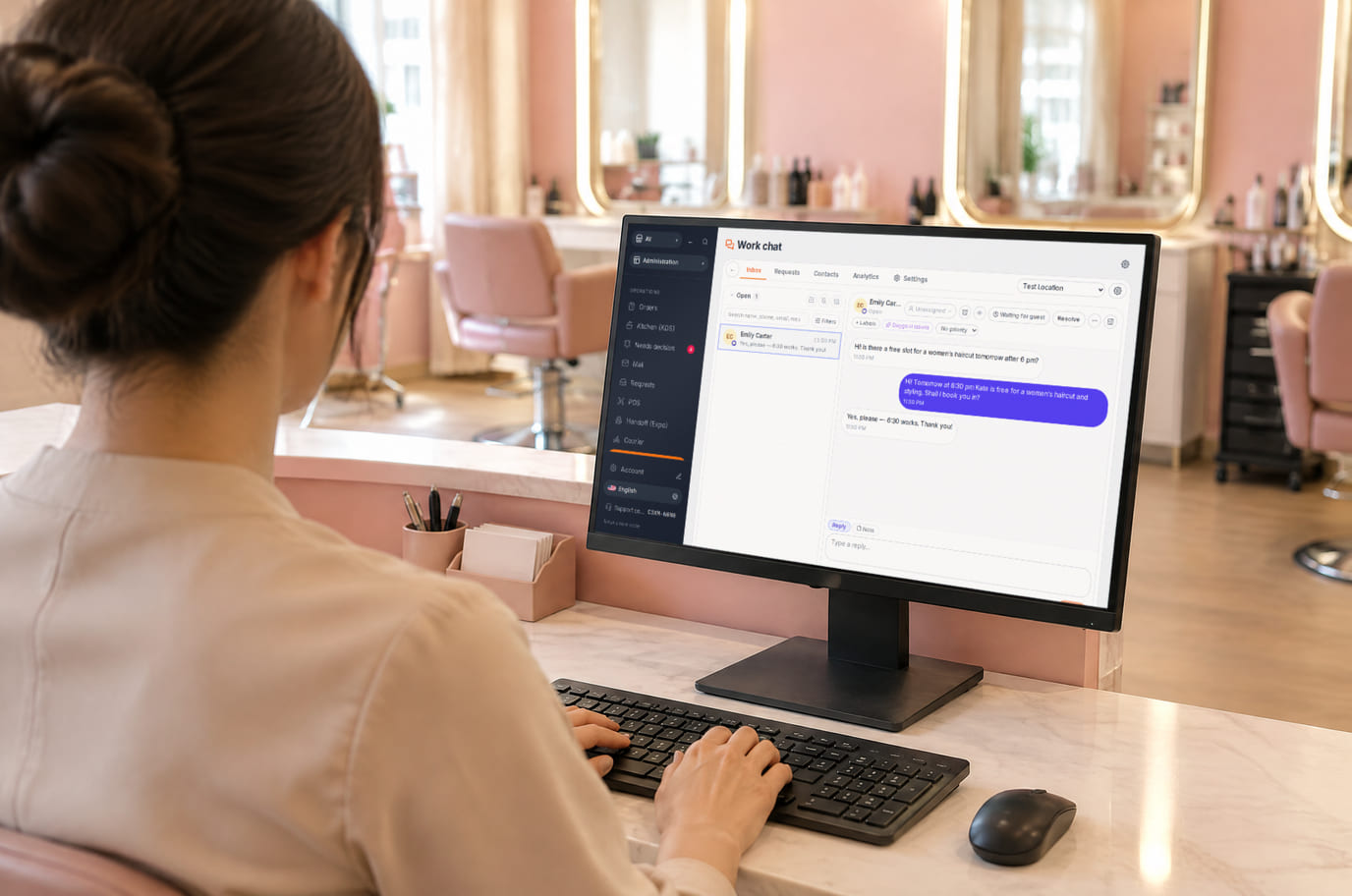
Illustration. Reception replies from the workspace without leaving the desk 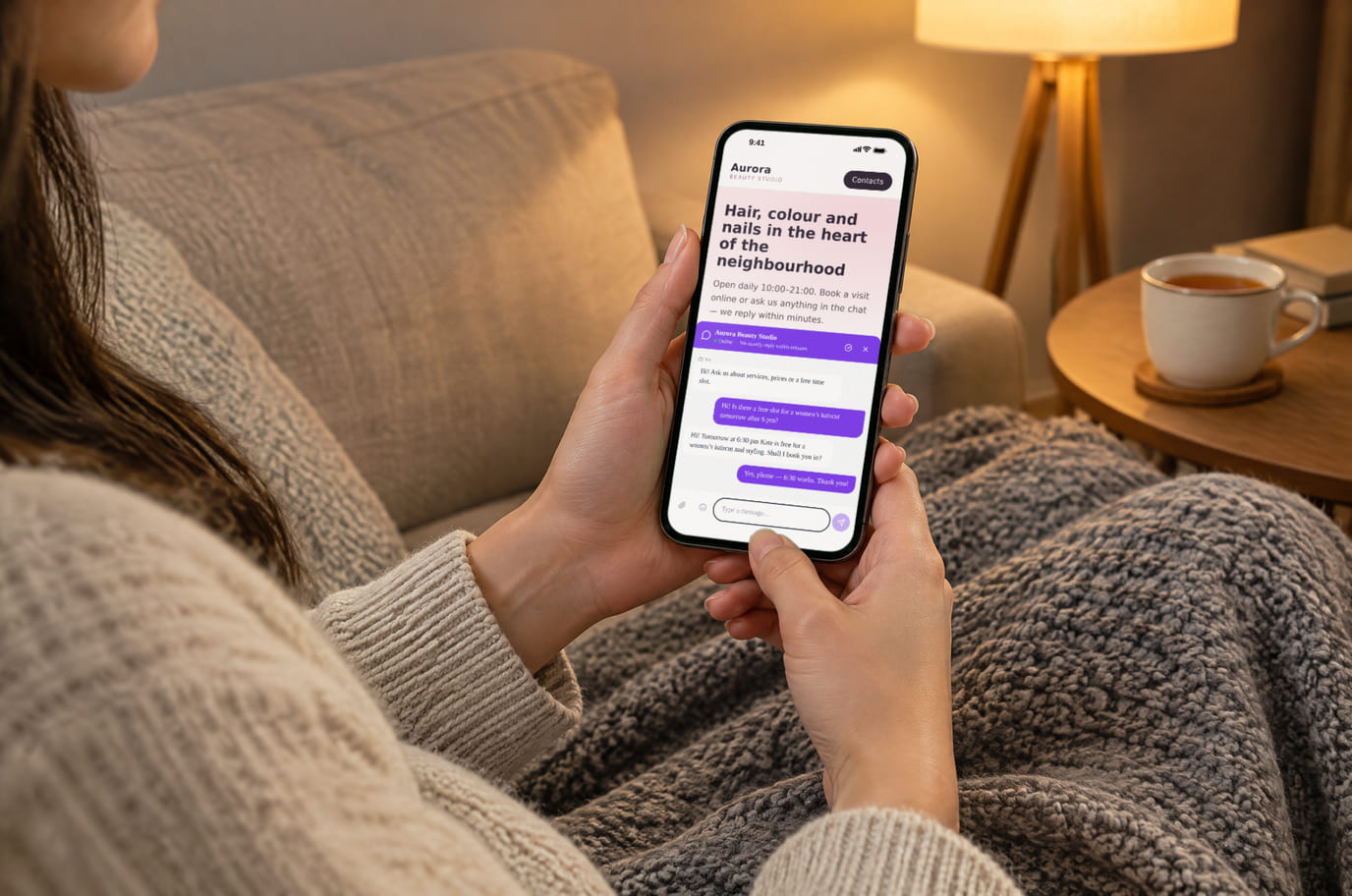
Illustration. An evening question, answered without a call


How it looks on your site
Example interface. Customise colours, position and labels, then check your page on desktop and mobile.
On desktop
On mobile
On your side: Those fields come from your chat settings, not from the page code: ask for a phone and the guest sees a phone field; do not ask, and they start typing right away.
On desktop
On mobile
On your side: A conversation from your own website goes into the same Chat section as conversations from the storefront: one queue, one history, answer from your phone.
On desktop
On mobile
On your side: The window does not pretend to be staffed: the guest sees “offline”, writes anyway, and the message waits for an operator in the same conversation.
Where it goes
Exact menu names and plan requirements, taken from each platform’s own help center.
Sites built with our website builder ship with the widgets already wired — nothing to paste.
Step-by-step guides per platform — in the help center →Build the chat for your site
Pick the button look and the first message — the widget appears in the corner of this page exactly as your visitors will see it. It is the real chat window, not a picture.
Step 3. Code for your site
<script src="https://cdn.cenaly.com/site/v1.js" data-domain="your-site.com" async></script>The code starts working after signup: the chat reads its look and texts from your account, not from the tag. Change the look — you never touch the site again.
The tag is only needed for your own website. With no site of your own — working on the Cenaly.com storefront or on a site generated in the dashboard — the chat is switched on with a toggle, nothing to paste.
Sign up with this chatYour settings travel to setup. After signup, confirm them, add your website and test the connection.
Pricing
Free
- Basic chat is free, with no per-agent or per-conversation charge
- AI replies and AI-assisted setup cost extra
- Calls require configured telephony and its charges
- Other communication channels connect separately under their own terms
What is included and what costs extra
Basic versions of 9 of the 13 widgets are free. Table booking, popups, help and legal pages on external sites are extensions. Connected services can cost extra.
With and without
| Without the widget | With the widget | |
|---|---|---|
| Who answers | ✕ Questions land in one person’s inbox or private messenger | ✓ The conversation opens as a team chat channel — whoever is on shift replies |
| Team workflow | ✕ You need to agree who handles enquiries | ✓ Staff with access reply from the shared team chat |
| Where history lives | ✕ The thread stays in a third-party service, far from your orders | ✓ History and contact live in your account, next to orders and bookings |
| Returning visitors | ✕ A returning visitor starts the conversation from scratch | ✓ The conversation can resume in the same browser while its conversation keys remain stored. Clearing browser data can lose access to the earlier thread. |
| Voice | ✕ To talk, the visitor has to find a number and call | ✓ With the web call enabled the visitor calls from the chat window, no dialling |
Honest about the limits
- Team chat is free. AI costs extra; calls require telephony.
- Until chat is configured in the admin the widget stays silent — no empty bubble ever appears on your site.
- The web call is off by default. It needs telephony configured for the location, HTTPS on your site and microphone permission.
- The window’s built-in labels are not fully translated: if the language pack doesn’t arrive within 2.5 seconds, the window opens in English and keeps working. The widget does not translate the conversation itself, AI answers or help articles.
- A microphone blocked by your page’s Permissions-Policy looks the same to us as a visitor declining — the widget simply asks to allow the mic.
- The install checker reads your page as a server and cannot see a tag injected through Google Tag Manager. The chat itself still works.
- With the multi-button enabled, the chat bubble is hidden on purpose — visitors open chat from its fan instead.
Who it's for
- Cafés, shops and salons where “whoever is on shift” answers
- Service sites where a question comes before the enquiry
- Anyone who doesn’t want a dedicated chat operator or a seat fee
What website chat is and when it earns its place
Website chat is a button in the bottom corner of a page that opens a conversation with your team. The visitor doesn’t have to register, leave an email or dial a number: they see the greeting and a text field, ask their question and read the answer without leaving the page.
Such a chat is needed wherever something has to be clarified before a purchase or an enquiry: a product size, the terms of a service, a menu for a private event. It also suits teams with no dedicated support desk — an admin, a manager or the owner can reply, including from a phone. If those questions go to a staff member’s personal messenger today, the team can’t see them and nothing is kept.
Here the widget is a door into the team chat: every website enquiry opens as its own channel for staff with access, and the history and the visitor’s contact stay in your account next to orders and bookings. There are no operator seats, which is why the widget is free and counts neither conversations, nor staff, nor websites.
Chat is the wrong choice when enquiries are rare and nobody can answer during business hours: the visitor sees "we're offline" and leaves with a worse impression than if the button had never been there. Then the multi-button is the honest option — it moves the conversation into the messenger the person already has open — or callback, where the initiative stays with you. The key difference from the multi-button: here the whole conversation stays in your admin next to orders and bookings, not in an employee's personal phone.
Questions and answers
Who answers the chat?
Any staff member with access to the Cenaly.com team chat: manager, admin, owner. A website conversation shows up as its own channel, and colleagues see the full thread rather than a summary.
Do I pay per agent?
No. The widget is free and there are no operator seats: everyone connected to the team chat can reply. Conversations are not capped either.
Where do conversations and contacts go?
History and contact details are stored in your Cenaly.com account: cenaly.com uses AWS, cenaly.ru uses Yandex Cloud in Russia. Connected AI and telephony services have separate processing terms.
What happens when nobody is around?
Staff can reply when available. The conversation can resume in the same browser while its conversation keys remain stored. Clearing browser data can lose access to the earlier thread.
Can I turn on an AI assistant and auto-replies?
Yes. The Chat section offers three modes: off, an AI draft for a staff member, and “AI answers until it hands over to a human” — the last one takes a separate legal confirmation. The assistant answers from your knowledge base and only from documents marked as shareable externally; it has its own persona, schedule and cap on answers per conversation, and a person can take the thread over at any moment. The widget enables none of this by default. WhatsApp, Telegram and email connect in the same place, and enquiries from every channel land in one conversation list. AI replies cost extra.
How do I add it to WordPress, Tilda or Shopify?
Sign up, add your domain and configure chat. Install the shared tag using your platform instructions, enable chat and send a test message. You need permission to insert code on the published site; setup time depends on your platform and access.
Will the chat slow my site down?
Chat adds a loader, the conversation interface and a language pack. They load separately but still use network and device resources. Check your own page, especially on a phone. If you only need messenger links, consider the messenger button.
Does chat also work on my Cenaly.com storefront?
Yes. One toggle covers both surfaces: chat works on the Cenaly.com storefront and on your own site, where it is loaded by the “My website” tag.
How much does it cost?
Team chat is free. AI costs extra; calls require telephony.
Does the chat translate visitors’ messages?
The widget does not translate conversations. Built-in labels follow the page language and fall back to English when a translation or language pack is unavailable. Set greetings and titles separately for your languages.
What do I need to install it?
An account, your website domain and permission to insert code. Prepare the selected widget’s data and test your published page. Follow the separate cookie banner instructions for early tracker blocking.
Will it work on my page?
Style isolation reduces conflicts but does not replace testing. Check buttons, forms, mobile layout and other scripts on your site.
What about languages and data?
Set your own texts separately; built-in labels fall back to English where translations are missing. Core data is stored in the brand’s cloud. Connected AI, telephony and other services have separate processing terms.
More — installation per platform, settings and troubleshooting — in the help center. Installation guide →
Works together with
All 13 widgets →Comparisons
Messenger button
One floating button: WhatsApp, Telegram, call, chat — up to 12 channels
Free
Callback
A callback request form, with automatic calling through your connected phone system
Free
Popups and forms
Modals, slide-ins, bars, embedded forms, coupons and quizzes with display rules and A/B testing
$9/mo
Switch chat on and take questions straight from your site
After signup, set up chat: add your website, write a greeting, install the tag and send a test message.
Connect chatTeam chat is free. AI costs extra; calls require telephony.