Free · up to 12 channels
WhatsApp, Telegram and phone in one button
Let visitors choose how to reach you on your website. Gather your contacts in one fan and see which channels they click.
The button is free. Conversations stay in your messengers; chat, calls and other actions connect separately.
- Up to 12 channels in your chosen order
- Click counts without reading conversations
- Optional bottom bar on phones

What the guest sees — and what appears on your side
Guest screen

In your dashboard
Where the data goes Conversations go to your WhatsApp and Telegram; clicks per channel land in the multi-button panel in your dashboard
- channels in the fan: messengers, socials, phone, email, custom link
- up to 12
- actions from enabled widgets on an external site
- 6
- for the button, the channels and the clicks — nothing to buy
- $0
- template characters; Telegram may ignore the text
- 300
How it works for the visitor
- 1
The visitor spots the contact button
It sits in the bottom corner in your colour and with your icon. On a narrow screen you can switch it for a bottom bar with the first 4 channels.
- 2
They open the fan
Inside are your channels in your order, and a line at the top: “Open until 22:00”, taken from the location’s working hours. No hours filled in — no line at all.
- 3
They pick a channel
Prefill WhatsApp messages with the page URL and title. Telegram may ignore the text, depending on the visitor’s app.
- 4
Or they stay on the site
External websites can open enabled widgets: chat, browser calls, callback, orders, table booking and appointments. Setup and charges follow their own terms. Enable the button separately on the Cenaly.com storefront; its fan has no browser-call action.
Set up in three steps
Create an account and add your site
Signup opens setup for the selected product. Have your domain and permission to insert code ready.
Configure and install
Follow your platform instructions. Blocking trackers before consent requires the early CMP script, not just the shared async tag.
Test your published site
Enable the widget and try the visitor action on the published page. Settings may appear after the cache refreshes.
The tag
<script src="https://cdn.cenaly.com/site/v1.js" data-domain="your-site.com" async></script>Shared widget tag. See the separate CMP instructions for blocking trackers before consent.
Set contact up for your site
Gather your channels into one fan
WhatsApp, Telegram, Viber, VK, Instagram, Facebook, TikTok, YouTube, phone, email and a custom link — up to 12 items, in your order. Each has its own caption per language and a display mode: everywhere, desktop only or mobile only. Best for sites where people write through several messengers at once.
Open your widgets from the same fan
External websites can open enabled widgets: chat, browser calls, callback, orders, table booking and appointments. Setup and charges follow their own terms. Enable the button separately on the Cenaly.com storefront; its fan has no browser-call action.
Invite the visitor to write — but not on every page
Set the text of the “Message us” bubble per language and how long after the button it appears. The pause before the next invitation is counted PER VISITOR, not per site — up to 30 days. Best for sites with long sessions, where a silent button simply goes unnoticed.
Prepare the first message for them
Prefill WhatsApp messages with the page URL and title. Telegram may ignore the text, depending on the visitor’s app.
Switch on the bottom bar for phones
It is off by default. Once enabled, on screens under 480 px the first 4 channels show as a strip and the rest sit behind “More”. The bar stands above someone else’s fixed panel, hides as the page scrolls down and respects the iPhone safe area. Best for sites with mobile traffic.
Show the button only where it belongs
Up to 20 page masks in the allow and exclude lists — exclusions win; a delay of up to 10 minutes; device; your own schedule of up to 14 windows or the location’s working hours. Useful, say, to keep contact in the catalogue but take the button off the checkout page.
Where it pays off
Chat and forms have taken over the corner
Add chat, ordering and callback to the fan: their separate buttons go dark while the widgets keep working.
You can’t tell which channels people pick
Open “Clicks over 30 days”: the breakdown by channel type shows the taps — not the contents of enquiries and not the messages sent.
Mobile visitors call, desktop visitors write
Show WhatsApp and phone on mobile, email and Telegram on desktop: the mode is set per channel.
People ask about a product without a link
Prefill WhatsApp messages with the page URL and title. Telegram may ignore the text, depending on the visitor’s app.
Visitors write after closing time
Show the location’s hours at the top of the fan: before writing, the visitor sees whether you are open now or open in the morning.
Contact is needed on campaign pages
Masks keep the button on your campaign landing pages while the blog and legal sections stay clean.
What it looks like in the product
Channel setup
View full size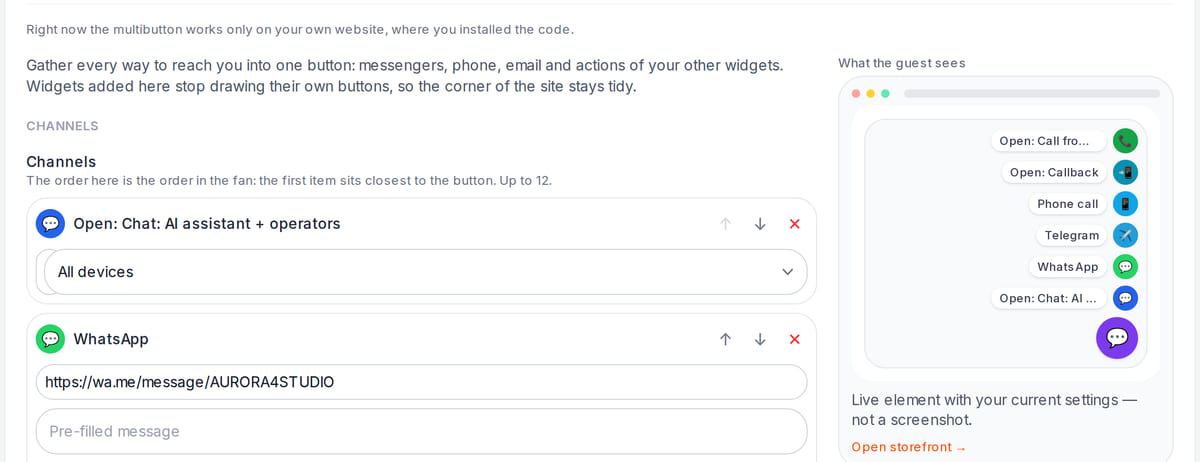
Channels and their order are set in the workspace with a live preview

How it works in practice
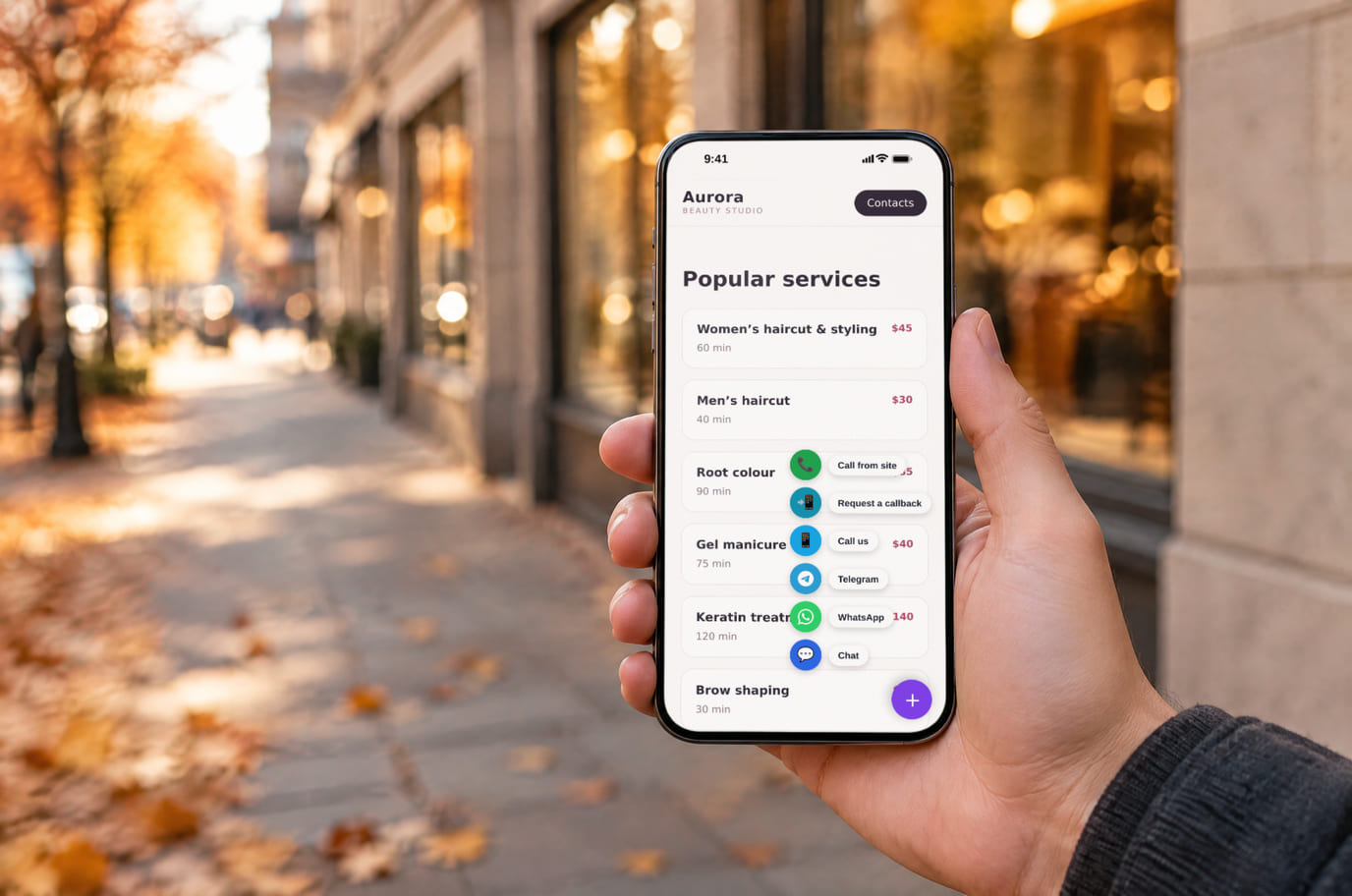
Illustration. Get in touch the way you prefer, right from the street

How it looks on your site
Example interface. Customise colours, position and labels, then check your page on desktop and mobile.
On desktop
On mobile
On your side: One FAB instead of a pile: the buttons of absorbed widgets go dark and their channels live in the fan. Switch on chat, ordering and callback — the corner of your site still has one button.
On desktop
On mobile
On your side: The set of channels comes from the location settings and changes without touching the site. Our own actions (chat, callback, table, appointment, order) open in place; messengers open in a new tab.
On desktop
On mobile
On your side: The status line is calculated from the location’s business hours: the guest sees you are closed and still leaves a request — instead of an unanswered call.
Where it goes
Exact menu names and plan requirements, taken from each platform’s own help center.
Sites built with our website builder ship with the widgets already wired — nothing to paste.
Step-by-step guides per platform — in the help center →Build your own multibutton
Tick the channels, pick the look — the button appears in the corner of this page exactly as your visitors will see it. It is the real widget, not a picture.
Step 3. Code for your site
<script src="https://cdn.cenaly.com/site/v1.js" data-domain="your-site.com" async></script>The code starts working after signup: the multibutton reads the fan and the look from your account, not from the tag. Change the channels — you never touch the site again.
Sign up with this multibuttonSettings travel to setup. After signup, confirm your channels, add your site and test the installation.
Pricing
Free
- Free button: up to 12 items, with no per-click charge
- The dashboard shows views, opens and clicks, not messages sent
- Calls and paid extensions in the fan have separate terms
What is included and what costs extra
Basic versions of 9 of the 13 widgets are free. Table booking, popups, help and legal pages on external sites are extensions. Connected services can cost extra.
With and without
| Without the widget | With the widget | |
|---|---|---|
| Screen corner | ✕ Every widget draws its own button in the same corner, and they jostle | ✓ One button in the corner and, if you want it, a 4-channel bar on phones |
| Choosing a channel | ✕ Contacts are scattered across the footer and header; visitors hunt for one | ✓ A fan with your channels and widget actions, ordered the way you set it |
| First message | ✕ The conversation starts with “hello” and you have to ask which page | ✓ Prefill WhatsApp messages with the page URL and title. Telegram may ignore the text, depending on the visitor’s app. |
| Working hours | ✕ A visitor writes at night with no idea whether you are open | ✓ “Open until 22:00” at the top of the fan, from your location’s hours |
| Cost | ✕ What a button like this and its clicks cost depends on the tool you pick | ✓ $0 for the button, the channels and the clicks; up to 12 items in the fan |
Honest about the limits
- An empty channel list means no button at all: an empty fan on someone’s site is worse than nothing. If no channels are left, the bottom bar disappears entirely too.
- Prefill WhatsApp messages with the page URL and title. Telegram may ignore the text, depending on the visitor’s app.
- An action item lives only while its widget is on: switch chat off and the “Open chat” item disappears from the settings on the first save and does not come back by itself.
- The “Open now” line is hidden if the location has no working hours filled in: declaring a business closed on an empty schedule is not acceptable. The button stays, and the line itself can be turned off.
- The display schedule uses the location’s time zone. If there is none, the windows are counted in the visitor’s time, and the settings panel warns about it.
- The bottom bar is off by default. It is only available on screens under 480 px and gives way to someone else’s fixed panel at the bottom of the page.
- The clicks panel counts views, fan openings and taps by channel type — not the messages sent: the conversation happens in your own messengers.
Who it's for
- Any site where people write on WhatsApp or Telegram
- Businesses with several contact channels and mobile traffic
- Anyone paying a separate service for a button like this
What a multi-channel button is and when you need one
A multi-channel button is a floating button on your site that fans out into ways of getting in touch. Instead of three icons in the footer and two widgets in the corner, the visitor sees one element and picks the channel they already use.
You need it wherever there is more than one channel: WhatsApp for quick questions, Telegram for regulars, the phone for something urgent. And especially where other widgets are already on: each of them draws its own button in the same bottom corner, and without a shared fan they start to jostle.
The Cenaly.com multi-button is free and knows about its neighbours: it opens our chat, callback, table booking, appointments and ordering right on your page while hiding their separate buttons. The conversation stays in your own messengers, and the clicks panel shows which channel types visitors pick — not what they wrote.
The multi-button is pointless when you have exactly one channel: a single WhatsApp link in the header does the same job without another element in the corner. And it is not a replacement for chat — conversations stay inside your messengers, and the admin only sees which channels were clicked. If you need the enquiry history to sit next to orders, switch on chat and keep the multi-button as the shared entrance for everything else.
Questions and answers
What does the free button include?
Up to 12 items, an invitation, display rules and click statistics. Prefill WhatsApp messages with the page URL and title. Telegram may ignore the text, depending on the visitor’s app.
Which channels can I add?
Messengers, phone, email, a custom link and widget actions — up to 12 items in total. External websites can open enabled widgets: chat, browser calls, callback, orders, table booking and appointments. Setup and charges follow their own terms. Enable the button separately on the Cenaly.com storefront; its fan has no browser-call action.
Where do enquiries go, and what do I see in the dashboard?
Conversations go to your own messengers — we never intercept them. The “Clicks over 30 days” panel shows button views, fan openings and taps by channel type; by design it holds no channel addresses, no message text and no visitor pages, and it lives inside your own account.
Can I show different channels on phones and on desktop?
Yes, each channel has a display mode: everywhere, desktop only, mobile only. The fan is rebuilt every time it opens, so rotating the phone or moving to another page is taken into account straight away.
Will I end up with two buttons — the multi-button and chat?
The fan can replace launchers of enabled widgets added to it. Check your own page, especially around fixed panels. To keep separate launchers, use the option described in the instructions.
How do I add it to WordPress, Tilda or Shopify?
After signup, add your website and channels, then install the shared tag using your platform instructions. Enable the button and test each link on the published page. Changes may appear after the cache refreshes.
Will the button slow my site down?
The widget loads its own interface; messengers open through ordinary links without their SDKs. The bottom bar loads separately when enabled on a narrow screen. Network and device resources are still needed: test speed and positioning on your site.
Will the button also appear on my Cenaly.com storefront?
Only if you switch it on yourself: the “Show on our storefront too” toggle is off by default, because there the multi-button absorbs the storefront’s native buttons — the chat bubble and the callback handset. The “browser call” action does not exist in the fan on the storefront at all.
How much does it cost, and do I have to buy anything?
$0 for the button, the channels and the clicks, with no limit on websites or staff. The widget is deliberately absent from the add-on catalogue: there is nothing to buy to switch it on.
What do I need to install it?
An account, your website domain and permission to insert code. Prepare the selected widget’s data and test your published page. Follow the separate cookie banner instructions for early tracker blocking.
Will it work on my page?
Style isolation reduces conflicts but does not replace testing. Check buttons, forms, mobile layout and other scripts on your site.
What about languages and data?
Set your own texts separately; built-in labels fall back to English where translations are missing. Core data is stored in the brand’s cloud. Connected AI, telephony and other services have separate processing terms.
More — installation per platform, settings and troubleshooting — in the help center. Installation guide →
Works together with
All 13 widgets →Live chat
Live chat with visitors — answered by your staff from the team chat
Free
Callback
A callback request form, with automatic calling through your connected phone system
Free
Browser call
A “Call us” button — a conversation from your site through your own PBX, with no number or app for the visitor
Free
Let visitors choose how to reach you
Signup opens messenger-button setup. Add your contacts, install the tag and test the links on desktop and mobile.
Connect the buttonThe button is free. Conversations stay in your messengers; chat, calls and other actions connect separately.