Add-on · free on sites from our builder
Prepare legal pages from your business details
A country and business questionnaire, document preview and publication on your site. Review details, answers and every language version before publishing.
$9/mo
Paid add-on for external sites; free on sites from our builder. This is not legal advice or a compliance guarantee. AI autofill is charged separately.
- Template text based on questionnaire answers
- Preview and export for review
- One tag for published documents

What the guest sees — and what appears on your side
Guest screen

In your dashboard
Where the data goes Visitors read published documents. The widget sends technical load, open and close events for statistics; questionnaire answers are edited in the dashboard.
- document types, from privacy and terms to the imprint and accessibility
- 9
- country rule sets — they decide both the set and what is mandatory
- 10
- languages: documents are published in your site’s languages
- 45
- ways to show them: inline text, footer links, a modal window
- 3
How it works — for you and for the visitor
- 1
You answer a questionnaire
Your country and your customers’ countries, the set of documents, questions about the business (do you take orders, do you deliver, do you collect reviews) and your company details. “Autofill from the site or the code” pulls in the details and third-party services found on your site or in its repository — you only check them.
- 2
Review document-selection guidance
The information panel shows typical requirements based on country and answers, a reference rule and the proposed sections. Check the guidance against your actual business; it is not an individual legal opinion.
- 3
You read the text and publish with one button
The preview switches between “document × language” tabs, and the text can be copied or downloaded as HTML and Markdown. Publishing assembles the documents in every language of your site and hosts them on our CDN as ready pages.
- 4
The visitor reads them on your site
Place text in a block or links in the footer. Depending on your setting, links open a document page or a window over the site.
Set up in three steps
Create an account and add your site
Signup opens setup for the selected product. Have your domain and permission to insert code ready.
Configure and install
Follow your platform instructions. Blocking trackers before consent requires the early CMP script, not just the shared async tag.
Test your published site
Enable the widget and try the visitor action on the published page. Settings may appear after the cache refreshes.
The tag
<script src="https://cdn.cenaly.com/site/v1.js" data-domain="your-site.com" async></script>Shared widget tag. See the separate CMP instructions for blocking trackers before consent.
Build your own legal section
Don’t fill it all in from scratch
Autofill searches your site or repository and proposes details with source quotations. A quotation does not guarantee a correct interpretation: review every field. The call uses your AI balance; you can fill the questionnaire manually.
Get documents for your country, not “universal” ones
The constructor has ten country rule sets. They help choose a structure based on business and customer countries, but do not automatically cover every country or activity.
Review document-selection guidance
The information panel shows typical requirements based on country and answers, a reference rule and the proposed sections. Check the guidance against your actual business; it is not an individual legal opinion.
Read everything before it goes live
The preview opens in “document × language” tabs, and the text can be copied or downloaded as HTML and Markdown — you can show it to a lawyer before it appears on the site. Changes take effect only when you publish. Best for anyone who doesn’t sign off on text unread.
Embed them the way your site works
Text straight into a block of the page, a set of links in the footer, or a modal opened from any link of yours. Inline text inherits your site’s styles, so there is nothing extra to design. Best for landing pages and large shops alike.
Check answers for consistency
The validator blocks known contradictions between answers and explains why. It checks the questionnaire, not every legal risk of the business.
Where it pays off
Launching a site
Fill the questionnaire manually or with paid autofill, review documents and add links after publication.
Taking orders
Terms, returns and delivery come as a set, and its contents follow your answers rather than someone else’s template.
Customers in the EU
Enter customer countries and review the constructor’s guidance. Check documents and cookie-consent setup separately for your site.
Changing company details
Moved or renamed — correct the details in the admin and publish again, without touching the site code.
A multilingual site
Publish the language versions you need after review. Without an exact match the widget uses the publication’s main language or first available version.
A site from our builder
Legal and consent are included on builder sites without a separate charge. You still review business details, document content and consent settings.
What it looks like in the product
The policy on your site
View full size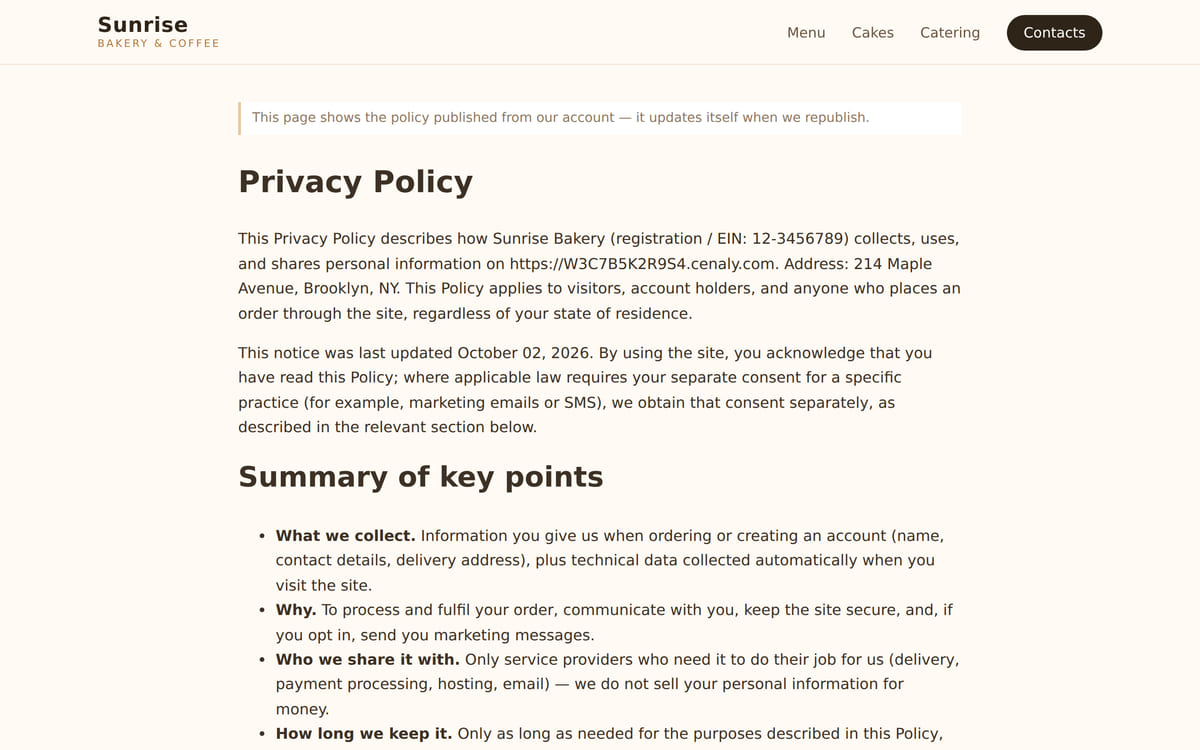
The document text is embedded right into your page

How it works in practice

Illustration. A questionnaire by country and business details instead of an internet template

How it looks on your site
Example interface. Customise colours, position and labels, then check your page on desktop and mobile.

Where it goes
Exact menu names and plan requirements, taken from each platform’s own help center.
Sites built with our website builder ship with the widgets already wired — nothing to paste.
Step-by-step guides per platform — in the help center →Pricing
$9/mo
Free on sites built with our website builder
- External-site embedding uses a paid add-on; see the price on this page and in the dashboard catalogue
- Paying yearly means 10 months instead of 12
- On sites built with our website builder the documents and the cookie banner are free
- The number of documents, languages and republishes is never metered; legal advice is not part of the add-on
- There is exactly one billable unit — the add-on subscription: not documents, not languages, not visitors and not domains
- AI autofill uses the AI balance separately; you can fill the questionnaire manually without it
With and without
| Without the widget | With the widget | |
|---|---|---|
| Where the text comes from | ✕ The text is found on a similar site and edited by hand — company details included | ✓ The text is assembled from your country, details and answers about the business |
| Company details | ✕ The address and the name have to be checked in every published document | ✓ Details are edited in one place and update everywhere once published |
| Languages | ✕ Language versions are placed page by page by hand | ✓ Documents are published in every language of your site |
| What to publish | ✕ The set of documents and what is mandatory are worked out separately, by guesswork | ✓ The information panel shows typical requirements based on country and answers, a reference rule and the proposed sections. Check the guidance against your actual business; it is not an individual legal opinion. |
| Making edits | ✕ Every correction means editing the site markup | ✓ The site carries one line — everything else changes in the admin |
Honest about the limits
- This is not legal advice and not a guarantee of compliance: the documents follow typical rules of your country and your answers, and unusual activities are worth showing to a lawyer.
- Questionnaire edits do not change published text on their own. Publish a new version and check it on the site after processing and cache refresh.
- The widget will not track changes in legislation for you — your site always shows the latest published version.
- Autofill puts in what it finds on your site, but checking and correcting it is on you: responsibility for the published content stays with the site owner.
- Without published documents or when files are unavailable, a block can remain empty. Check links and text on the published page.
- On an external site this is a paid add-on; documents are free only on sites built with our website builder.
- The free website check reads one page’s source HTML. It does not execute JavaScript, inspect actual cookies or certify legal compliance.
Who it's for
- Any site that collects contacts or takes orders
- Shops: returns, delivery and terms of sale
- Sites built with our website builder — free there
What legal pages are and when you need them
Legal pages are the privacy policy, terms of use, return and delivery conditions, cookie policy and the other documents that explain to a visitor what happens to their data and their money. Which ones you need depends on the country and on how the business works: one set does not fit every site.
Copying them from a similar site is dangerous for exactly the reason it is convenient: the other company’s details, country and obligations travel with the text. A document naming the wrong data controller protects nobody.
The information panel shows typical requirements based on country and answers, a reference rule and the proposed sections. Check the guidance against your actual business; it is not an individual legal opinion. Autofill searches your site or repository and proposes details with source quotations. A quotation does not guarantee a correct interpretation: review every field. The call uses your AI balance; you can fill the questionnaire manually.
Documents are included on builder sites without a separate charge. Preparing text does not replace reviewing business activities, cross-border transfers or industry terms. The cookie banner is a separate consent tool; its installation and tracker blocking need setup and testing.
Questions and answers
How much does it cost?
External-site embedding uses a paid add-on; see the price on this page and in the dashboard catalogue Free on sites from our builder. Annual billing costs 10 months rather than 12. AI autofill is charged separately.
Is this legal advice?
No, and publishing is not a guarantee of compliance either. The documents follow typical rules of your country and your answers; for licensed, medical or financial activities the text is worth reviewing with a lawyer — you can download it from the preview for exactly that.
Which documents can I publish?
Nine types: privacy, terms of use, returns, cookies, delivery, a consent withdrawal form, imprint, disclaimer and an accessibility statement. The set depends on your country and your answers.
Can I first see what my site already has?
The free website check reads one page’s source HTML. It does not execute JavaScript, inspect actual cookies or certify legal compliance.
How do I embed them on Tilda or WordPress?
The same shared “My website” tag — it powers all 13 widgets — plus a container: `<div data-cenaly-legal="privacy"></div>` for the text or `<div data-cenaly-legal-links></div>` for footer links. No plugins needed, and a modal opens with `window.CenalyLegal.open()`.
Will the legal pages slow my site down?
The loader reads configuration and published documents. Inline mode loads text for embedding; a modal opens the document page on click. Test speed and readability with your documents on a phone.
How many languages will the documents have?
Your site’s languages — the platform has 45. The language is picked per page: an exact match first, then the publication’s main language, then the first available one. Every version can be read in the preview before publishing.
What if my company details change?
Questionnaire edits do not change published text on their own. Publish a new version and check it on the site after processing and cache refresh.
Do I still need a cookie banner?
Documents describe rules; a banner manages consent. The free neighbouring widget requires correct installation before trackers; publishing a document alone does not block scripts.
Does the widget send display events?
Visitors read published documents. The widget sends technical load, open and close events for statistics; questionnaire answers are edited in the dashboard.
What do I need to install it?
An account, your website domain and permission to insert code. Prepare the selected widget’s data and test your published page. Follow the separate cookie banner instructions for early tracker blocking.
Will it work on my page?
Style isolation reduces conflicts but does not replace testing. Check buttons, forms, mobile layout and other scripts on your site.
What about languages and data?
Set your own texts separately; built-in labels fall back to English where translations are missing. Core data is stored in the brand’s cloud. Connected AI, telephony and other services have separate processing terms.
Check your site for trackers and a cookie banner →
More — installation per platform, settings and troubleshooting — in the help center. Installation guide →
Works together with
All 13 widgets →Prepare and review documents before publishing
After signup, fill the questionnaire, read the preview and export it for review if needed. Then publish documents, install the tag and check your site links.
Open the document questionnairePrice in the extensions catalogue · free on sites from our builder · yearly = 10 months instead of 12