C cenaly.com
Start free

Platform for hotels and guest houses

One workspace for your whole hotel

Rooms and bookings, guest messages, calls, the POS with receipts and your hotel website run on the same data. Guest, room and bill are shared by every module: a call from the room, a restaurant order and a request from the QR code land where reception manages the stay.

  • Rooms, availability grid, rates and guest folio
  • In-room QR app: chat, requests, orders, calls
  • Your own PBX with a hotel module: wake-up calls, cleaning status, calls on the bill
  • A website on your own domain and widgets for any site

No card to register. Start with one room and a test stay.

Every module carries a maturity badge. OTA channels are still in a test environment.

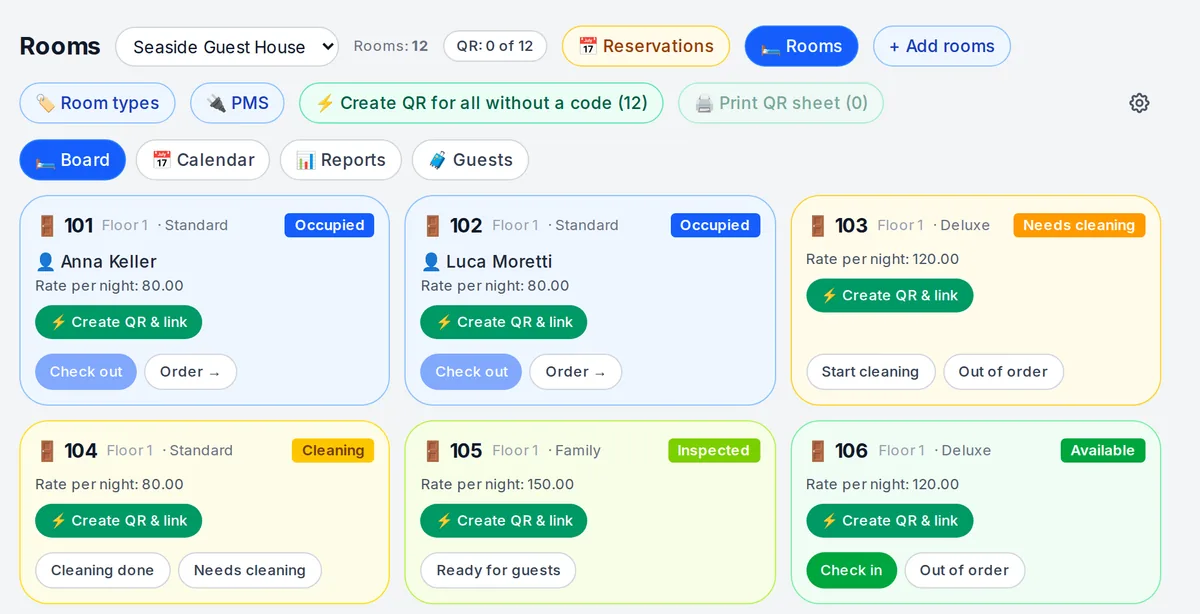
Hotel room board: occupancy, cleaning and room QR codes
Real room board, 21 September 2026: demonstration guests and rates. An interface screenshot, not a customer outcome.

Usually five separate services

  • PMS
  • Phone system
  • Chat service
  • POS
  • Website builder

Here: one workspace, one set of data

workspace: guest, room and bill shared by modules
1
apps for guests to install — the QR opens a browser
0
wake-up call and cleaning status from the room phone
*41 · *42
widgets for any hotel website
13

In-room app by QR code

Put a QR code in the room — guests use it to reach reception and sort everything out

The guest scans the card in the room and the hotel’s remote control opens in the browser. One QR code inside the room — on the wall by the entrance, at the desk or on the nightstand — replaces calling reception, the paper room-service menu and the note for housekeeping.

  • No app store download
  • No sign-up
  • No hunting for the reception number
A QR plaque on the wall inside a hotel room, by the entrance door next to the light switch
Illustration. The hotel prints the plaque and mounts it inside the room — by the entrance on the inside, at the desk or on the nightstand; the code is linked to a room on the plan.

The QR code lives inside the room — that’s the safeguard

The code is linked to the room and opens its bill, charge-to-room orders and requests, so the plaque goes inside the room, not on the door in the corridor: only someone in the room can see it. On top of that, the server accepts orders and requests only while the room is occupied, and a charge-to-room order goes to the current stay’s folio — guests can’t pick someone else’s bill. QR codes for every room are created on the room board in one click.

  • Message the hotel

    live

    An AI assistant answers from the hotel’s knowledge base; a live operator picks up the conversation in the team chat.

  • Service requests

    live

    Towels, cleaning, do not disturb, wake-up, repairs. The guest sees the status of each request.

  • Order to the room

    live

    Restaurant, bar and room service charged to the room: the server checks that the room is occupied.

  • Call-me-back and browser calls

    live

    Guests don’t need the reception number. Auto-dialling a callback request needs your own PBX; without it the request goes to staff.

  • In the guest’s language

    live

    Interface and menu in 45 languages, with automatic menu translation.

  • Talk to reception in your own language

    beta

    AI translator: the guest speaks or types in their language, staff see the translation, and the guest’s request becomes a service request.

  • Pre-arrival form and self-service booking

    with limits

    From the link in an email or from reception, guests fill in the form, change dates or cancel under the rate’s terms.

  • AI concierge in chat

    coming soon

    Will answer about free rooms and prices from the hotel’s published data and call a human.

  • Room requests

    Room 207 “Room services” sheet: fresh towels, cleaning, do not disturb, wake-up call, maintenance and “talk to reception in my language”
    Real screen, demo data, 2 October 2026
  • Room service

    Hotel room-service menu in the phone browser: continental breakfast added to the order
    Real screen, demo data, 2 October 2026
  • Contact the hotel

    “Contact the hotel” sheet: call the hotel or book a room
    Real screen, demo data, 2 October 2026
  • Guest language

    Hotel storefront language picker: Georgian, English, Russian
    Real screen, demo data, 2 October 2026

What happens next — on its own

One system — one guest, one room, one folio. Nothing is re-keyed by hand.

Request Request from the room QR Housekeeping task on the board Room status in the PMS Order Charge-to-room order Stay folio One receipt at check-out Call Outside call from the room Line “Phone: number, minutes” Same folio and receipt
Diagram

The guest journey — from search to return visit

Every step runs on a module of the same system, and the data carries forward on its own.

  1. 1

    Finds the hotel

    live

    The hotel website on your own domain, or the hotel storefront right after sign-up; SEO and Google Business Profile.

    Modules: WebsiteWidgets Learn more: Website engine →
  2. 2

    Messages or calls

    live

    Messages from the website, Telegram, Messenger and email in one inbox. Calls land on your own PBX with a voice menu; the website offers call-me-back.

    Modules: Guest chatsPhone system Learn more: Phone system →
  3. 3

    Books

    with limits

    Room booking on the hotel website: dates, room type, rate, deposit or prepayment, email confirmation. Or reception puts the booking on the grid.

    Modules: Website bookingAvailability grid Learn more: First reception workflow: rooms and check-ins →
  4. 4

    Checks in

    with limits

    Pre-arrival form by link; check-in as one operation covering booking, room and folio. The guest receives the room QR code and a link to their bill.

    Modules: PMSReception Learn more: First stay →
  5. 5

    Stays

    live

    The in-room QR app: chat with the hotel, requests, orders to the room. The room phone: wake-up call *41, outside calls posted to the bill.

    Modules: In-room appRoom servicePBX hotel module Learn more: In-room app →
  6. 6

    Checks out

    live

    Nights, restaurant, bar, services and calls on one folio; check-out closes it and the guest gets one receipt. Tax invoices with VAT/GST for the UK, Australia, New Zealand and the UAE.

    Modules: Guest folioPOSReceipt Learn more: Receipts and refunds →
  7. 7

    Leaves a review and comes back

    live

    A thank-you email after departure in the booking language; reviews and newsletters from one guest database.

    Modules: Stay emailsReviewsNewsletters Learn more: Guests and reviews →

Platform modules for hotels

Each module works on its own, but together they share the guest, the room and the bill.

livewith limitsbetacoming soon

Maturity follows our product map as of 2 October 2026. “With limits” works with the restrictions listed under limits; “coming soon” carries no promised date.

“Room types & rates” window: nightly rates, capacity and seasonal rates per room type
Real screen, demo data, 2 October 2026

PMS and reception

Room inventory, bookings, guest folios and the reception shift in one place.

  • Rooms, room types and booking grid live
  • Rates and price calendar live
  • Guest folio: charge to room, transfers, one receipt live
  • Guest service requests and stay emails live
  • Booking from the hotel website with limits
  • Check-in, check-out and pre-arrival form with limits
  • Groups and a master payer with limits
  • Nightly charges and tourist tax with limits
  • Reception and housekeeping workspaces, daily cleaning, minibar beta
A guest in the room on a phone: the “Room services” sheet with “Talk to reception in my language”
Illustration; the screen shows the real interface, demo data, 2 October 2026

Guest chats and AI

Every guest message lands in the team chat, next to the room and the booking.

  • Website, widget, Telegram, Messenger and email in one inbox live
  • AI answers from the knowledge base; an operator takes over live
  • AI translator for talking to foreign guests beta
  • Hotel AI concierge in chat coming soon
Small-hotel reception: shift tasks on the monitor, a desk SIP phone next to it
Illustration; the screen shows the real interface, demo data, 2 October 2026

Phone system and PBX hotel module

The hotel’s own PBX, with a room phone that knows the guest, the PMS and the bill.

  • Numbers, extensions, call recording and AI review live
  • Voice menu, auto-callback, call-me-back and website calls live
  • Wake-up call *41: the guest sets it, the PBX wakes them in their language live
  • Housekeeping dials *42 and the cleaning status reaches the PMS live
  • Guest outside calls posted to the room bill live
  • Reception sees “101 · Surname”, not a bare extension live
  • Custom *42 digits and spoken housekeeping reports with limits
  • Voice AI concierge and calls from the hotel page coming soon

Stay folio

  • Nights at the room rate
  • Restaurant and bar — charged to room
  • Order from the room QR
  • Phone: number, minutes
  • Services and minibar

Check-out → one receipt

Diagram: which lines add up to one folio. Not a product screen.

Guest folio, POS and receipts

One bill per stay, the POS and the receipt — no amounts copied by hand.

  • Nights, restaurant, bar, services and calls on one folio live
  • Charge to room from the QR app and the restaurant POS live
  • Check-out only with a settled folio, one receipt for everything with limits
  • Receipt registry, refunds and exchanges live
  • Tax invoices with VAT/GST: UK, Australia, New Zealand, UAE live
The hotel website on a laptop: hotel name, search and the “Breakfast in the room” menu with prices
Illustration; the screen shows the real interface, demo data, 2 October 2026

Hotel website and widgets — our own engine

Run your whole website: the hotel site on your own domain — or our widgets on any site you already have, with one line of code. Chat, calls and bookings from the website arrive in the same places as everything else.

  • The hotel storefront works as a website right after sign-up live
  • Your own domain with a certificate live
  • SEO: indexing, sitemap, Search Console and Yandex Webmaster live
  • 13 widgets for any site: chat, call, booking, ordering, cookies, legal pages live
  • Legal pages and consents by country live
  • Google Business Profile: hours, posts, reviews live
  • Room booking right on the website with limits
  • AI website builder, section studio and visual editor beta
  • Articles, pages and a blog beta
Hotel room-service menu on the website: breakfast in the room, all-day dining, bar; “Add” buttons
Real screen, demo data, 2 October 2026

Restaurant and room service

The hotel restaurant and bar work with the same guest folio.

  • Orders from the room QR go to the stay folio live
  • The restaurant POS sees the guest folio and charges to the room live
  • The same kitchen display and POS as a restaurant live
Shift tasks: daily cleaning of room 301 with due dates, “To do”, “In progress” and “Done” columns
Real screen, demo data, 2 October 2026

Team

Reception, housekeeping and maintenance share one team chat and one task board.

  • Shift team chat: guest requests and messages arrive here live
  • Cleaning after check-out as a task on the board with limits
  • Housekeeper role: room statuses without bookings or money with limits
  • Maintenance tickets that take a room out of service beta

Why one system instead of five

Links that separate services don’t have without an integrator.

A call from the room posts itself to the bill

The PBX knows who is staying in the room and adds a “Phone: number, minutes” line using the hotel’s destination rates.

*42 from the room phone sets the PMS status

Housekeeping dials the code and a digit; the room board shows the new status with “phone 101, housekeeper 305” as the author. “Out of order” becomes a repair request.

Reception sees “101 · Surname”

A call from a room arrives with the guest’s name from the PMS, not a bare extension.

Restaurant and bar charge to the room

An order from the QR app or the restaurant POS goes to the stay folio; the POS sees the guest’s bill.

A QR request becomes a team task

The guest’s request lands in the team chat, cleaning and repairs become tasks on the board, and the guest sees the status.

One receipt at check-out

Nights, orders, services and calls close with one receipt; check-out itself closes the stay folio.

Honest limits

  • The PBX hotel module runs on a dedicated Cenaly PBX. Custom *42 digits and spoken housekeeping reports switch on as the PBX is updated — until then the standard digits 1–5 apply.
  • OTA and channel manager (Channex) are in a test environment. TravelLine, digital door keys and external PMS links are planned, with no date.
  • iCal shares only occupancy, with a delay of minutes and no rates. It is not a full OTA integration.
  • The AI concierge in chat and the voice concierge are not live yet: today the chat is answered by an AI assistant using the knowledge base and by an operator.
  • New housekeeping, maintenance and pre-arrival screens are rolling out gradually and are marked “beta” or “with limits”. Migration from another PMS is not included.
  • Live online payment for room bookings goes through Stripe; other providers are being added gradually.
  • Fiscalisation for Georgia, Turkey, Poland and Kazakhstan is in development and not promised here.

Module maturity is checked against our product map; this page is updated with it.

FAQ

Do guests need to download an app?

No. The QR code in the room opens a page in the phone’s browser — no app store, no sign-up and no reception phone number needed. Orders and requests are accepted only while the room is occupied.

Where should the QR plaque go?

Inside the room: on the wall by the entrance on the inside, at the desk, on the nightstand or in the guest folder — not on the door in the corridor. The code opens the room’s bill, charge-to-room orders and requests, so only someone in the room should see it. And the server accepts a charge-to-room order only while the room is occupied anyway.

Do I have to turn on every module at once?

No. Start with the room board and one test stay, then add QR codes in rooms, the phone system, the POS or the website. Modules share the same data, so nothing needs to be migrated between them.

Can I keep my current PMS?

External PMS links are planned. You can run room-service orders or chats on their own, but folios, guests and statuses are not transferred automatically to another PMS — agree on reconciliation first.

How does the PBX hotel module work?

On a dedicated Cenaly PBX, each room phone is linked to its room in the PMS. Guests set wake-up calls with *41, housekeeping changes cleaning status with *42, and outside calls are posted to the bill using rates the hotel sets.

Do you connect to Booking.com and other OTAs?

The channel manager is in a test environment. Today each room has an iCal occupancy feed: it shares only “booked” and dates, without rates.

What receipt does the guest get?

One receipt for the whole stay at check-out. In the UK, Australia, New Zealand and the UAE it is a tax invoice with VAT/GST; fiscalisation for other countries is in development.

How much does it cost?

Your account plan unlocks the modules and sets the room limit per location: Free 5, Basic 20, Premium 100, Enterprise unlimited. Phone numbers, payment providers, hardware and AI usage are billed separately.

Put a QR code in one room and test the whole journey

Create a hotel account, add a room, check in a test guest and follow the path from a QR request to the receipt at check-out.

Create a hotel account

No card to register. Start with one room and a test stay.