Cenaly Phone: transferring a call
How to hand a call in progress to a colleague or to another number. Transfer is available during a call — the “Transfer” button on the call screen (see Dialing, calls and call log).
Open the transfer screen#
During a call, tap “Transfer”. The “Who should take the call?” window opens:
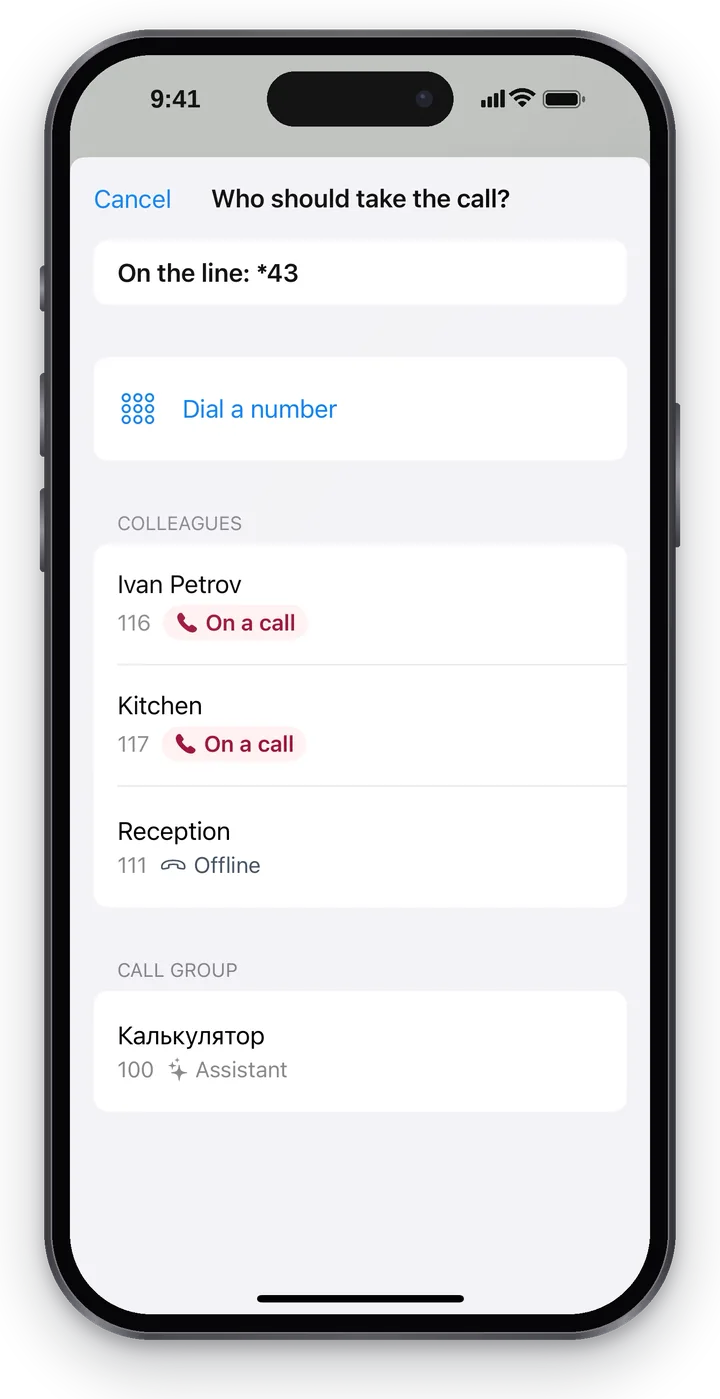 Screenshot: Cenaly Phone for iPhone, choosing who takes the call.
- at the top — “On the line: …”, who you are talking to right now;
- the “Name or extension” search;
- “Dial a number” — transfer to a number that is not in the list (for example, a colleague's mobile);
- the “Favorites”, “Colleagues” and “Call group” lists — each colleague with their extension and status.
The status helps you choose who to hand the call to:
| Status | What it means |
|---|---|
| Available | The colleague is connected and not on a call |
| On a call | The colleague is talking right now — better choose someone else or talk first |
| Ringing / Dialing | The colleague's phone is ringing, or they are dialing a number themselves |
| Stepped away / Do not disturb | The colleague asked not to be sent calls |
| Offline | None of the colleague's devices is connected right now — the call won't reach them |
| Status unknown | The status hasn't been updated for a while; above the list you'll see “Call statuses are unavailable right now” |
Choose who takes the call#
Tap a colleague — they get a ✓ tick, and the transfer buttons appear at the bottom. The tap itself doesn't transfer anything yet.
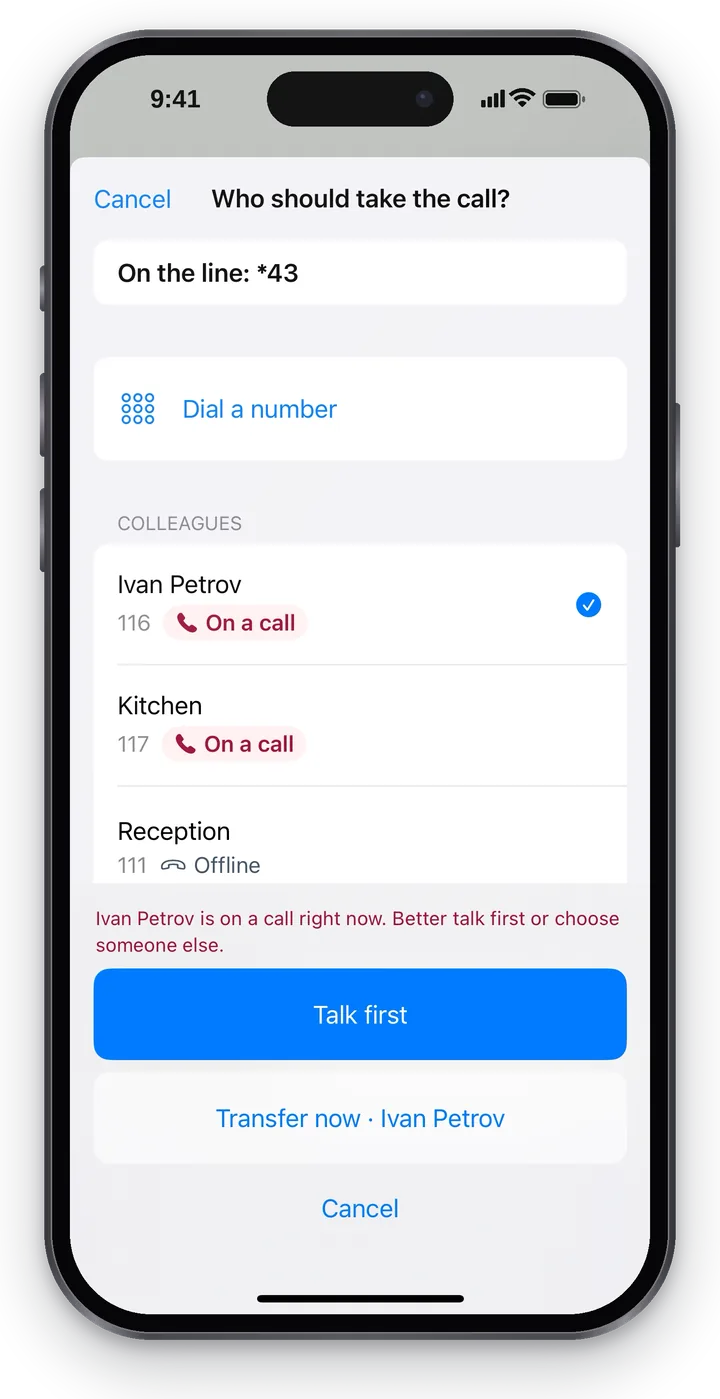 Screenshot: Cenaly Phone for iPhone, a colleague selected — two ways to transfer.
If the selected colleague is talking, you'll see above the buttons: “Ivan Petrov is on a call right now. Better talk first or choose someone else.”
| Option | How it works | When it's handy |
|---|---|---|
| “Talk first” | The other person waits on hold while you call your colleague and explain who is on the line; then you connect them | You need to warn your colleague or check whether they can take the call |
| “Transfer now” | The call goes straight to your colleague, and you drop off | Your colleague is definitely there and already knows |
“Talk first”#
- Choose a colleague and tap “Talk first”. The other person is put on hold, and the app calls your colleague. At the top of the call screen: “Caller is waiting · Calling: Ivan Petrov…”.
- Your colleague answers — “Ivan Petrov is on the line. The caller can't hear you”. Explain who is calling and why.
- Tap “Connect with Ivan Petrov” — the caller and your colleague are connected, and you drop off. The app shows “Call transferred”.
Changed your mind — “Back to caller”: the call to your colleague ends, and you are talking to the caller again.
If your colleague doesn't answer, you'll see “Ivan Petrov didn't answer” and two buttons: “Back to caller” or “Choose someone else”.
“Transfer now”#
Choose a colleague and tap “Transfer now · name”. The app says “Transferring the call: …” and, once the phone system confirms the transfer, “Call transferred”; the call screen closes.
If the transfer fails, you'll see “Couldn't transfer. You're still on the line” — you carry on with the call and can tap “Choose someone else”.
Messages during a transfer#
| Message | What it means |
|---|---|
| “Caller is waiting · Calling: …” | You called your colleague; the caller is on hold |
| “… is on the line. The caller can't hear you” | Your colleague answered; the caller can't hear your conversation with your colleague |
| “… didn't answer” | Your colleague didn't pick up |
| “The other person is waiting” | The call to your colleague ended, but the caller is still on hold — go back to them |
| “Transferring the call: …” | The phone system is transferring the call |
| “Call transferred” | The transfer is confirmed — your colleague has the call |
| “Couldn't transfer. You're still on the line” | The transfer failed, the call continues |
Troubleshooting#
| Symptom | What to do |
|---|---|
| The “Transfer” button is greyed out | Transfer is available only during a call and not while the connection is being restored; you can't transfer the call to your colleague during “Talk first” — connect them or go back to the caller |
| The colleague isn't in the list | Find them by searching their name or number, or tap “Dial a number” |
| “You already have another call: …” | You have another, unrelated call on hold — go back to it or end it first |
| “Status unknown” statuses | Statuses are temporarily unavailable — you can still transfer, but “Talk first” is safer |
FAQ#
Does the caller hear my conversation with my colleague?#
No. While you “talk first” with your colleague, the caller is on hold and can't hear you.
Can I transfer a call to a colleague's mobile?#
Yes: “Dial a number” and the phone number — if your manager allows outgoing calls to such numbers.