Eltex SMG-2/4/16/32 and TAU-FXO — setup for our PBX
Eltex is a Russian manufacturer of gateways for telecom operators and for buyers who need domestically made equipment. This page covers two of its lines that bring an outside line into our PBX:
- TAU-32M.IP with FXO submodules — a 19-inch 1U chassis with four slots of 8 ports each. The TAU32M-M8O submodule gives 8 FXO ports — 8 analog landlines; TAU32M-M4S4O-R gives 4 FXO and 4 FXS ports plus a relay that connects a phone straight to the landline when power fails. Up to 32 lines in total. The smaller TAU models (TAU-1M, 2M, 4M, 8N and others) have no FXO ports — only FXS for analog phones; they are covered in the “Eltex TAU” phone guide.
- SMG-2 and SMG-4 — desktop trunk gateways for an E1 trunk from the operator with ISDN PRI (Q.931) or SS7 signalling. The SMG-2 has one E1 (a second one by licence), the SMG-4 has four.
There are no models called SMG-16 or SMG-32 in the Eltex catalogue: the 16-E1 trunk gateways are the carrier chassis SMG-1016M, SMG-2016, SMG-3016 and SMG-3116 (see “Models in the family”). Next to them sit the office IP PBXs SMG-200 (16 FXS/FXO ports) and SMG-500 (4 E1) on the same platform — they can also act as a “gateway” in front of our PBX.
TAU-32M.IP suits a venue with a bundle of well-known landline numbers that cannot be ported to a SIP provider (4 to 32 lines); SMG-2/4 suits a hotel, resort or large venue that already has an E1 from the operator. For a café with one or two lines a TAU-32M.IP is overkill: a SIP provider number (“Connecting a provider number”) or a single-port FXO gateway is simpler.
To our PBX the gateway is just another extension: it registers on the PBX server with an extension's credentials and dials an incoming call from the line or the trunk to a ring group or operator number. What is the same for all gateways is in the overview “GSM gateway, landline or ISDN in your PBX”. Here is the step-by-step for Eltex, with screens from the manufacturer's manuals (TAU-32M.IP firmware 2.23.8, SMG-2/4 firmware 3.1.20).
What you need#
Extension credentials from the admin panel: Telephony → Staff & groups → create an operator for the gateway (e.g. “Eltex gateway, landline 1”) → “Reset password” → the “Extension credentials” window: SIP server, Extension number, Login, Password, Port
5060, TransportUDP. How many sets you need:- TAU-32M.IP — one extension per FXO port (each line registers with its own login and password — this is how Eltex describes connecting to a software PBX);
- SMG-2/4 — one for the whole trunk: the SMG registers the SIP interface as a whole, and all E1 channels go to the PBX through it.
The password is shown once — copy it into the gateway right away. Details — “Extension credentials for a gateway”.
The number the gateway will dial inside the PBX — a ring group number (Telephony → “Ring groups”, numbers from 700) or an operator's extension number. You will need it in step 4.
For TAU-32M.IP: the landlines wired to a distribution frame (the submodule ports come out on a CENTRONICS-36 connector; the manufacturer requires protection modules on the line side of the frame). For SMG-2/4: the trunk cable into the
E1port (RJ-48) and the trunk parameters from the operator — signalling (usually Q.931, “User” side), CRC4, HDB3 line code.A computer with a browser and a network cable: the first login is done directly at the factory address.
Step 1. Find the gateway's IP address#
Neither TAU-32M.IP nor SMG has a display, a voice menu or a discovery utility. Instead the whole platform shares the same factory static address 192.168.1.2, mask 255.255.255.0:
- Connect the computer to the gateway's Ethernet port with a cable and power the gateway on.
- Give the computer an address in the same subnet, e.g.
192.168.1.10, mask255.255.255.0. - Open
http://192.168.1.2in the browser and go to step 2.
After logging in, move the gateway to the venue's network addressing (on TAU-32M.IP — the Network settings menu) and write the new address down. If the address was changed and is unknown, connect over the console (TAU-32M.IP — RS-232 DB-9, 115200 8N1; SMG — Console RJ-45 port) or reset the gateway to factory defaults: after the reset it is back at 192.168.1.2.
Step 2. Log in to the web interface#
| What | Value |
|---|---|
| Address | http://192.168.1.2 (or the address you set in step 1) |
| Login | admin |
| Password | rootpasswd |
| Language | chosen at login: Russian or English |
The login and password are the same on TAU-32M.IP, SMG-2/4 and SMG-200/500 — and widely known. Change the password right away, as the manufacturer also recommends: on TAU-32M.IP — Service → Password, on SMG — the manual section on setting the web configurator access password. A gateway with landlines and a factory password means strangers' calls at the venue's expense. Do not expose the gateway's web interface, Telnet or SSH to the internet; both gateways can restrict access to a list of allowed addresses.
Step 3. Enter the PBX credentials#
The two gateways are built differently, so this step has two parts: TAU-32M.IP (landlines) and SMG-2/4 (E1 trunk). The field mapping table is at the end of the step. Menu names below are from the English web interface; the Russian interface has the same layout.
TAU-32M.IP: SIP profile and per-port FXO credentials#
TAU keeps the server settings in a SIP profile (up to 8 profiles), while the login and password live on each subscriber port that refers to the profile.
- PBX → SIP/H323 Profiles → SIP Common: tick Enable SIP, set Transport =
udp only. - PBX → SIP/H323 Profiles → Profile 1 → SIP Custom:
- Proxy mode =
HomingorParking(with a single server they behave the same). The factory value isOff— in that state the gateway registers nowhere; - Proxy address and Registrar address in row 1 — the SIP server address from the credentials window, in both fields; a port, if needed, goes after a colon, without it the gateway uses
5060; - tick Use registration 1;
- Outbound = on;
- SIP Domain — the same SIP server address;
- Authentication =
user defined— the login and password are set on each port.
- Proxy mode =
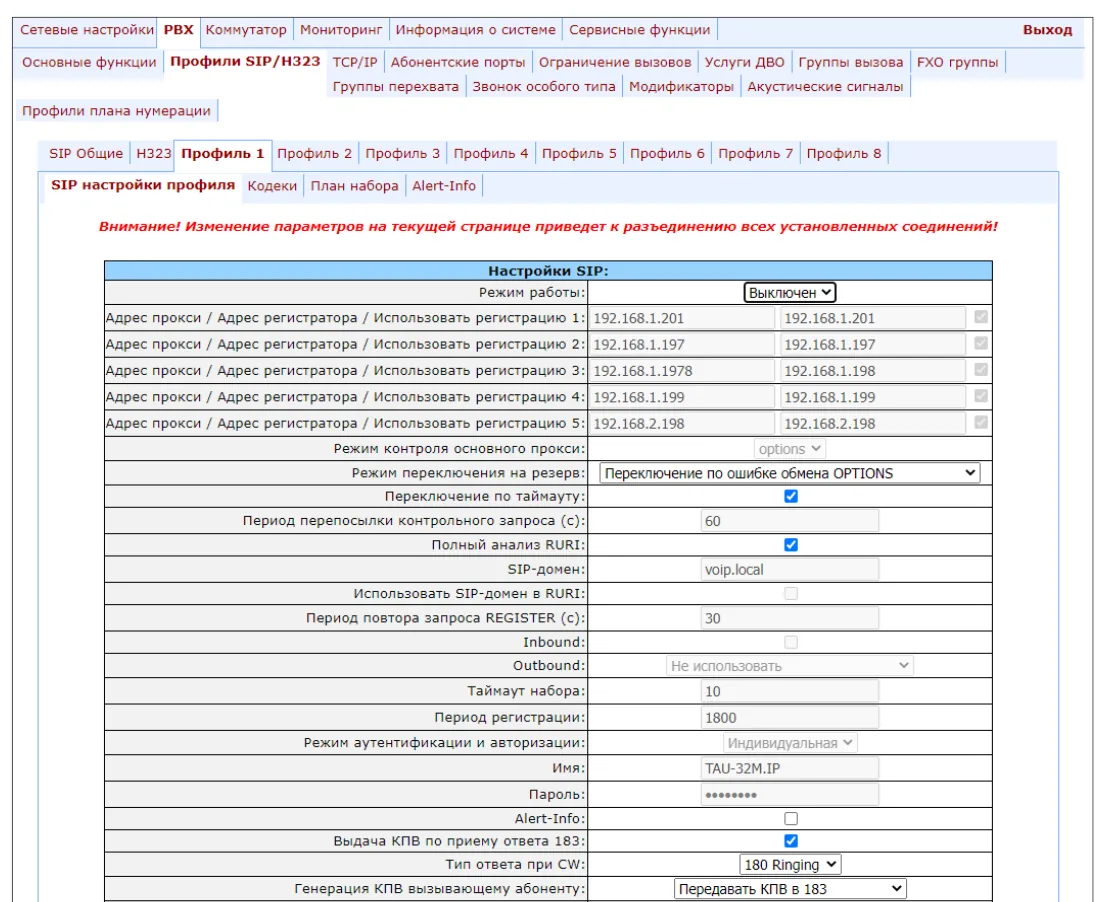 Screenshot: TAU-32M.IP User Manual (Russian edition), firmware 2.23.8, p. 99; the manufacturer's example shows backup servers — our PBX needs only row 1.
PBX → Ports → “Edit” on the FXO port → Custom tab:
- Phone — the login
sip-…-<number>; - Authentication name — the same login in full;
- Authentication password — the extension password;
- SIP/H.323 profile =
Profile 1, the Disabled box unticked.
A screen of this tab is in step 4: the incoming route is set on it too.
- Phone — the login
Click Apply, then Save — without saving, the settings last only until a reboot. Applying SIP settings drops the gateway's current calls — do it outside peak hours.
Repeat item 3 for every line with its own extension.
SMG-2/4: SIP interface with trunk registration#
The SIP side of the SMG is made of SIP interfaces in the Routing section; our PBX needs one interface that registers on it.
- Routing → SIP/SIP-T/SIP-I Interfaces → general configuration: Transport =
UDP-only, the local SIP port —5060. - Add an interface, SIP Interface Configuration tab: Mode =
SIP; Hostname/IP-address — the SIP server address; Remote SIP port =5060; SIP domain — the same address; TrunkGroup — the group the interface belongs to (needed in step 4). If the gateway sits behind a router without port forwarding, fill in Public IP. - SIP Protocol Configuration tab, Registration Settings block:
- Upper registration =
Trunk registration(factory value — no registration); - Login and Username/Number — the login
sip-…-<number>in full in both fields; - Password — the extension password;
- tick Replace CgPN on egress call (why — see step 4);
- Registration period (sec) — the factory 1800 is fine.
- Upper registration =
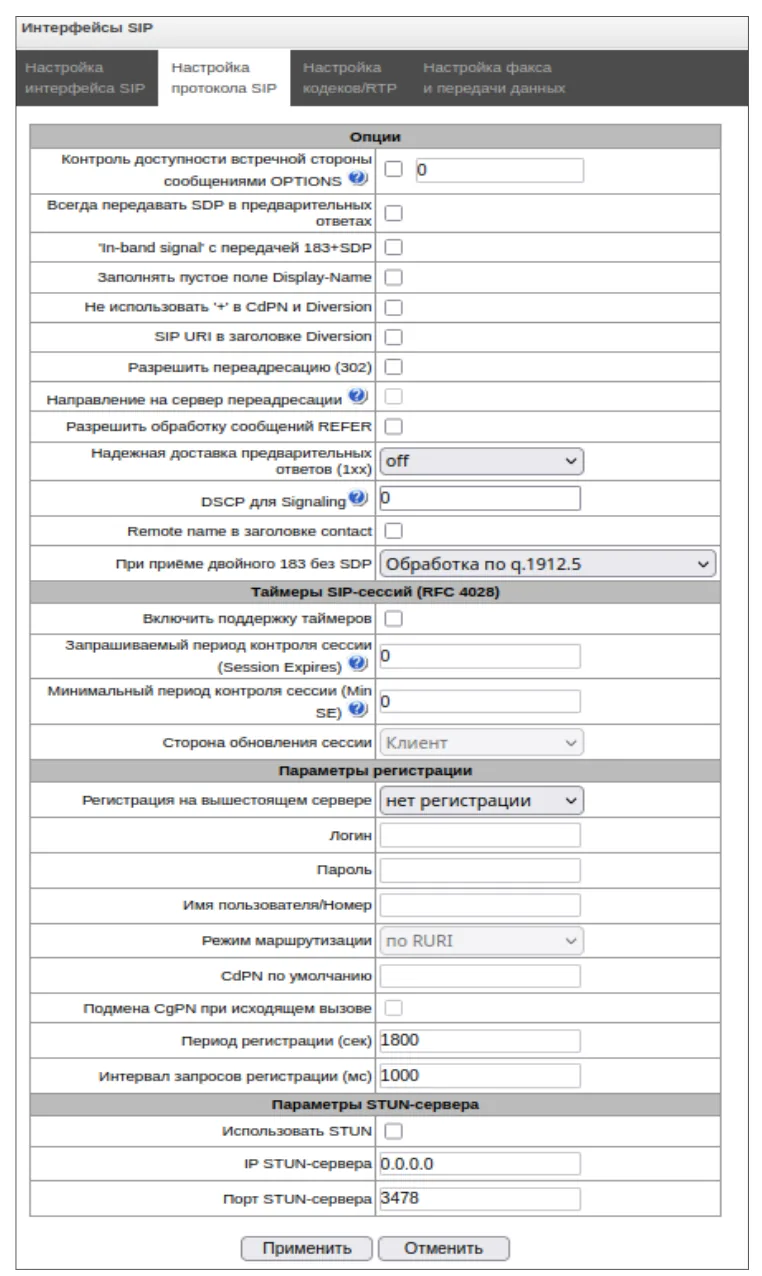 Screenshot: SMG-2, SMG-4 Trunk Gateway User Manual (Russian edition), firmware 3.1.20, p. 74.
- RTP codecs tab:
G.711Afirst,G.711Usecond; DTMF transfer method =rfc2833. - Apply, then Service → Save Configuration into Flash — without it the SMG returns to the old settings after a reboot.
What goes where#
| In the admin panel (“Extension credentials”) | TAU-32M.IP | SMG-2 / SMG-4 |
|---|---|---|
| SIP server | Proxy address and Registrar address (row 1) + the profile's SIP Domain | the interface's Hostname/IP-address and SIP domain |
Login sip-…-<number> |
the port's Phone and Authentication name | Login and Username/Number in Registration Settings |
| Password | the port's Authentication password | Password in Registration Settings |
Port 5060 |
after a colon in the address (default 5060) | Remote SIP port = 5060 |
Transport UDP |
Transport = udp only (SIP Common) |
Transport = UDP-only (general configuration) |
| — (turn registration on) | Use registration 1 ✓, Proxy mode not Off |
Upper registration = Trunk registration |
| Extension number | not entered | not entered |
Codecs, DTMF, NAT and field length
- Codecs. On TAU-32M.IP — the profile's Codecs tab:
G.711AandG.711Uat the top. Turn G.729 off completely: our PBX does not use it, and TAU also describes it in SDP in a non-standard way. There is no G.722 on TAU-32M.IP or SMG-2/4 (SMG-200/500 have it) — G.711 works, and it is enough for a landline or an E1. - DTMF —
RFC2833on both gateways (on TAU — DTMF Transfer in the profile). - NAT. TAU has a registration period and a keepalive period in the profile — they keep registration alive through a router; SMG has the interface's Public IP and a STUN server block (on TAU, STUN works only with the
udp onlytransport). Turn SIP ALG off on the router. - TLS for SIP is not available on TAU-32M.IP or SMG-2/4 — our PBX does not need it. The “UDP preferred, TCP” transport on TAU and
UDP-preferon SMG also work: large packets go over TCP, which our PBX accepts. - TAU field length. Phone, Authentication name, Authentication password and Hot Number take up to 20 characters — the
sip-…-<number>login fits.
Step 4. Send incoming calls to the PBX#
Now tell the gateway what to do with a call from the line or the trunk: call through our SIP account and dial a number inside our PBX — a ring group or an operator.
TAU-32M.IP: Hot line on the FXO port#
When an FXO port receives a call from the landline, it dials the “hot number” by itself — that is the incoming route.
- PBX → Ports → “Edit” on the FXO port → Custom (the same tab as in step 3):
- tick Hot line;
- hot line timeout =
0— dial immediately; - Hot Number — the ring group number (e.g.
700) or an operator's extension number; - No offhook at ringing — optional: the line is not picked up until the PBX answers (works only together with Hot line).
- Apply → Save.
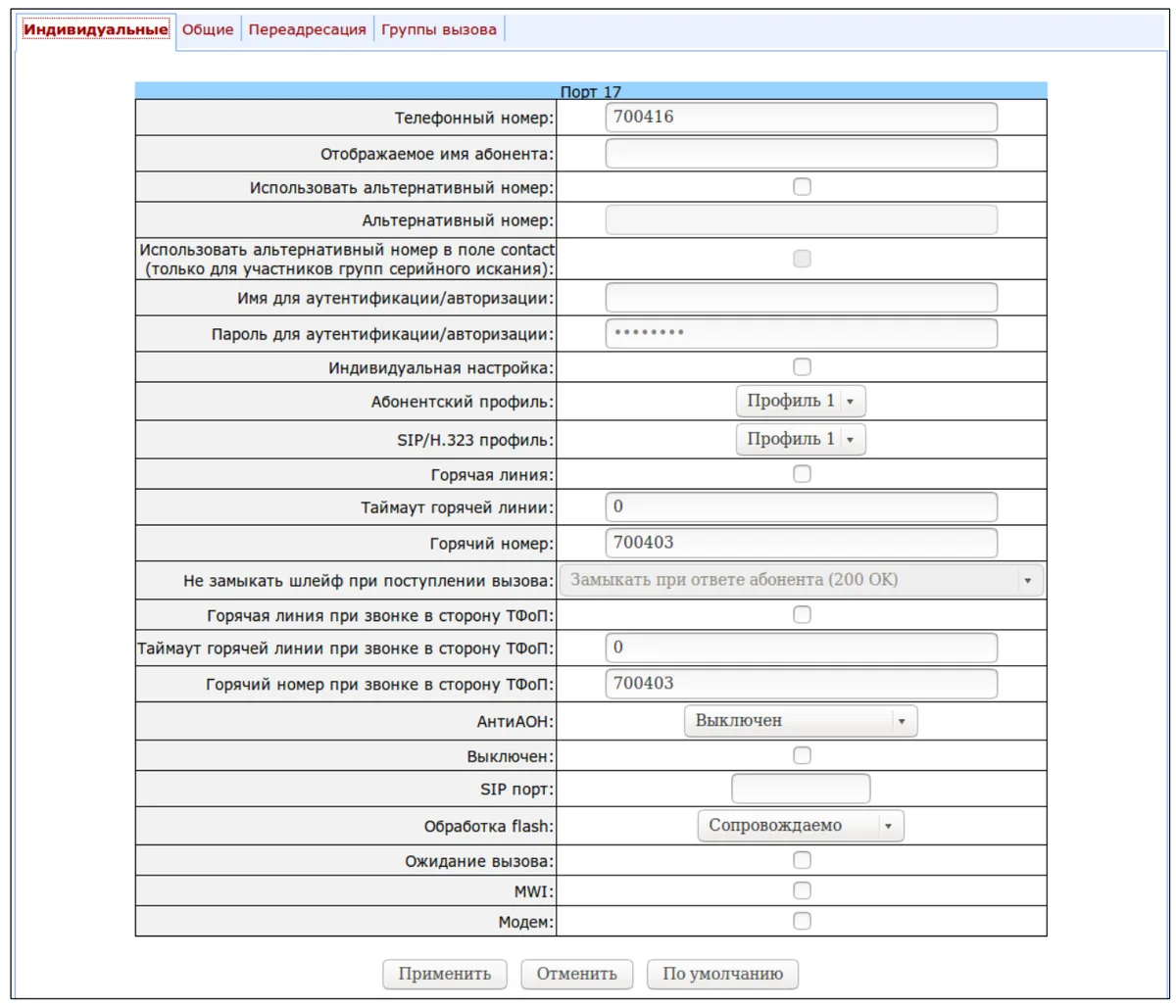 Screenshot: TAU-32M.IP User Manual (Russian edition), firmware 2.23.8, p. 145.
- The port's subscriber profile (PBX → Ports → Subscriber profiles → Profile n, incoming direction block): Ring detection — factory
2(the gateway waits for the second ring to catch the caller's number, which the operator sends after the first one);1— if the line uses continuous ringing. Untick Use PSTN CallerID (see “Caller number” below).
SMG-2/4: direct prefix and number replacement#
On the SMG a call from the trunk follows the chain “E1 trunk group → prefix → SIP trunk group → SIP interface”.
- Trunk. In the E1 Streams section — signalling =
Q.931 (User)towards the operator (or SS7 if that is what the operator provides), CRC4 and theHDB3line code — per the operator's form. - Prefix to our PBX. In the numbering schedule create a prefix with prefix type = trunk group and the trunk group — the group with the SIP interface from step 3.
- Trunk group of the E1. Routing → Trunk Groups → the group with the E1 channels: Direct routing prefix — the prefix from item 2. A direct prefix switches all calls of the group to another group regardless of the dialled number.
- Number for the PBX. The operator sends your landline number (or its last digits) in the call — our PBX has no such number, so it has to be replaced with the ring group number. Create a modifier in Internal Resources → Modifier Tables, set the rule on the CdPN/Original CdPN Modification tab and attach it in the E1 trunk group, Ingress calls modifiers block → “Add”
CdPN. By the manual's syntax+inserts digits and!cuts off everything after it, so the rule+700!turns any number into700. The manual has no ready example of “any number → group number” — before applying, test the rule with the Modification example button using your own landline number. - Apply → Service → Save Configuration into Flash.
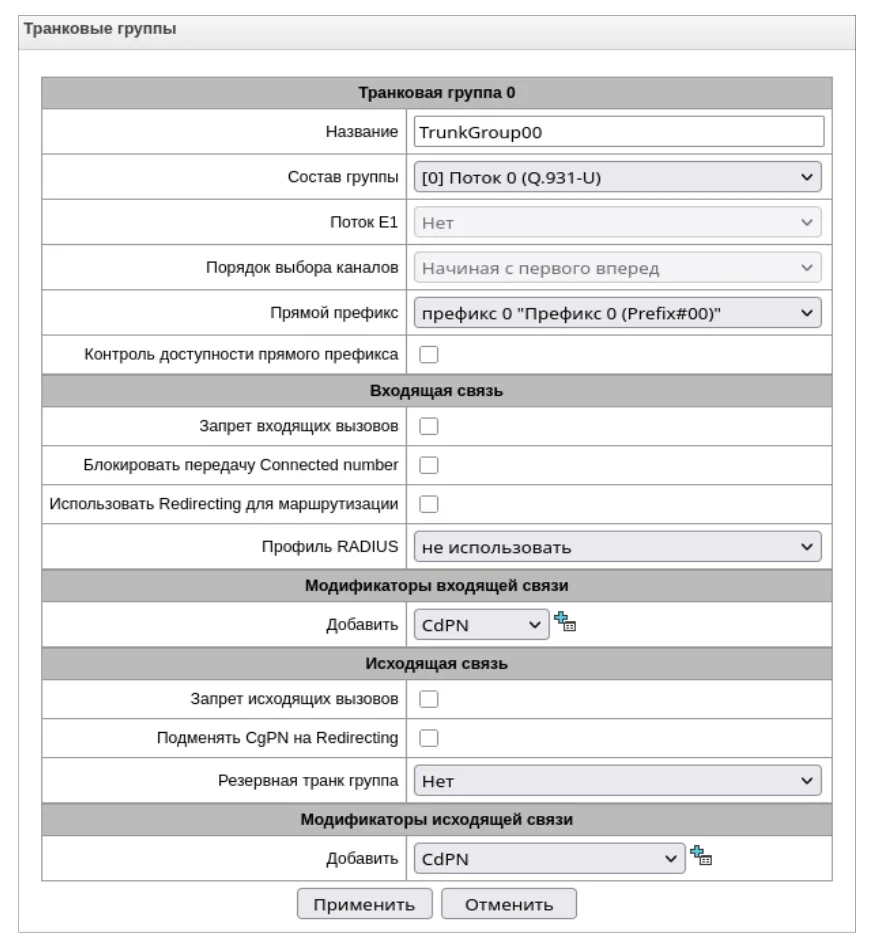 Screenshot: SMG-2, SMG-4 Trunk Gateway User Manual (Russian edition), firmware 3.1.20, p. 62.
Caller number#
Both gateways can pass the caller's number from the line or the trunk into the call, but they put it into the From header instead of the login — and then our PBX no longer recognises its own extension in the call: registration is green, yet calls are rejected. So for the first start, on TAU-32M.IP Use PSTN CallerID stays unticked (the call carries the port's Phone, i.e. the login), and on SMG Replace CgPN on egress call is ticked (the number is taken from Username/Number). In the operator panel the call shows as coming from the gateway's extension; the caller's number is not shown there yet. The routing rules of provider numbers (schedule, voice menu) do not apply to calls from a gateway — a ring group with its own time-based variants covers the same need, see “Where to send incoming calls”.
About outgoing calls — honestly. Calling out of the PBX through this gateway's landline or trunk is not possible yet: the PBX outgoing rule can only use a SIP provider line, and to the PBX the gateway is an extension. The Eltex gateways themselves can do it (TAU-32M.IP — FXO groups, SMG — a prefix to the E1 trunk group), but our PBX does not support such outgoing calls — do not configure them for our PBX. Today this gateway is a way to receive calls on landline numbers; outgoing calls go through a SIP provider number, see “Outgoing calls through a gateway — not yet”.
SMG-200 and SMG-500 instead of TAU and SMG-2/4
The SMG-200 (FXO ports) and SMG-500 (E1 trunks) office IP PBXs connect to our PBX through the same SIP interface: on the SIP protocol tab set the upper registration type to Trunk registration (the “subscriber” and “transit” variants do not suit us). For incoming calls from a landline on the SMG-200: in the subscribers' FXS/FXO profiles → FXO set the dialling mode to “Hot line (incoming calls)” and put the ring group number into the FXO port's hot line field. The seizure detection option “after CallerID reception” passes the caller's number — as with TAU, better leave it off for the first start. SMG-200/500 support the G.722 codec. These are full PBXs for 100–500 users — buying them just as a gateway makes no sense.
Step 5. Check registration and a call#
- Registration in the gateway. On TAU-32M.IP — Monitoring → Port: the Registration state column of the FXO port should read
ok;failed— the attempt failed,off— registration is disabled. For SMG-2/4 the manual does not describe a separate registration status screen for the SIP interface — rely on the admin panel (item 3). - Trunk (SMG). Monitoring → E1 streams: the stream state is
WORK, the D-channel state isup.LOS— no signal,AIS/RAI— an alarm on the operator side or mismatched parameters. - Registration in the admin panel. Telephony → “Staff & groups” tab — the gateway's extension (on TAU — each port's) shows a green dot.
- A call. Call the landline number from a mobile — the ring group or operator from the Hot Number (TAU) or from the modifier rule (SMG) should ring.
- Audio — the
*43echo test. Registration says nothing about audio: it flows separately. Temporarily send incoming calls to the service number*43— on TAU put it into the port's Hot Number, on SMG into the modifier rule (+*43!, test it with Modification example) — and call the landline number: the PBX gives a short beep and then plays your voice back with a delay. You hear yourself — audio flows both ways; there is a beep but you do not hear yourself — audio does not get from the gateway to the PBX; no beep at all — it does not get from the PBX to the gateway. The test result appears in the call log. Whether the gateway accepts the*character in these fields is not stated in the documentation — if it does not, check the audio with an ordinary call to the group. After the check put the group number back and save.
Everything about checking — in the overview, section “How to check”.
Factory reset#
A reset is needed if the password is unknown (the gateway came with the premises), the gateway does not open at its known address, or the configuration is hopelessly tangled.
TAU-32M.IP, with the button. Hold the F button on the front panel for 10–14 seconds — until the Status LED starts flashing yellow, green and red in turn and Alarm lights red — then release: the configuration is reset and the gateway reboots. Holding it for 1–9 seconds is just a reboot; more than 15 seconds enters the protected Safemode, where the configuration is not reset.
TAU-32M.IP, from the web interface. Service → Backup/Restore → the factory configuration block → Restore default button; the gateway reboots by itself after the reset.
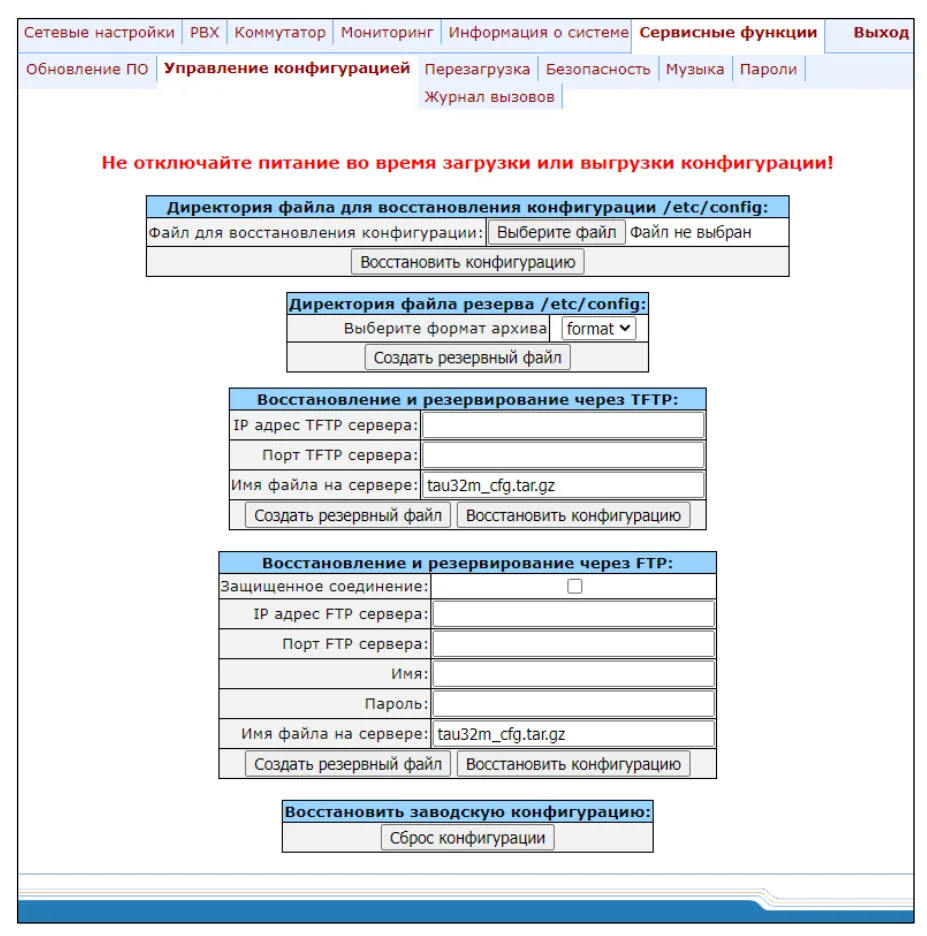 Screenshot: TAU-32M.IP User Manual (Russian edition), firmware 2.23.8, p. 190.
SMG-2/4, with the button. On a running gateway press F for 1 second (three LEDs turn yellow) — a reboot starts. When Alarm and Status turn green (the system is loading), press F again and hold it for 40–45 seconds until Alarm and Status turn yellow — release. The gateway boots with factory parameters, but the old configuration is still in flash: to keep it from coming back at the next reboot, log in over Telnet or the console (admin / rootpasswd), enter sh, then save and reboot. The manual does not describe a factory reset item in the SMG-2/4 web interface. SMG-200/500 work similarly: the F button per the manual's table and the same sh → save → reboot.
What is erased: the whole configuration — SIP profiles and interfaces, port and trunk settings, routes, network settings and the password.
What to do afterwards: the gateway is again at http://192.168.1.2 with admin / rootpasswd — go through steps 1–5 and change the password at once. On TAU-32M.IP, after a reset Telnet, SSH and the console let admin in without a password — set passwords for them too. Resetting the gateway does not change the extension login in the admin panel; if the extension password was not kept, issue a new one: Telephony → Staff & groups → “Reset password”. Before resetting a working gateway, save its settings: on TAU — the Backup button on the same screen (device access passwords are not included in the file), on SMG — configuration file management in the Service menu. General notes on resets — in the overview.
If the gateway does not register#
- TAU: the profile's Proxy mode is
Off(the factory value) or Use registration 1 is not ticked. You needHoming/Parkingand the tick, and the address in both fields of row 1. - TAU: the login is not on the port. Authentication must be
user defined, and the login must be in the port's Authentication name (and in Phone), not the extension number from the credentials window. - SMG: registration not enabled or not saved. The upper registration type is still “no registration”, or the settings were not written with Save Configuration into Flash and were lost after a reboot.
- Registration is green but calls are rejected. The call carried the caller's number instead of the login: on TAU Use PSTN CallerID is ticked, on SMG Replace CgPN on egress call is unticked (step 4, “Caller number”). If TAU did not accept the login in Phone and a numeric number stayed there, contact support: on the PBX side the gateway's extension can be identified by its authentication name.
- Registered, but a call from the line does not arrive. On TAU Hot line is not ticked or Hot Number points to a non-existent number; on SMG there is no direct prefix or modifier (the PBX receives the landline number), the stream is not
WORK, and on the SMG-2 a second E1 without a licence does not work at all. - After upgrading TAU-32M.IP to 2.22.1 or later the gateway “disappeared from the network” — the new firmware series has a different network model: reconfigure the network interfaces, default gateway, DNS and NTP following the manufacturer's instructions.
General causes (SIP ALG on the router, UDP 5060 blocked) — in the overview, section “If the gateway does not register”; about the network — “Venue network, NAT and SIM card”.
Models in the family#
| Model | Ports / channels | Line and network | Setup differences |
|---|---|---|---|
| TAU-32M.IP + TAU32M-M8O | 4 slots × 8 ports: up to 32 FXO | analog landlines; 3 × GE RJ-45 + 2 × SFP, RS-232 | 19" 1U, 220 V AC or 48/60 V DC; credentials on each port; polarity reversal on FXO for hang-up detection — board revision B only |
| TAU-32M.IP + TAU32M-M4S4O-R | 4 FXS + 4 FXO per submodule | line + analog phones | relay: without power the FXS phone is connected straight to the FXO line |
| TAU-32M.IP + TAU32M-M8S | 8 FXS per submodule | analog phones | gives no outside line — these are extensions, see “Eltex TAU” |
| SMG-2 | 1 × E1 (second by licence), 32 channels (up to 64 as an option) | Q.931 (PRI) or SS7; 1 × GE, Console RJ-45 | desktop case 187 × 32 × 124 mm, 12 V; SIP interface with trunk registration |
| SMG-4 | 4 × E1, 128 channels | same | same firmware and manual as SMG-2 |
| SMG-200 / SMG-200 rev.B | 16 FXS/FXO ports (in steps of 8) | FXO/FXS; 4 × GE | office IP PBX; to us — trunk registration, FXO hot line for incoming calls; G.722 available |
| SMG-500 | 4 × E1 | DSS1 (PRI), QSIG, SS7; 4 × GE | office IP PBX for 250–500 users; to us — like SMG-2/4 |
| SMG-1016M, SMG-2016 | up to 16 E1, up to 768 channels | Q.931, SS7 | discontinued (support continues); carrier chassis |
| SMG-3016, SMG-3116 | up to 16 E1, up to 768 channels | Q.931, SS7 | carrier platforms; overkill for a venue |
Manuals: TAU-32M.IP — firmware 2.23.8, SMG-2/4 — firmware 3.1.20, SMG-200/500 — firmware 3.411.0. The English manuals on the manufacturer's export site lag several versions behind; menu names on this page follow the current manuals. The equipment is designed for networks in Russia and the CIS: the TAU manual contains no line impedance profiles for other countries.
FAQ#
Do TAU-1M, TAU-2M, TAU-4M or TAU-8N have FXO?#
No. Only the TAU-32M.IP with a TAU32M-M8O or TAU32M-M4S4O-R submodule accepts landlines. The other TAU models are FXS gateways for analog phones: they connect to the PBX as extensions, see “Eltex TAU”.
Where are the SMG-16 and SMG-32?#
Eltex has no models with those names. The desktop trunk gateways are the SMG-2 and SMG-4; for 16 E1 trunks there are the carrier chassis SMG-1016M, SMG-2016 (discontinued), SMG-3016 and SMG-3116. An SMG-2 is usually enough for a venue.
Can I call out through the landline or trunk from the PBX?#
Not yet. Through this gateway our PBX can only receive calls; outgoing calls go through a SIP provider number. See “Outgoing calls through a gateway — not yet”.
What happens to the landline if the venue loses power?#
With the TAU32M-M4S4O-R submodule the relay connects an FXS port directly to an FXO port — an analog phone on the FXS port stays on the landline without the gateway's power and without the PBX. The TAU32M-M8O has no such relay.
The operator panel does not show the caller's number — is that a fault?#
No. The gateways know the number, but its transfer is turned off for the first start (step 4), and the PBX currently shows the call as coming from the gateway's extension.
Is Eltex suitable for a purchase that requires domestically made equipment?#
The SMG-2 and SMG-4 are listed in the Russian radio-electronics register (entries 10685002 and 10685003); for the TAU-32M.IP the product page says the listing is “being confirmed”. The manufacturer's site publishes EAEU declarations for the SMG and TAU series. Check the exact status with your supplier at the time of purchase.
Sources#
Eltex documents, accessed 10.09.2026:
- TAU-32M.IP User Manual, firmware 2.23.8 (27.02.2026, Russian) — https://eltex.ru/storage/upload_center/files/50/TAU32M.IP_user_manual_2.23.8.pdf — factory address and password, F button and Safemode, SIP profiles, subscriber ports and FXO profiles, Hot line, port monitoring, Backup/Restore. Source of the TAU screenshots.
- TAU-32M.IP appendix “Configuring TAU-32M.IP for the Asterisk software PBX” (Russian) — https://eltex.ru/storage/upload_center/files/14/TAU-32M_%D0%90%D0%A2%D0%A1_Asterisk.pdf — registering ports on an external PBX: proxy mode, proxy and registrar address, Outbound, user-defined authentication.
- TAU-32M.IP User manual, firmware 2.21.0 (English) — https://api.eltex-co.com/storage/upload_center/files/35/TAU32M.IP_2.21.0_en.pdf
- TAU-32M.IP — product page — https://eltex.ru/product/tau-32m-ip/; analog gateways catalogue — https://eltex.ru/catalog/voip/voip-gateways/
- SMG-2, SMG-4 Trunk Gateway User Manual, firmware 3.1.20 (26.12.2025, Russian) — https://eltex.ru/storage/upload_center/files/51/SMG-2_4_user_manual_3.1.20.pdf — factory address and password, F button and saving the factory configuration, E1 streams, numbering schedule, trunk groups, SIP interfaces and registration settings, modifier tables. Source of the SMG screenshots.
- SMG-2, SMG-4 User manual, firmware 3.1.6 (English) — https://api.eltex-co.com/storage/upload_center/files/33/SMG2_4_3.1.6_EN.pdf
- SMG-2, SMG-4 datasheet 3.1.20 (Russian) — https://eltex.ru/storage/upload_center/files/51/SMG-2_4_datasheet_3.1.20.pdf — ports, channels, codecs, licences.
- SMG-2 — https://eltex.ru/product/smg-2/; SMG-4 — https://eltex.ru/product/smg-4/; trunk gateways catalogue — https://eltex.ru/catalog/voip/trunk_gateways/
- SMG-200, SMG-500 Office IP PBX User Manual, firmware 3.411.0 (Russian) — https://eltex.ru/storage/upload_center/files/58/SMG-200_500_user_manual_3.411.0.pdf — trunk registration, FXO profiles, F button.
- SMG-200 — https://eltex.ru/product/smg-200/; SMG-200 rev.B — https://eltex.ru/product/smg-200-revb/; SMG-500 — https://eltex.ru/product/smg-500/
- SMG-1016M — https://eltex.ru/product/smg-1016m/; SMG-2016 — https://eltex.ru/product/smg-2016/; SMG-3016 — https://eltex.ru/product/gibridnaya_platforma_smg-3016/; SMG-3116 — https://eltex.ru/product/gibridnaia-platforma-smg-3116-s-funkciiami-ip-ats/