Cisco SPA3102 / SPA8800 (FXO, legacy) — setup for our PBX
Your venue has a landline number on an ordinary telephone line, and a grey Cisco (or Linksys) box is already sitting in the cabinet — an SPA3102 or an SPA8800. These are FXO gateways from the Cisco Small Business line (formerly Sipura and Linksys): the landline plugs into their LINE port, and the gateway turns it into SIP. The SPA3102 has one landline, one analog phone and a built-in router; the SPA8800 has four landlines and four analog phones in a metal case.
Both gateways are discontinued and no longer supported by Cisco, and the vendor has removed their documentation from its website — it survives in Internet Archive copies. If you already have one, it is worth connecting: the setup is simple and well documented. We do not recommend buying one new: Cisco has no FXO replacement, and for new sites Grandstream HT841/HT881 or Yeastar TA FXO are a better fit.
To our PBX the gateway is just another extension: each landline registers on the PBX server with its own credentials, and the gateway itself dials an incoming call through to a ring group or an operator. What is the same for all gateways is in the overview “GSM gateway, landline or ISDN in your PBX”. This page is the step-by-step for Cisco, with screenshots from the vendor's documentation.
What you need#
- Extension credentials from the admin panel — one set per landline (one for the SPA3102, up to four for the SPA8800): Telephony → Staff & groups → create an operator for the line (“Landline 1”) → “Reset password” → the “Extension credentials” window: SIP server, Extension number, Login, Password, Port
5060, TransportUDP. The password is shown only once. Details — “Extension credentials for a gateway”. - The number the gateway will dial inside the PBX — a ring group number (Telephony → “Ring groups”, numbers from 700) or an operator's extension number. You will need it in step 4.
- The landline plugged into the LINE port (on the SPA8800 — LINE 1…4 or the shared RJ-21 connector). ⚠️ Do not mix it up with the PHONE port: Cisco warns that a PHONE port plugged into a telephone wall jack can damage the gateway or the wiring.
- An analog phone — mandatory with these gateways: the voice menu that reads out the IP address and performs the reset works only through it (there is no reset button). Plug it into PHONE (SPA3102) or strictly into PHONE 1 (SPA8800).
- The gateway on your venue network: on the SPA3102 the cable from your router goes into the INTERNET port, on the SPA8800 into ETHERNET.
- A computer with a browser on the same network.
- Your line's country. The factory settings are for the USA — the section “Tune the line for your country” is mandatory.
Step 1. Find the gateway's IP address#
The gateway's network port (INTERNET on the SPA3102, ETHERNET on the SPA8800) gets its address via DHCP from your venue router out of the box.
- By voice, through the analog phone (both gateways): lift the handset of the phone in PHONE / PHONE 1 (there may be no dial tone), dial
****, wait for the menu greeting and dial110#— the gateway reads out its address. Other useful codes:120#— netmask,130#— gateway,150#— firmware version,210#— local address. The menu drops out after a minute of inactivity. - SPA3102 from its second port: plug a laptop into the ETHERNET port — the gateway gives it an address itself, and its web interface opens at
http://192.168.0.1/advanced. - SPA8800 through the service port: plug a laptop into the AUX port — the same address
http://192.168.0.1/advanced. The gateway does not forward traffic from AUX anywhere; it is for configuration only. - From your router's client list — by the MAC address on the label.
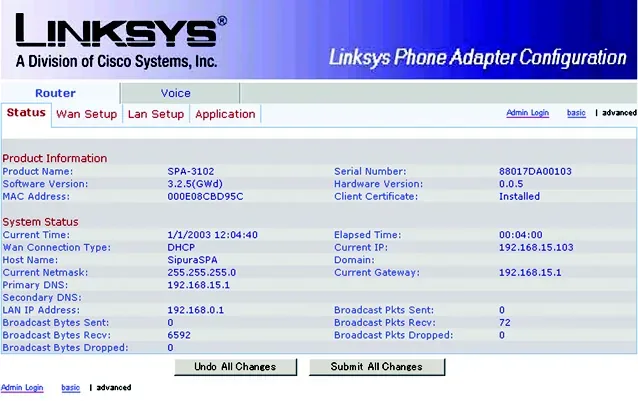
Screenshot: Voice Gateway with Router SPA3102 — Quick Installation, Cisco (Internet Archive copy), p. 1; the addresses shown are an example.
By default the SPA3102 works as a router (voice menu 201#: 0 — router, 1 — bridge). If it sits behind your venue router, you can leave the mode as it is.
Step 2. Log in to the web interface#
Open http://<gateway IP>/admin/advanced. If you open just http://<gateway IP>, you land in the user view — click Admin Login, then advanced (top right), otherwise half of the settings are hidden.
| Value | |
|---|---|
| Accounts | admin (administrator) and user (user view); the names cannot be changed |
| Factory password | no password — neither for admin nor for user: out of the box there is no login prompt |
If the browser does ask for a password, it was set by the provider the gateway came from. Without it, the only way in is a factory reset (which may also be locked with the provider's password).
Set an administrator password right after setup: Voice → System → System Configuration section → Admin Password (and User Password).
The tab names differ between models: the SPA3102 has Router (network) and Voice (Info, System, SIP, Provisioning, Regional, Line 1, PSTN Line…), the SPA8800 has Network and Voice (…, Phone 1–4, Line 1–4). Every change is applied with the Submit All Changes button at the bottom of the page — the gateway reboots.
The page does not open at the address from 110#? Enable web access from the venue network side by voice: **** → 7932# → 1.
Step 3. Enter the PBX credentials#
On a Cisco SPA the server address, login and password all live on one line page. One landline = one tab = one extension of ours:
- SPA3102 — the Voice → PSTN Line tab. Do not confuse it with Voice → Line 1: that is the account of the analog phone in the PHONE port; it is set up like a phone (Cisco — phones and ATAs) and needs its own, separate extension.
- SPA8800 — the Voice → Line 1…Line 4 tabs, one per landline. The Phone 1…4 tabs are the analog phones.
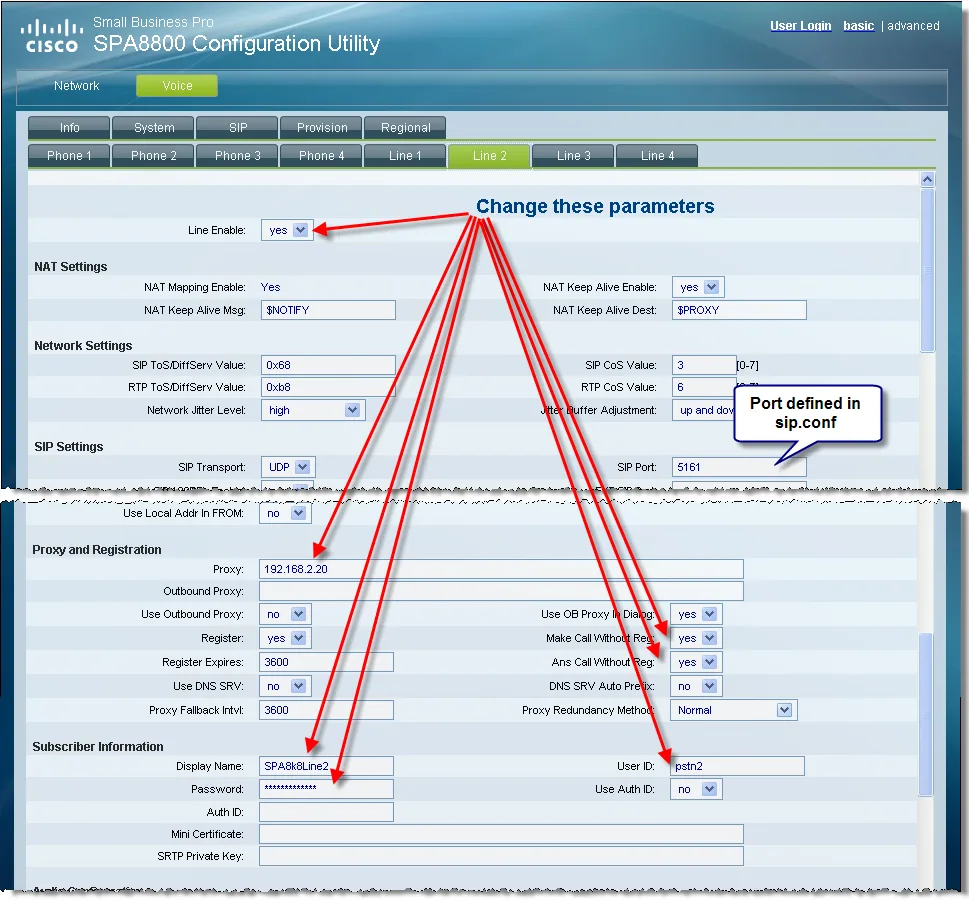
Screenshot: Application Note “Configuring the Cisco SPA8800 IP Telephony Gateway in an Asterisk Environment”, Cisco, 2009, p. 16. In Cisco's example the gateway works without registering (Make Call / Ans Call Without Reg = yes, Use Auth ID = no) — our PBX needs it differently, per the table below.
| Field in the “Extension credentials” window | Value | Where in the gateway (SPA3102: PSTN Line, SPA8800: Line N) |
|---|---|---|
| — | yes |
Line Enable |
| SIP server | our PBX address | Proxy and Registration → Proxy |
| — | no, field empty |
Use Outbound Proxy, Outbound Proxy |
| — | yes |
Register (ignored if Proxy is empty) |
| Port | 5060 |
there is no separate field — 5060 is used automatically; optionally enter address:5060 in Proxy. The SIP Port field in SIP Settings is the gateway's own port — leave it alone |
| Transport | UDP |
SIP Settings → SIP Transport |
| Login | sip-…-<number> — in full |
Subscriber Information → User ID |
| Login | the same full string | Use Auth ID = yes, Auth ID = login |
| Password | the extension password (shown once) | Password |
| Extension number | a label for yourself | Display Name |
| — | yes |
SIP Settings → Restrict Source IP — accept SIP only from the server in the Proxy field (see below) |
Click Submit All Changes. On the SPA8800 repeat for every connected line with its own extension.
⚠️ Restrict Source IP = yes is mandatory. Out of the box the gateway accepts an outgoing call from any address on the internet without checks (VoIP Caller Auth Method = none, One Stage Dialing = yes) and dials it into your landline — at your expense. With Restrict Source IP the gateway drops everything that does not come from the address of the server in the Proxy field. On the SPA3102 you can switch this direction off entirely: VoIP-To-PSTN Gateway Enable = no (our PBX does not use outbound calls through the gateway anyway). Do not forward the gateway's SIP ports on your router and do not expose its web interface to the internet: these firmwares get no security updates.
Codecs, DTMF, NAT and local ports
- Codecs (Audio Configuration): Preferred Codec =
G711a(Europe, CIS, Georgia) orG711u(North America); G729a Enable =no. G.711 A-law and µ-law are always enabled on the gateway. These gateways have no G.722 — calls run in G.711, which is exactly the quality of a landline. Our PBX does not use G.729a, G.723 or G.726 — do not set them as Preferred Codec and do not enable Use Pref Codec Only. - DTMF: DTMF Tx Method =
AVT(this is RFC 2833; the factory value isAuto). - NAT. Behind an ordinary router the gateway works without port forwarding: Symmetric RTP =
yes(factory), NAT Mapping Enable =no, no STUN needed. If registration drops now and then, lower Register Expires (factory 3600 s) to 60–300 s. Turn SIP ALG off on the router. - The lines' local SIP ports differ (on the SPA8800, for example, 5161 for Line 2 and 5261 for Line 3; on the SPA3102 the PSTN Line port differs from Line 1). That is how it should be — do not make them equal by hand.
- Do not enable TLS or SRTP: our PBX has neither (on the SPA8800-XU SRTP is removed from the firmware anyway).
Step 4. Send incoming calls to the PBX#
Out of the box the gateway behaves dangerously: when a call arrives on the landline, it picks up after 16 seconds, gives the caller a dial tone and lets them dial any number inside the PBX (dial plan 1 = (xx.) — “anything”). We need the gateway to dial the group number itself and immediately. On Cisco this is done with a “hotline” in the dial plan — on the same line tab (PSTN Line on the SPA3102, Line N on the SPA8800):
| Section | Field | What to set |
|---|---|---|
| Dial Plans | Dial Plan 2 (any free one of 1–8) | (S0<:700>), where 700 is the ring group number (or an operator's extension number) |
| PSTN-To-VoIP Gateway Setup | PSTN Caller Default DP | 2 — the number of the plan from the row above |
| PSTN-To-VoIP Gateway Setup | PSTN-To-VoIP Gateway Enable (SPA3102) | yes |
| PSTN-To-VoIP Gateway Setup | PSTN Caller Auth Method (SPA3102) | none — no PIN needed, the gateway dials the number itself |
| PSTN-To-VoIP Gateway Setup | PSTN Ring Thru Line 1 (SPA3102) | no — otherwise the analog phone in PHONE rings in parallel (sometimes handy as a “ring in the hall”, but make it a deliberate choice) |
| FXO Timer Values | PSTN Answer Delay | factory 16 s — lower it to about 5. Not less: the caller's number would not arrive in time |
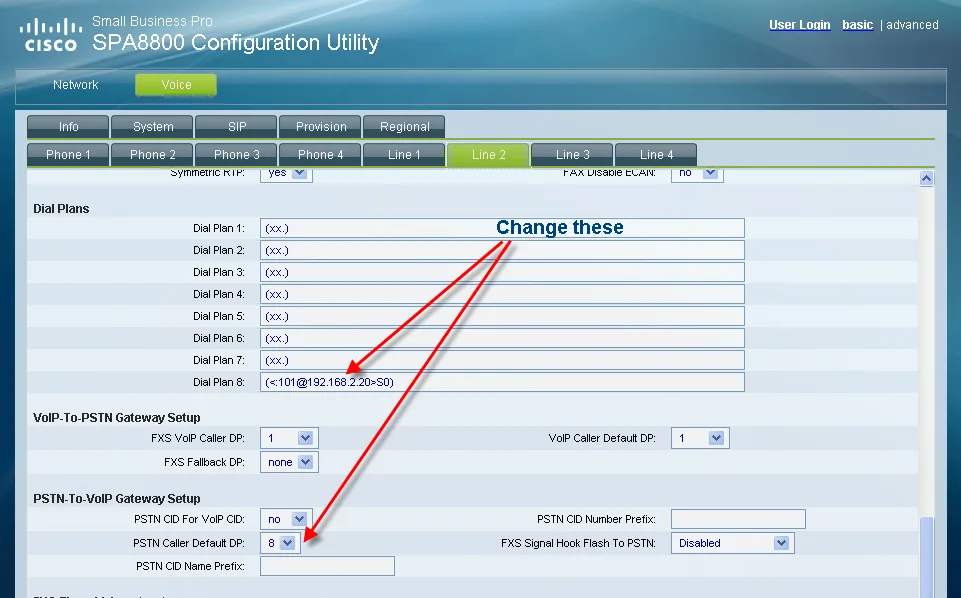
Screenshot: Application Note “Configuring the Cisco SPA8800 IP Telephony Gateway in an Asterisk Environment”, Cisco, 2009, p. 17. Cisco's example uses plan 8 and the server address after the number; for our PBX (S0<:700>) in any free plan is enough — without an address the number goes to the server in the Proxy field of the same line.
Click Submit All Changes. Different SPA8800 lines can go to different groups — each Line N tab has its own dial plan.
The gateway answers the landline before anyone on our side does: for the caller the call starts when the gateway answers, even if the group then does not pick up. Routing rules for provider numbers (schedule, voice menu) do not apply to calls from a gateway — the group is chosen by the number in the hotline, and time-based options and fallback live in the group itself, see “Where to send incoming calls”.
Caller ID. Leave PSTN CID For VoIP CID at the factory no: the call shows up in the panel as a call from the gateway's extension, and the landline caller's number is not visible. Where the gateway puts the number when set to yes is not stated in Cisco's documentation, and our PBX recognises its extension by the login in the From field — if the number ends up there instead of the login, the call will be rejected.
About outbound calls — honestly. Calling out of the PBX through this gateway's landline is not possible right now: the outbound rule only leads to a SIP provider line, and to the PBX the gateway is an extension. The gateway itself can do it (the VoIP-To-PSTN Gateway Setup section), but such outbound calls are not supported on the PBX side — do not configure them. Today the SPA3102/SPA8800 is a way to receive calls on a landline number; outbound calls go through a SIP provider number, see “Outbound calls through a gateway — not yet”.
Step 5. Check registration and a call#
- Registration on the gateway. Voice → Info → the PSTN Line Status section (SPA3102) or PSTN Line N Status (SPA8800): Registration State =
Registered. Line Voltage is there too — if it is0, the landline is not connected (or the cable is in PHONE instead of LINE). - Registration in the admin panel. The extension for this line on the “Staff & groups” tab should show a green dot.
- A call. Call the landline number from a mobile — once the gateway answers, the group or operator from step 4 should ring. Hang up on the mobile: the call on the operator's side must end within a few seconds. If it “hangs”, disconnect detection is not configured — see the next section.
- Audio — the
*43echo test. Registration says nothing about audio: it travels as a separate stream. Temporarily put(S0<:*43>)into your dial plan, click Submit All Changes and call the landline number: the PBX answers and starts playing your own voice back with a short delay. If you hear yourself, audio flows both ways. Afterwards put the group number back.
Everything about checking — in the overview, section “How to check”.
Tune the line for your country#
These gateways have no regional firmware: out of the box everything is set for the US network — 600 Ω line impedance, the American busy tone, the American caller ID format. On a line in any other country this step is mandatory: otherwise the gateway does not notice that the caller has hung up, and the group keeps ringing.
- Line impedance — FXO Port Impedance (the International Control section). Cisco's hint: USA —
600; Europe (UK, Germany, Netherlands, Sweden, Norway, Italy, Spain, Portugal, Poland, Denmark) and France —270+750||150nF; Australia —220+820||120nF; New Zealand —370+620||310nF. Russia, the CIS countries, Georgia and Turkey are not in the hint — ask your line operator for the value. Echo and hiss during a call are a sign of the wrong value. - Disconnect detection — the PSTN Disconnect Detection section. Detect CPC (loop current drop) and Detect Polarity Reversal are on from the factory — leave them. Detect Disconnect Tone is on too, but the Disconnect Tone itself is American:
480@-30,620@-30;4(.25/.25/1+2). Enter your country's busy tone in the same syntax (frequencies, level, tone and pause durations). The Administration Guide lists values for a number of European countries, Australia and New Zealand; for Russia and the CIS it does not — ask your operator for the parameters. The safety net is Detect Long Silence (on the SPA8800 — Detect PSTN Long Silence), on from the factory with a 30 s threshold: a call in complete silence ends by itself. - Caller number from the line — the Regional tab → Caller ID Method: factory
Bellcore (N.Amer, China); other options areDTMF (Finland, Sweden),DTMF (Denmark),ETSI DTMF,ETSI DTMF With PR,ETSI DTMF After Ring,ETSI FSK,ETSI FSK With PR (UK). The Russian “AON” (caller number requested via multi-frequency signalling) is not in the list. The gateway only gets the number in time if PSTN Answer Delay is longer than its delivery time (step 4).
Other line fields
- SPA To PSTN Gain / PSTN To SPA Gain — volume towards the line and from it (−15…+12 dB).
- Ring Frequency Min/Max, Ring Validation Time, Ring Threshold — ringing signal detection.
- Line-In-Use Voltage (40 V): below it the gateway assumes a parallel phone has taken the line.
- PSTN Dial Digit Len, PSTN Dialing Delay, PSTN Hook Flash Len (0.25 s) — dialing and flash towards the line.
- Fax — T.38 or G.711 (the SPA8800 has one T.38 session per pair of PHONE ports).
- Lifeline. When power is lost the SPA3102 connects PHONE directly to LINE — the phone works as an ordinary landline phone; the SPA8800 connects PHONE and LINE ports in fixed pairs for this case.
Factory reset#
A reset is needed if the web password is unknown, the gateway came from a provider or a previous owner, or the configuration is hopelessly tangled.
These gateways have no reset button (Cisco's documentation mentions none), and the documentation does not describe a reset item in the web interface either — only the voice menu via an analog phone:
- Phone in PHONE (SPA3102) or PHONE 1 (SPA8800 — the menu only works from this port), lift the handset, dial
****. - Dial
73738#(R-E-S-E-T) — full factory reset. The variant877778#resets only user settings (the provider's settings stay);732668#is just a reboot. - Press
1to confirm (*cancels), wait for “Option successful” and hang up — the gateway reboots.
The reset may be locked with the provider's password — then the menu asks for it. Letters are dialed with the keypad digits: A/B/C → 2 … W/X/Y/Z → 9, other characters → 0 (for example, phone@321 is dialed as 746630321). Without that password a provider-supplied gateway cannot be reset.
What gets erased: network settings, line accounts, the dial plan and country settings, the administrator password (empty again). The firmware stays as it was.
What to do afterwards: the network port takes an address via DHCP again (read it out again with **** → 110#), the web interface has no password; go through steps 1–5 and the country section again. Issue a new extension password — it is shown only once: Telephony → Staff & groups → “Reset password”. General notes on resetting gateways — in the overview.
If the gateway does not register#
- Account entered on the wrong tab. On the SPA3102 it belongs on PSTN Line, not Line 1 (that is the phone in the PHONE port); on the SPA8800 on Line N, not Phone N.
- Empty Proxy or Register = no. Without an address in Proxy the gateway does not register at all, even with Register =
yes. - Login not entered in full. User ID and Auth ID need the whole string
sip-…-<number>, with Use Auth ID =yes. - Submit All Changes not clicked — nothing is saved without it.
- SIP Transport = TLS or TCP — set
UDP. - Registered, but calls from the line do not arrive. The hotline is not set up, or the number in PSTN Caller Default DP does not match the plan number; Line Voltage =
0means the line is in the wrong port. Check that the number from the plan can be dialed from any PBX phone.
General causes (SIP ALG on the router, an outdated password, UDP 5060 blocked) — in the overview, section “If the gateway does not register”; about the network — “Venue network, NAT and SIM card”.
Models in the family#
| Model | Ports | Network and case | Status and firmware | Setup differences |
|---|---|---|---|---|
| SPA3102 | 1 × FXO (LINE) + 1 × FXS (PHONE), RJ-11 | 2 × RJ-45: INTERNET (to the venue network) and ETHERNET (LAN, the gateway hands out addresses, 192.168.0.1); built-in router |
end of sale 2014-09-23, support until 2019-09-30; last known firmware 5.2.13 (2012) | line — Voice → PSTN Line, phone — Voice → Line 1; two extensions if both ports are used |
| SPA8800 | 4 × FXO (LINE 1–4) + 4 × FXS (PHONE 1–4), RJ-11 + shared RJ-21 | RJ-45 ETHERNET (to the network) + AUX (configuration only, 192.168.0.1); 12 V 3 A power |
end of sale 2019-03-15, support until 2024-03-31, no replacement; firmware 6.1.7 (2009), 6.1.11 (2013) | lines — Voice → Line 1–4, phones — Phone 1–4; voice menu only from PHONE 1 |
| SPA8800-XU | as SPA8800 | as SPA8800 | as SPA8800; firmware 6.1.11(XU) | SRTP removed from the firmware — irrelevant for our PBX |
The SPA3102 came in regional variants (-NA, -EU, -UK, -AU and others) — Cisco's documentation describes no setup differences between them; the country is set with the fields from “Tune the line for your country”.
Related models and what to buy instead
SPA8000 (8 × FXS), SPA2102, PAP2T, SPA112/SPA122 and ATA 191/192 only have ports for analog phones and cannot connect a landline; their setup is in Cisco — phones and ATAs. There is no FXO gateway left in Cisco's small-business line: Cisco named the SPA122 as the SPA3102's replacement, but it has no FXO. The whole Cisco Small Business Voice Gateways and ATAs series reached end of support on 2025-05-31.
For a new site with landline numbers, take Grandstream HT841/HT881 or Yeastar TA FXO. And if the landline number can be ported to a SIP provider, that is more reliable and cheaper than any gateway: “Connecting a provider number”.
FAQ#
The gateway is discontinued — is it worth connecting?#
If it is already installed — yes: registering the line as an extension and incoming calls to a group work, and setup takes about fifteen minutes. Be sure to lock the gateway down with Restrict Source IP and the hotline (steps 3–4) and set an administrator password: these firmwares will not get security updates any more. Buying one for a new site is not worth it.
How many extensions does an SPA8800 need?#
One per connected landline (tabs Line 1–4) — up to four. If analog phones are plugged into the PHONE ports and should work in the PBX too, each of them needs its own extension on the Phone N tab.
Can I call out through the landline via the PBX?#
Not yet. Through this gateway our PBX can only receive calls from the line; outbound calls go through a SIP provider number. More — “Outbound calls through a gateway — not yet”.
The call arrives but does not end when the guest hangs up#
Disconnect detection is not set for your country: the factory busy tone is American. Go through “Tune the line for your country”: FXO Port Impedance and your operator's Disconnect Tone.
Why does the caller hear ringing for so long?#
The factory PSTN Answer Delay is 16 seconds: that is how long the gateway waits before answering a call from the line. Lower it to ~5 seconds (step 4).
Why is there no G.722 in the codec list?#
No model in the family has it — calls run in G.711. For a landline that is exactly the quality the line itself delivers.
Sources#
Cisco documentation; the originals have been removed from cisco.com, so the links point to Internet Archive copies and Cisco Community attachments. Accessed 2026-09-10.
- Cisco Small Business Analog Telephone Adapters Administration Guide (PAP2T, SPA2102, SPA3102, SPA8000, SPA8800), 2012 — no default passwords, voice menu, PSTN Line and Line pages, Restrict Source IP, dial plan and hotline, PSTN Answer Delay, impedance, Disconnect Tone, Caller ID Method, one- and two-stage dialing.
- Voice Gateway with Router SPA3102 — Quick Installation — ports,
192.168.0.1/advanced, voice menu table (110, 201, 7932, 73738, 877778, 732668), entering a password with digits. Source of the SPA3102 screenshot on this page. - Cisco Small Business Pro SPA8800 IP Telephony Gateway — Quick Start Guide — AUX port, voice menu only from PHONE 1, reset.
- Application Note: Configuring the Cisco SPA8800 IP Telephony Gateway in an Asterisk Environment, 2009 — Line N tabs,
/admin/advanced, dial plan with a hotline and PSTN Caller Default DP, Line Voltage on the Info page. Source of the SPA8800 screenshots on this page. - Data Sheet: Cisco SPA8800 IP Telephony Gateway with 4 FXS and 4 FXO Ports — interfaces, codecs, power, password-protected reset.
- End-of-Sale and End-of-Life Announcement for the Cisco SPA3102 — end-of-life dates, regional variants, SPA122 as replacement.
- End-of-Sale and End-of-Life Announcement for the Cisco SPA8000 and SPA8800 — end-of-life dates, SPA8800-XU, no replacement.
- Release Notes for Cisco SPA3102 Firmware 5.2.13 and Release Notes SPA8800 Firmware 6.1.11(XU) — latest firmwares, SRTP in XU.
- Cisco Small Business Voice Gateways and ATAs — series page — end of support for the series on 2025-05-31.