AudioCodes MediaPack FXO and Mediant BRI/PRI — setup for our PBX
AudioCodes is an Israeli maker of enterprise VoIP gateways, installed by integrators and telecom operators. Two branches matter for a venue. The first is the analogue MediaPack for one to eight landlines (FXO ports): the current MP-508 and the discontinued but still common MP-114 and MP-118. The second is Mediant: a gateway and a session border controller in one box, for when the line from the operator is ISDN — Mediant 500Li (BRI), Mediant 500 and Mediant 800 (E1/T1 PRI trunk; the 800 also has BRI and FXO). For a single analogue line there are simpler and cheaper gateways — see the family table in the overview.
To our PBX the gateway is just another extension: it registers on the PBX server and, when someone calls the line, dials a ring group or an operator by itself. What is the same for all gateways (credentials, where to send incoming calls, network, limitations) is in the overview “GSM gateways and landlines”. This page is the step-by-step guide for AudioCodes, with screens from the manufacturer's documentation.
AudioCodes has two firmware generations with different menus and addresses — guides found online are often written for the other one:
| MP-114, MP-118 (firmware 6.6) | MP-508, Mediant 500 / 500Li / 800 (firmware 7.x) | |
|---|---|---|
| Menu | Configuration tab on the left | Setup menu at the top |
| Apply changes | Submit button on the page | Apply button on the page |
| Save to flash memory | Burn button on the toolbar | Save button on the toolbar |
Without saving to flash memory, the settings are lost at the next reboot. Menu paths below are given for both generations.
What you need#
- Extension credentials from the admin panel: Telephony → Staff & groups → create an operator for the gateway (for example, “AudioCodes gateway, landline”) → “Reset password” → the “Extension credentials” window: SIP server, Extension number, Login, Password, Port
5060, TransportUDP. The password is shown once — copy it into the gateway right away. Details — “Extension credentials for the gateway”. - How many extensions: one for the whole gateway. AudioCodes registers the gateway as a whole (Per Gateway mode — according to the manufacturer's documentation “typically used for FXO interfaces”) and sends calls from all lines through that account.
- The number the gateway will send incoming calls to: a ring group number (Telephony → “Ring groups”, numbers from 700) or an operator's extension number.
- A line: an analogue landline in an FXO port (RJ-11), or an ISDN line from the operator's equipment in a BRI or E1/T1 port.
- A network cable, a computer with a browser and a mobile phone to call the line.
Step 1. Find the gateway's IP address#
AudioCodes gateways have a factory address that you can reach by connecting a laptop directly:
| Models | Factory address | How to connect |
|---|---|---|
| MP-114, MP-118 (6.6) | 10.1.10.10 (mask 255.255.0.0); the FXO-only model (MP114/4O) — 10.1.10.11 |
give the laptop an address from 10.1.x.x with mask 255.255.0.0 and cable it to the gateway |
| MP-508 (7.2) | LAN port (S1 / GE LAN) — 192.168.0.1 |
a laptop in the LAN port gets an address automatically: the gateway hands out addresses via DHCP. The WAN port (S0 / WAN) takes an address from the router via DHCP |
| Mediant 500Li (7.2) | LAN port — 192.168.0.1 |
as with the MP-508: address via DHCP from the gateway |
| Mediant 500, Mediant 800, Mediant 500L | 192.168.0.2 (mask 255.255.255.0) |
give the laptop an address from 192.168.0.x; on the Mediant 800 the cable goes into port GE 1 |
| Mediant 1000 | not stated in the documents this page is based on | check with your supplier |
On the MP-114 and MP-118 the address is static; DHCP is off by default. If the gateway is already on the network and the address is unknown:
- Voice menu (only if the gateway has an FXS port): connect an ordinary phone to the FXS port, lift the handset, dial
***12345, wait for the voice prompt and press1#— the gateway reads out its IP address. The FXO-only model (MP114/4O) has no voice menu; it is also disabled automatically once theAdminpassword is changed. - The AcBootP utility from AudioCodes assigns an address by the MAC address from the label on the bottom of the case.
- Console port — in the block below.
On the MP-508 and Mediant 500Li the web interface is closed on the WAN side by default: configure them from the LAN port or enable remote access to WAN in the gateway settings.
MP-114 / MP-118: RS-232 console
9600 bit/s, 8N1. Log in with Admin / Admin, then CONF → GCP IP — show the address; SCP IP <address> <mask> <gateway> — set a new one; SAR — save and reboot.
Step 2. Log in to the web interface#
Open http://<gateway address> in a browser.
| What | All models |
|---|---|
| Login | Admin — capital A, case-sensitive (admin will not work) |
| Password | Admin — also case-sensitive |
| Second factory user | User / User — read-only, but can see SIP server addresses |
Change both passwords right away. AudioCodes warns that the User account can see SIP settings that a stranger could use to make calls at your expense. These gateways do not force a password change at first login — you have to do it yourself:
- 7.x: Setup → Administration → Web & CLI → Local Users → Password field → Apply → Save;
- 6.6: Configuration → System → Web User Accounts → Submit → Burn.
Then give the gateway an address in the venue's network (or keep DHCP on the MP-508's WAN port) so it reaches the internet through the router.
Step 3. Enter the PBX credentials#
The gateway registers on the PBX as a whole — one account for all ports. The server address goes into Proxy Set 0, the login and password into the Proxy & Registration page.
3.1. PBX address — Proxy Set 0.
- 6.6: Configuration → VoIP → Control Network → Proxy Sets Table;
- 7.x: Setup → Signaling & Media → Core Entities → Proxy Sets → first row → Proxy Address link.
Proxy Set ID = 0, in the first Proxy Address row — <SIP server>:5060, Transport Type — UDP.
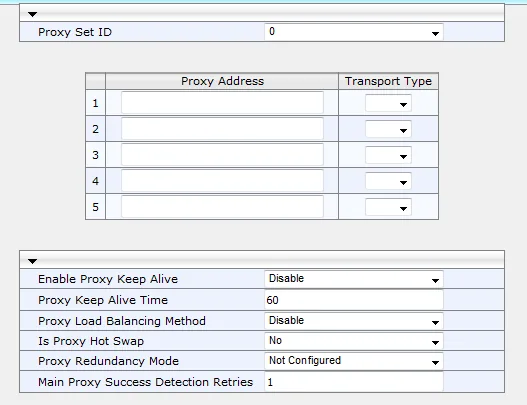 Screenshot: MP-11x & MP-124 SIP User's Manual, Ver. 6.6 (LTRT-65456), fig. 16-1, p. 205.
3.2. Registration — Proxy & Registration.
- 6.6: Configuration → VoIP → SIP Definitions → Proxy & Registration;
- 7.x: Setup → Signaling & Media → SIP Definitions → Proxy & Registration.
| Field | Value |
|---|---|
| Use Default Proxy | Yes (in the 7.x screenshot below this option is called Use Proxy): calls from the lines go to the address in Proxy Set 0, no separate routing rules are needed |
| Proxy Name | SIP server |
| Enable Registration | Enable (factory value — Disable) |
| Registrar Name | SIP server |
| Gateway Name | SIP server — the gateway puts it into the “From” address |
| User Name | the whole Login sip-…-<number> |
| Password | Password. The factory value is Default_Passwd — a forgotten field means a rejected registration |
| Registration Mode (Authentication Mode in 7.x) | Per Gateway — the factory value, keep it |
| Registration Time | 180 s — the factory value is fine |
Click Submit / Apply, then Burn / Save. In firmware 6.6 the Register button on the same page sends the registration immediately, without waiting for a reboot.
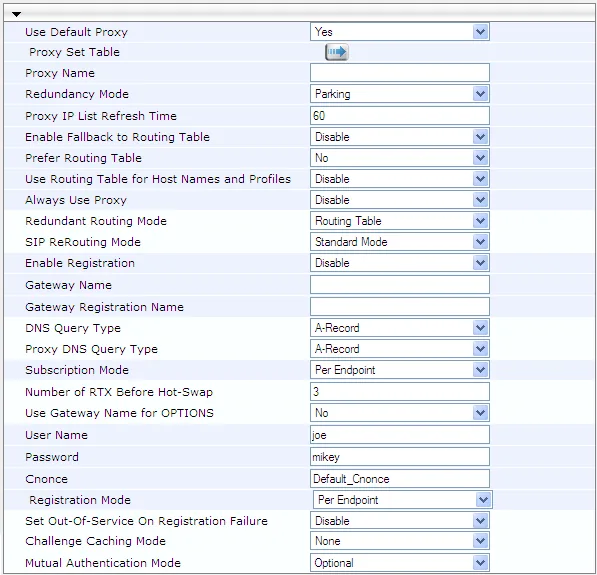 Screenshot: MP-11x & MP-124 SIP User's Manual, Ver. 6.6 (LTRT-65456), p. 212. Field values are the manufacturer's example; for our PBX Registration Mode is
 Per Gateway.
In firmware 7.x (MP-508, Mediant) the same fields are grouped into GENERAL, GATEWAY PROXY, AUTHENTICATION and REGISTRATION blocks:
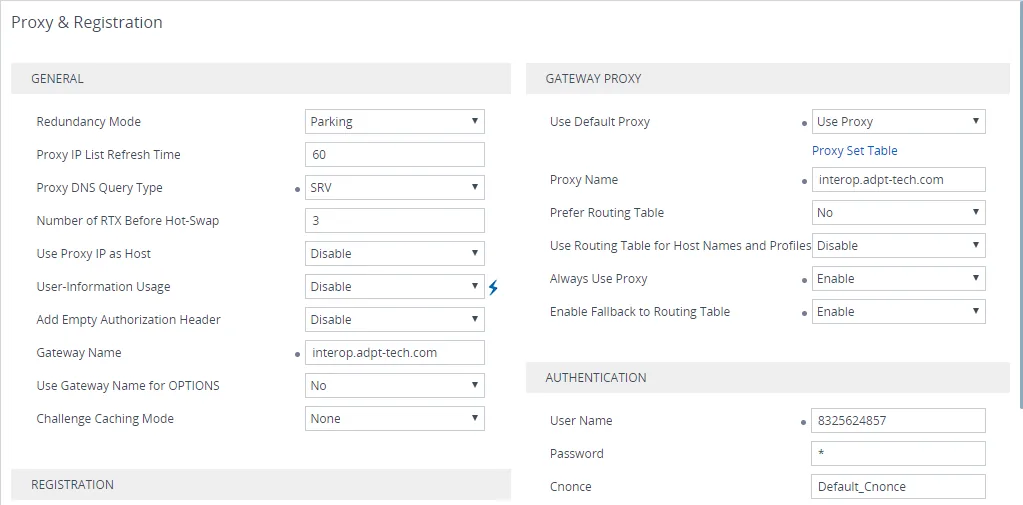 Screenshot: Mediant BRI/PRI Media Gateways — BroadCloud SIP Trunk Quick Setup Guide (LTRT-12394, Ver. 7.2), fig. 5-6, p. 17. Values are the manufacturer's example for another operator.
3.3. Enable the ports. A port without a number is disabled — “the line is there, but no calls”.
- 6.6: Configuration → VoIP → GW and IP to IP → Hunt Group → Endpoint Phone Number — in a row enter the channels (for example,
1-4), Phone Number (for example,200: the ports get numbers 200, 201, 202, 203) and Hunt Group ID1. - 7.x: Setup → Signaling & Media → Gateway → Trunks & Groups → Trunk Groups — Module, Channels, Phone Number and Trunk Group ID the same way. The manufacturer advises against Trunk Group ID
0.
These port numbers are internal to the gateway; you will need them in step 4.
| In the admin panel (“Extension credentials”) | Where in the AudioCodes gateway |
|---|---|
| SIP server | Proxy Set 0 → Proxy Address; Proxy Name, Registrar Name, Gateway Name — the same address |
Login sip-…-<number> |
User Name on Proxy & Registration and Prefix to Add from step 4 — the whole string |
| Password | Password on Proxy & Registration |
Port 5060 |
:5060 in Proxy Address |
Transport UDP |
Transport Type = UDP in the Proxy Set (TCP is accepted too; we have no TLS) |
| Extension number | not entered — just remember which extension the gateway occupies |
Codecs, DTMF, NAT
- Codecs — 6.6: Configuration → VoIP → Coders and Profiles → Coders; 7.x: Setup → Signaling & Media → Coders & Profiles → Coder Groups. Put
G.711 A-law(g711Alaw64k) first andG.711 µ-lawsecond. The factory set is American — µ-law and G.729 first; our PBX has no G.729, so remove it or move it last. On the MP-114/MP-118, G.722 is only available in a separate DSP template that takes away channels (the MP-114 keeps 3 of 4, the MP-118 6 of 8) — G.711 is enough for us. - DTMF — leave it alone: the default is
RFC 2833 Relay DTMF. - NAT — a gateway behind the venue's router works without port forwarding: it re-registers by itself (at half the Registration Time) and keeps the connection open that way. Turn off SIP ALG on the router.
Different lines as different extensions (Accounts table)
If each line should arrive in the PBX as its own extension, AudioCodes offers the Accounts table (7.x: Setup → Signaling & Media → SIP Definitions → Accounts; 6.6: SIP Definitions → Account Table): one row per port group — Served Trunk Group (or Hunt Group) = the line's port group, Username / Password = the credentials of its extension, Host Name = SIP server, Register = Yes, Contact User = the same login. For that port group, set Registration Mode = Per Account in Trunk Group Settings (6.6 — Hunt Group Settings). For one number on all lines you do not need this.
Step 4. Send incoming calls to the PBX#
4.1. Analogue line (FXO): Automatic Dialing. A landline has no destination number, so the number the gateway dials in the PBX is set for each FXO port:
- 6.6: Configuration → VoIP → GW and IP to IP → Analog Gateway → Automatic Dialing;
- 7.x: Setup → Signaling & Media → Gateway → Analog Gateway → Automatic Dialing → the port's row → Edit.
In the row of each FXO port: Destination Phone Number = the ring group number (from 700) or an operator's extension number; Auto Dial Status = Enable. In this mode the gateway calls the PBX as soon as it hears ringing on the line and seizes the line itself only once the PBX answers: until the group picks up, the caller hears ordinary ringback. Do not use Hotline mode — in it the gateway picks up by itself and waits for the caller to dial an extension.
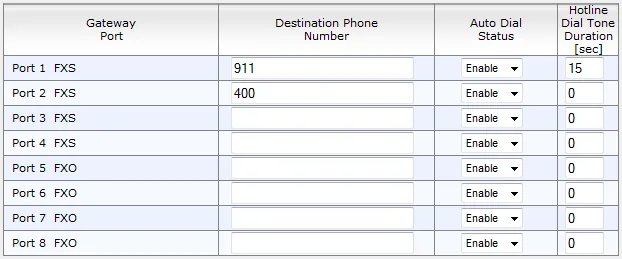 Screenshot: MP-11x & MP-124 SIP User's Manual, Ver. 6.6 (LTRT-65456), fig. 25-5, p. 307. In the manufacturer's example the numbers are set on FXS ports; for our PBX the ring group number goes into the FXO port rows.
4.2. The login in the “From” field. Our PBX recognises the extension by the login in the call's From field. AudioCodes, however, puts the caller's number there — and on an FXO line where caller ID detection is off (the factory setting: Enable Caller ID = off), the port number from step 3.3. Without a fix, registration will be green while incoming calls are rejected. Replace the number with the login using a number manipulation rule:
- 6.6: Configuration → VoIP → GW and IP to IP → Manipulations → Source Number Tel->IP → Add;
- 7.x: Setup → Signaling & Media → Gateway → Manipulation → Source Number Tel->IP → New.
| Rule field | Value |
|---|---|
| Source Prefix (Rule / Match tab) | * — any number |
| Stripped Digits From Left (Action tab) | how many digits the port numbers have: for numbers 200–203 — 3 |
| Prefix to Add | the whole Login sip-…-<number> — per the documentation the field accepts “number or string” |
The gateway first strips digits from the left, then adds the prefix — exactly the login is left of the port number. Keep Enable Caller ID off on the FXO ports, otherwise a subscriber's number of a different length will come instead of the port number.
4.3. ISDN (Mediant 500Li, 500, 800). An ISDN line delivers the dialled number (MSN on BRI, DDI on PRI), but our PBX does not know such numbers on a gateway extension. A Dest Number Tel->IP rule (in the same Manipulation folder) rewrites it into the group number: Destination Prefix = the number the operator sends, Stripped Digits From Left = its length, Prefix to Add = the ring group number. For several numbers, one rule per number — this way different numbers can go to different groups. The login in the From field is set differently on ISDN, because the caller's number from the operator varies in length — see the “ISDN” block below.
Caller's number. With this setup the call shows in the operator panel as coming from the gateway's extension; the subscriber's number is not shown. Routing rules for provider numbers (schedule, voice menu) do not apply to calls from the gateway — a ring group with its time-based options does the same job (see “Where to send incoming calls”).
Outgoing calls. Calling out from the PBX through this gateway's lines is not possible yet: the PBX's outgoing rule only leads to a SIP provider line. AudioCodes itself can do it (IP → Tel rules into a port group), but do not set that part up for our PBX. For outgoing calls from your own number, use a SIP provider — more in “Outgoing calls through a gateway — not yet”.
FXO lines: country profile, tones and disconnect
AudioCodes' factory settings are American — outside the US they need to be changed, otherwise the gateway may not notice that the caller hung up, and the call will “hang” at the operator.
- Line profile — FXO Coefficient Type on the Analog Settings page (6.6: Configuration → VoIP → Media → Analog Settings; 7.x: Setup → Signaling & Media → Gateway → Analog Gateway → Analog Settings): factory
USA, the other option isEurope(TBR21 standard). For Russia, the CIS and Europe chooseEurope; takes effect after a reboot with save. - Tones — the factory tone file (CPT) is American. The gateway detects disconnect by the busy tone of its country, so load your country's tone file (6.6: Maintenance → Software Update → Load Auxiliary Files; 7.x: Setup → Administration → Maintenance → Auxiliary Files).
- Disconnect by polarity reversal or current loss — the manufacturer calls it the best method; the
EnableReversalPolarityandEnableCurrentDisconnectparameters are off from the factory. Enable them if the operator provides such a signal on the line. - Caller ID detection on FXO is off from the factory, the default standard is
Bellcore;ETSIis available for Europe. The Russian caller ID format is not mentioned in AudioCodes' documents. - Guard Time Between Calls (1 s) protects against a false disconnect between calls.
ISDN: port, protocol and the login in the “From” field
- Port — Setup → Signaling & Media → Gateway → Trunks & Groups → Trunks: Protocol Type (for example,
BRI EURO ISDN,E1 EURO ISDN) — as the operator uses; ISDN Termination Side =User side(towards the operator's line); on PRI Clock Master =Recovered(clock from the operator's line) and Framing — as the operator tells you. The port's channels are enabled in Trunk Groups the same way as in step 3.3. - Login in the
Fromfield — with a SIP message rule (firmware 7.x):- Setup → Signaling & Media → Message Manipulation → Message Manipulations → New: Manipulation Set ID
1, Message TypeInvite.Request, Action Subjectheader.from.url.user, Action TypeModify, Action Value'<Login>'(the login in single quotes). - Setup → Signaling & Media → Core Entities → IP Groups → New: type Server, Proxy Set — the one with the PBX address, Outbound Message Manipulation Set =
1. - In the Tel-to-IP Routing table (Gateway → Routing folder) — a rule: calls from the ISDN port group → to this IP Group; on the Proxy & Registration page — Prefer Routing Table =
Yes, so the gateway checks the routing table first.
- Setup → Signaling & Media → Message Manipulation → Message Manipulations → New: Manipulation Set ID
Step 5. Check registration and a call#
- Registration in the gateway. 6.6: Status & Diagnostics → VoIP Status → Registration Status — the Registered Per Gateway row should say
YES. 7.x: Monitor → Monitor → VoIP Status → Registration Status. - Registration in the admin panel. Telephony → the “Staff & groups” tab — the gateway's extension has a green dot.
- A call. Call the landline number from a mobile — the group's operators (or the operator) from Destination Phone Number / the Dest Number Tel->IP rule should ring. Hang up — the call at the operator should end within seconds; if it hangs, see “FXO lines” in step 4.
- Sound — the
*43echo test. Registration says nothing about sound. Temporarily put*43into the port's Destination Phone Number (on ISDN — into Prefix to Add of the Dest Number Tel->IP rule) and call the line: the PBX plays a short beep, then plays your voice back with a delay — talk for about ten seconds. If you hear the beep and yourself, sound works both ways; beep but no voice — sound is not getting from the gateway to the PBX; no beep at all — sound is not getting from the PBX to the gateway. The test result is shown in the call log. After the check, put the group number back and save (Burn / Save).
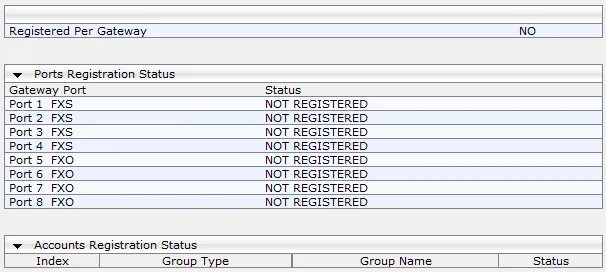 Screenshot: MP-11x & MP-124 SIP User's Manual, Ver. 6.6 (LTRT-65456), fig. 36-5, p. 419. In the screenshot the gateway is not registered yet (
NO); after step 3 the Registered Per Gateway row should turn YES.
Everything about checking is in the overview, section “How to check”.
Factory reset#
A reset is needed if the password or address is forgotten, the gateway came with someone else's configuration, or it does not boot. Before resetting a working gateway, save its configuration to a file (6.6: Maintenance → Software Update → Configuration File; 7.x: Setup → Administration → Maintenance → Configuration File → Save INI File). The manufacturer warns: a reset erases the entire configuration.
With the Reset button (recessed, pressed with a paper clip):
| Model | How |
|---|---|
| MP-114, MP-118 | disconnect the network cable, hold Reset for about 6 seconds — the red Fail LED lights up; when it goes out, reconnect the cable |
| MP-508 | hold for 15–25 seconds (the quick guide says “at least 12”, the 7.2 manual — “at least 15 and no more than 25”; 15–25 s satisfies both) |
| Mediant 500, 500Li, 800 | hold for 15–25 seconds |
Do not hold longer than 25 seconds.
From the web interface.
- 7.x: Setup → Administration → Maintenance → Configuration File (or the Actions menu → Configuration File) → Restore Defaults → OK, then reboot the gateway. In the console —
enable→write factory. - 6.6: load an empty ini file on the Configuration File page. ⚠️ This resets everything except the management address and the web interface login/password — a forgotten password cannot be recovered this way, only with the button or from the console (
conf→RestoreFactorySettings).
What to do afterwards: the gateway returns to the factory address from step 1 (MP-114/118 — 10.1.10.10 or .11, MP-508 and Mediant 500Li — 192.168.0.1 on LAN, Mediant 500/800 — 192.168.0.2) and accepts Admin / Admin. Start from step 1, change the Admin and User passwords right away, and set up the Proxy Set, Proxy & Registration, port numbers, Automatic Dialing and the manipulation rule again, and choose the line profile and tones. A gateway reset does not change the extension's login and password in the admin panel; if the extension password was not kept, issue a new one with the “Reset password” button. General notes on resetting gateways — in the overview.
If the gateway does not register#
- Settings disappeared after a reboot. You clicked Submit / Apply but not Burn / Save — the changes lived only in RAM. Some parameters (the gateway address, the FXO line profile, the DSP template) also need a reboot with save.
- Registration is off or the password is the factory one. Enable Registration is
Disablefrom the factory, and Password holdsDefault_Passwd. Check both fields and that User Name holds the whole loginsip-…-<number>. - The server address is in the wrong place. The PBX address must be in Proxy Set 0 with port
5060and transportUDP, and Use Default Proxy must beYes. - Registration is green but incoming calls are rejected. A number rather than the login goes into the “From” field: the Source Number Tel->IP rule from step 4.2 is missing, the number of stripped digits does not match the length of the port numbers, or caller ID detection is on for FXO. On ISDN — the Message Manipulations rule is missing.
- The line is there, but no calls. The port has no number in Endpoint Phone Number / Trunk Groups (such a port is disabled), or Destination Phone Number in Automatic Dialing is empty. Check that the group number can be dialled from any PBX phone.
- Cannot log in to the web interface. The login and password are case-sensitive —
Admin, notadmin. On the MP-508 and Mediant 500Li the web interface is closed on the WAN port by default — connect from the LAN port.
General causes (SIP ALG on the router, UDP 5060 blocked) — in the overview, section “If the gateway does not register”; about the network — “Venue network, NAT and SIM card”.
Models in the family#
The part number encodes the ports: S — FXS (for phones), O — FXO (for landlines). MP114/2S/2O/SIP — 2 FXS + 2 FXO.
| Model | Ports / channels | Network / line | Setup differences |
|---|---|---|---|
MP-508 (MP508/4S4O, /2S2O, /4O) |
up to 4 FXO + 4 FXS, up to 8 channels; Gigabit WAN and LAN | landline | firmware 7.2, Setup menu; LAN 192.168.0.1 with DHCP; reset 15–25 s; FXO is a separately ordered board. Replaces the discontinued MP-114 FXO and Mediant 500L FXO |
MP-114 FXO (MP114/4O, MP114/2S/2O) |
4 FXO or 2 FXS + 2 FXO, 4 channels; 10/100 Ethernet | landline | discontinued (since 01.04.2025); firmware 6.6, Configuration tab, Burn; 10.1.10.10 or .11; reset ~6 s without the cable; on power loss the line switches to an analogue phone. Units of revision HW Ver: 0x7 (from 12.2018) accept only firmware 6.60A.349.003 and newer |
| MP-118 | 8 ports: FXO, FXS or 4 + 4 | landline | as MP-114; listed in the MediaPack 1xx line on the AudioCodes website, and the end-of-sale notice does not name it — check availability with your supplier |
Mediant 500Li (M500L-i2B, M500L-i4B) |
2 or 4 BRI + FXS/FXO, up to 8 channels | ISDN BRI | all-in-one router (WAN GE/SFP/xDSL/LTE); LAN 192.168.0.1; protocol BRI EURO ISDN; replaces the Mediant 500L |
| Mediant 500 | 1 E1/T1, up to 30 channels; 4 GE | ISDN PRI (EuroISDN, NI-2 and others), CAS | 192.168.0.2; reset 15–25 s |
| Mediant 800 (800B / 800C) | up to 4 E1/T1, 4 or 8 BRI, 4 FXS/FXO; up to 124 channels | PRI · BRI · landline | 192.168.0.2, cable into GE 1; reset 15–25 s |
| Mediant 1000 | 6 slots, up to 6 E1 / 8 T1, up to 192 channels | ISDN PRI | FXO, FXS and BRI modules discontinued (2023) — for FXO and BRI lines the manufacturer points to other Mediant models (the notice names 800, 500, 500L); check the factory address with your supplier |
| Mediant 500L | up to 4 BRI, 4 FXS, 4 FXO | BRI · landline | discontinued (2024–2025); set up like the Mediant 800, 192.168.0.2 |
| MP-516 | 16 ports | — | the datasheet mentions an 8 FXS + 8 FXO assembly, while the 7.2 manual says only the MP-508 supports FXO — check with your supplier before ordering |
| MP-112, MP-124, MP-1288, MP-502/504/524/532 | FXS only | analogue phones | do not connect landlines; phones on FXS are extensions, see “SIP phone setup”. The MP-112 and MP-124 are discontinued |
For analogue lines choose the MP-508, for ISDN BRI — the Mediant 500Li, for an E1/T1 trunk — the Mediant 500 or 800. Do not buy a new MP-114 FXO, MP-124, MP-112 or Mediant 500L: they are discontinued, and their firmware is released only under general service.
FAQ#
Can I call out from the PBX through this gateway with the landline number?#
Not yet — with us the gateway handles incoming calls only. AudioCodes itself can do outgoing calls (an IP → Tel route into a port group with selection of a free line), but our PBX does not yet send calls to a gateway extension as if it were a line. For outgoing calls from your own number, use a SIP provider.
How many extensions does a gateway with 4 or 8 lines need?#
One: in Per Gateway mode the gateway registers one account and sends calls from all lines through it. If you need to tell the lines apart in the PBX — the Accounts table (block in step 3), one extension per port group.
Why is registration green but calls from the line are not accepted?#
AudioCodes puts a number (the caller's or the port's) into the “From” field, while our PBX recognises the extension by the login. You need the Source Number Tel->IP rule from step 4.2 (on ISDN — Message Manipulations) that replaces the number with the login.
Why is the caller's number not shown in the panel?#
For the PBX to recognise the call as coming from the extension, the gateway's login goes into the “From” field. The PBX does not show the subscriber's number yet — the call shows as coming from the gateway's extension.
Which line profile should I use in Russia or Europe?#
FXO Coefficient Type = Europe (TBR21 standard; the only other option is USA), your country's tones instead of the factory American ones and, if the operator provides it, disconnect by polarity reversal. Without this the gateway may not notice the caller hanging up (see “FXO lines” in step 4).
I have ISDN with several numbers — can I route them to different groups?#
Yes: one Dest Number Tel->IP rule for each number the operator sends, with its group number in Prefix to Add (step 4.3).
Sources#
AudioCodes documents, accessed 10.09.2026:
- MP-11x & MP-124 SIP User's Manual, Ver. 6.6 (LTRT-65456) — https://www.audiocodes.com/media/13280/mp-11x-and-mp-124-sip-users-manual-ver-66.pdf
- MediaPack 11x Series Hardware Installation Manual (Ver. 6.6) — https://www.audiocodes.com/media/12706/ltrt-59825-mp-11x-sip-hardware-installation-manual.pdf
- MediaPack MP-11x/MP-124 Analog Gateways Datasheet — https://www.audiocodes.com/media/2373/mp-1xx-and-mp-124-datasheet.pdf
- MediaPack 5xx (MP-5xx) User's Manual, Ver. 7.2 (LTRT-14217, 18.06.2026) — https://www.audiocodes.com/media/ekzfkzh0/mediapack-5xx-users-manual-ver-72.pdf
- MediaPack 504-508 (MP-5xx) Voice Gateway Quick Guide (LTRT-14230, 26.10.2023) — https://www.audiocodes.com/media/bgtj3cvx/mediapack-504-508-mp-5xx-voice-gateway-quick-guide.pdf
- MediaPack 504-508 Hardware Installation Manual (09.07.2025) — https://www.audiocodes.com/media/mqximvou/mediapack-504-508-mp-5xx-hardware-installation-manual.pdf
- MediaPack 5xx Series Datasheet — https://www.audiocodes.com/media/5oqem5ch/mediapack-5xx-mp-5xx-series-analog-voip-gateways-datasheet.pdf
- Mediant BRI/PRI Media Gateways — BroadCloud SIP Trunk Quick Setup Guide, Ver. 7.2 (LTRT-12394) — https://www.audiocodes.com/media/13684/mediant-bri-or-pri-gateway-for-broadcloud-sip-trunk-quick-setup-guide.pdf
- Mediant 800 Gateway & E-SBC User's Manual, Ver. 7.6 (04.08.2026) — https://www.audiocodes.com/media/ub4baqam/mediant-800-gateway-e-sbc-users-manual-ver-76.pdf
- Mediant 800 Gateway & E-SBC Quick Guide — https://www.audiocodes.com/media/13726/mediant-800-gateway-e-sbc-quick-guide.pdf
- Mediant 500 Gateway & E-SBC Quick Guide — https://www.audiocodes.com/media/13266/mediant-500-gateway-e-sbc-quick-guide.pdf
- Mediant 500Li MSBR User's Manual, Ver. 7.2 (18.06.2026) — https://www.audiocodes.com/media/15478/mediant-500li-msbr-users-manual-ver-72.pdf
- Mediant 500L Gateway & E-SBC User's Manual, Ver. 7.2 — https://www.audiocodes.com/media/13226/mediant-500l-gateway-and-e-sbc-users-manual-ver-72.pdf
- Mediant 1000 Hybrid E-SBC and Media Gateway Datasheet — https://www.audiocodes.com/media/2418/mediant-1000-hybrid-e-sbc-and-media-gateway-datasheet.pdf
- Product Notice #0546 — End-of-Sale for MediaPack 124, 112 and 114 FXO (10.10.2024) — https://www.audiocodes.com/media/phrjb5se/0546-product-notice-end-of-sale-for-mediapack-124-mediapack-112-and-mediapack-114-fxo.pdf
- Product Notice #0342 — Hardware Change for MediaPack MP-112 and MP-114 (12.2018) — https://www.audiocodes.com/media/13544/0342-product-notice-hardware-change-for-sip-mp-112-and-mp-114.pdf
- Product Notice #0519 — End-of-Product-Sale for Mediant 500L Gateway and MSBR (01.12.2023) — https://www.audiocodes.com/media/i1obwmr2/0519-product-notice-end-of-product-sale-for-mediant-500l-gateway-msbr.pdf
- Product Notice #0490 — End-of-Sale for Mediant 1000B FXS, FXO and BRI Modules (10.01.2023) — https://www.audiocodes.com/media/h05itsxy/0490-product-notice-end-of-sale-for-mediant-1000b-fxs-fxo-and-bri-modules.pdf
- ISDN and Analog Media Gateways — product line page — https://www.audiocodes.com/products/isdn-and-analog-media-gateways