Synway SMG (GSM/LTE, FXO/FXS, E1) — setup for our PBX
Synway SMG is a line of gateways from the Chinese manufacturer Synway, with the same web interface on three platforms. The wireless SMG4004/4008/4016/4032 take 4–32 SIM cards (GSM, 3G or LTE, depending on the module chosen when ordering): an option for a café, salon or delivery service whose main number is a mobile one. The analogue SMG1000-D4O/D8O/D16O/D32O connect 4–32 landlines (FXO ports), and the hybrid D2S2O…D16S16O also connect old analogue phones. The digital SMG2000/SMG3000 work with E1/T1 trunks (ISDN PRI, SS7) — that is operator and call-centre class, and a venue will hardly need it.
To our PBX the gateway is just another extension: the whole gateway (more precisely, a group of its ports) or each port registers on the PBX server, and the gateway itself dials an incoming call on a SIM or a line through to a ring group or an operator. What is the same for all gateways (credentials, where to send incoming calls, network, limitations) is in the overview “GSM gateways and landlines”. This page is the step-by-step guide for Synway, with screenshots from the manufacturer's manual. The steps are written for the wireless SMG4000 series; the analogue SMG1000-D has the same menus, and its differences are given right in the steps. The digital gateways get a separate block in step 3.
What you need#
- Extension credentials from the admin panel: Telephony → Staff & groups → create an operator for the gateway (for example, “GSM gateway, Vodafone SIM”) → “Reset password” → the “Extension credentials” window: SIP server, Extension number, Login, Password, Port
5060, TransportUDP. The password is shown once — copy it into the gateway right away. Details — “Extension credentials for the gateway”. - How many extensions: one is enough if you put all ports into a group with a shared account (step 3). If you need to see in the PBX which SIM or line was called, create one extension per port.
- The number the gateway will send incoming calls to: a ring group number (Telephony → “Ring groups”, numbers from 700) or an operator's extension number.
- For SMG4000 — a SIM card of standard size (mini-SIM) with a voice plan, and the antennas from the box, one per channel. It is best to remove the PIN in a phone beforehand. The gateway's module must match your country's network (see “Models in the family”).
- For SMG1000-D — landlines plugged into the FXO ports (RJ-11 connector).
- A network cable, a computer with a browser and a mobile phone — to call the SIM or line and test a call.
Step 1. Find the gateway's IP address#
Out of the box, SMG gateways have a static address 192.168.1.101 on port LAN1. The SMG1000-D and the digital SMG2000/3000 also have LAN2 with the address 192.168.0.101 (disabled by default on the SMG1000-D). DHCP is not enabled at the factory.
- For SMG4000: insert the SIM cards and screw on the antennas. For SMG1000-D: plug the lines into the FXO ports. Connect power.
- Plug the network cable into LAN1 and give the computer an address in the same subnet, for example
192.168.1.10. - Open
http://192.168.1.101in the browser and go to step 2.
After logging in, move the gateway into the venue's network: on SMG4000 — Advanced Settings → Network, on SMG1000-D — System Tools → Network. The address type is Static, DHCP or PPPoE. If both LAN ports have the same settings, they act as hot standby for each other. After changing the address, log in again at the new address.
If the gateway is already on the network and its address is unknown, Synway offers three ways:
- Reset to factory settings (see “Factory reset”) — the address becomes
192.168.1.101again. This is the way the manual names first. - Ask the gateway by voice (SMG4000). Call the gateway's SIM from a mobile: in two-stage dialling mode it answers “Please dial the extension number”, and then you can dial the function key that queries the address. The keys are set in Advanced Settings → Function Key; on the screenshot of this screen in the manual the factory codes are
*11*(Query LAN) and*61*(Set LAN), but check them in the same section of your firmware. On SMG1000-D the key is dialled from an analogue phone on an FXS port; pure FXO models (D4O…D32O) have no FXS ports, which leaves the reset or the console. - Console: 115200 bit/s, 8N1. SMG4004/4008 use the RJ45→DB-9 cable from the box, SMG4016/4032 and SMG1000-D use mini-USB.
Step 2. Log in to the web interface#
| What | Value |
|---|---|
| Address | http://192.168.1.101 (or the address you set in step 1) |
| Login | admin |
| Password | admin |
The factory login and password are the same on all three SMG series: the gateway has a single user. It does not force a password change on first login, but Synway recommends changing it right away: System Tools → Change Password, then log in again. Forgot the password — only a factory reset helps.
The Reset button at the bottom of every settings page does not reset the gateway: it only reverts unsaved changes on the form. Changes are saved with Save (in edit windows — Modify). If the gateway offers to restart after saving, agree — otherwise the changes will not take effect.
Web interface security
- Do not expose the gateway to the internet. Web access can be limited to an address allow-list: Advanced Settings → System Param → Access Setting.
- The voice-menu function keys (querying and changing network settings) are available to anyone who calls the SIM in two-stage dialling mode. Once the ports are set to
Static Binding(step 4), the caller does not get the menu; if you do not need the functions, disable them in Advanced Settings → Function Key.
Step 3. Enter the PBX credentials#
On Synway the PBX address is set once on the SIP page, and the login and password go either on a port group (one extension for the whole gateway) or on each port (an extension per SIM or line).
3.1. PBX address. Open VoIP Settings → SIP:
- Registrar IP Address — the SIP server from the credentials window; Registrar Port —
5060. - SIP Transport Protocol —
UDP(factory value). On SMG1000-D the list also hasTLS— do not choose it: our PBX has no TLS. - Registry Validity Period — the factory
600seconds are fine. - Spare Registrar Server, Multi-Registrar Server Mode, Switch Signal Port if SIP Registration Failed and IMS Network — off. On the screenshot below some boxes are ticked only for the manual's example; our PBX has one server and needs no spare.
- Leave Register Gateway at
Noif you register a port group or ports (options in 3.2).
The field is called “IP Address”, and the manual does not say whether it accepts a domain name (DNS is listed among the gateway's features). Enter the SIP server address as it is. If the gateway does not save it or stays Failed, enter the IP address the server name resolves to, and remember: if the server address changes, you will have to update this field and the route from step 4.
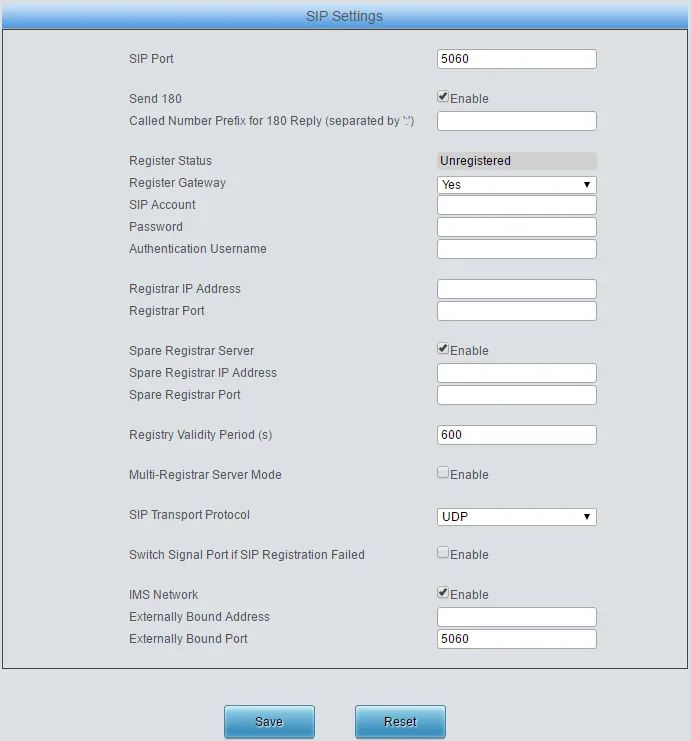 Screenshot: Synway SMG Series Wireless Gateway User Manual v1.8.0, p. 27.
3.2. Extension account. One extension for the whole gateway is the simplest option. Open Port Settings → Port Group → Add New:
- Description — any name; it cannot be left empty;
- Register Port Group —
Yes, then SIP Account and Password appear; - Authentication Mode —
Register Port Group. The factoryDo Not Registermeans that calls from the gateway to the PBX go without authentication, and the PBX will not accept them even with a green registration; - Port — tick the ports you need (Check All — all) → Save.
| In the admin panel (“Extension credentials”) | Gateway field |
|---|---|
| SIP server | VoIP Settings → SIP → Registrar IP Address |
Port 5060 |
VoIP Settings → SIP → Registrar Port |
Transport UDP |
VoIP Settings → SIP → SIP Transport Protocol = UDP |
Login sip-…-<number> |
Port Group → SIP Account — the whole string, not just the number |
| Password | Port Group → Password |
| Extension number | not entered — just remember which extension the gateway uses |
| — | Port Group → Authentication Mode = Register Port Group |
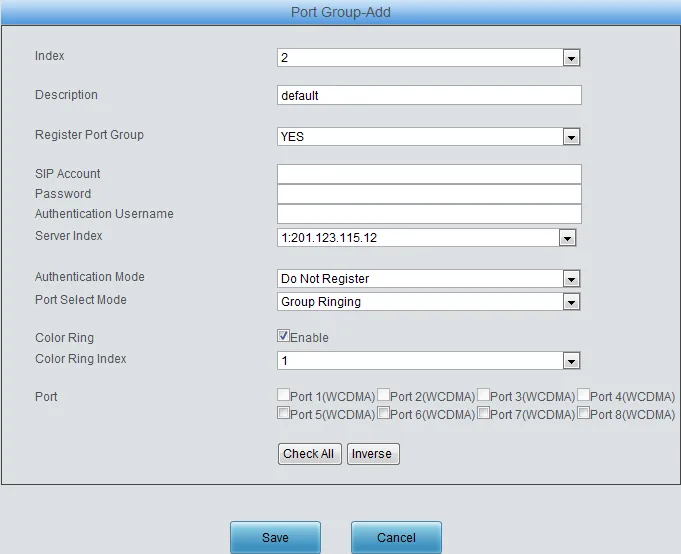 Screenshot: Synway SMG Series Wireless Gateway User Manual v1.8.0, p. 96.
The Authentication Username and Server Index fields show on the screenshot because the manual's example has IMS Network and Multi-Registrar Server Mode on; with those features off they are not there. A port that already belongs to one group cannot be added to another.
Other options: an extension per port, or registering the whole gateway
- An extension per SIM or line. In the admin panel — one operator per port. In the gateway — Port Settings → Port (on SMG1000-D — Port Settings → FXO) → Modify on the port: Register Port =
Yes, SIP Account = that extension's full login (the factory value is80XX, for example8001on port 1 — replace it), Password. On the port group set Authentication Mode =Register Port. This way the PBX shows which number was called. Do not give several ports the same login: each port registers separately, and one extension piles up many registrations. For a shared login there is the port group. - Registering the whole gateway (SMG1000-D). On VoIP Settings → SIP: Register Gateway =
Yes, SIP Account and Authentication Username = the login, Password; on the port group — Authentication Mode =Register Gateway. The wireless series manual v1.8.0 does not list this option under Authentication Mode, so on SMG4000 use the port group.
3.3. Caller's number — into the name, not the login. Open VoIP Settings → SIP Compatibility and set Set CallerID Position = Displayname of From Field. The factory value is Username of From Field: the gateway puts the mobile caller's number in place of the login in the From header, and the PBX does not recognise its own extension in the call. Registration stays green, while incoming calls are rejected.
Codecs, DTMF, NAT, encryption
- Codecs — VoIP Settings → Media → CODEC Priority: G711A and G711U (PCMA/PCMU) first. Our PBX does not use G729, G723, AMR or iLBC — better remove them. On SMG4000 you can keep G722; SMG1000-D does not have it, and G.711 is enough.
- DTMF — same place, DTMF Transmit Mode =
RFC2833(factory value; notIn-bandorSignaling). - NAT — VoIP Settings → NAT Setting: Rport is on at the factory, which is usually enough behind the venue's router; STUN is not needed. Turn SIP ALG off on the router. SIP Compatibility has Server Status Detection — a periodic “ping” of the server (factory
0— off; the manual suggests 15 s if you need the feature). - SIP Encryption / RTP Encryption — proprietary encryption for VOS softswitches. Do not enable it: our PBX does not support it.
Digital gateways SMG2000 / SMG3000 (E1)
On the digital series the account is set up as a SIP trunk with registration:
| In the admin panel | SMG2000 / SMG3000 field |
|---|---|
SIP server / Port 5060 |
SIP Settings → SIP Trunk: Remote Address / Remote Port; SIP Settings → SIP Register: Register Address / Register Port |
Transport UDP |
SIP Trunk → Transport Protocol = UDP; SRTP Mode = RTP |
Login sip-…-<number> |
SIP Register → Username and Authentication Username — the whole string |
| Password | SIP Register → Password |
According to the manual, Remote Address accepts both an IP address and a domain name. Add the trunk to SIP Settings → SIP Trunk Group. Incoming calls from E1 — Route Settings → PSTN to IP: Call Initiator — the PCM trunk group, CallerID/CalleeID Prefix = *, Call Destination — the SIP trunk group with our trunk. The dialled landline number reaches the PBX as the called number; to get the call into a ring group, replace it with the group number using a Number Manipulation → PSTN Call In CalleeID rule.
Step 4. Send incoming calls to the PBX#
Now the gateway needs to know what to do with a call on the SIM or line: which number to dial on the PBX. Out of the box the port works in two-stage dialling mode: the gateway picks up, the caller hears “Please dial the extension number” and has to dial the number themselves, and after the third repeat of the prompt the gateway hangs up. That does not work for guests.
- Number in the PBX. Port Settings → Port (on SMG1000-D — Port Settings → FXO) → Modify on the port: Connection Method =
Static Binding, and in the Bound Number field that appears — the ring group number (from 700) or the operator's extension number → Modify. For all ports at once — Batch Modify with Bound Number Step Rule =Same. - Account for the call. The port group from step 3 must have Authentication Mode =
Register Port Group(orRegister Port) — otherwise the gateway calls the PBX without authentication. - Tel→IP route. There are no rules at the factory. Open Route Settings → Tel→IP (on SMG1000-D — Tel to IP) → Add New: Description — anything, Source Port Group — your group (or
*— any), CallerID Prefix and CalleeID Prefix =*, Destination IP — the SIP server from the credentials window, Destination Port —5060→ Save. About a domain name in Destination IP — same as in step 3.1: the manual describes the field as an IP address.
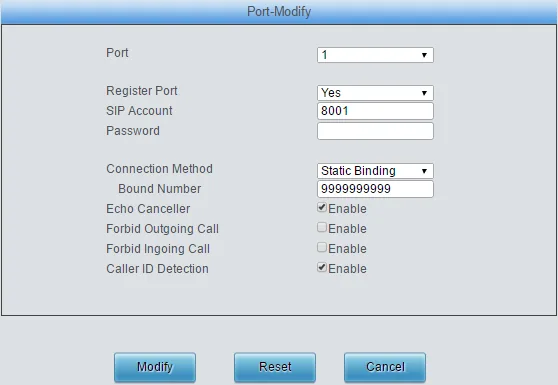 Screenshot: Synway SMG Series Wireless Gateway User Manual v1.8.0, p. 93.
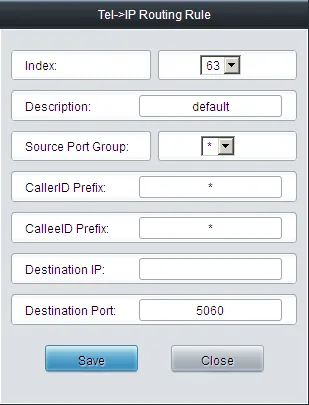 Screenshot: Synway SMG Series Wireless Gateway User Manual v1.8.0, p. 103.
Caller's number. The gateway detects the caller's number (Caller ID Detection on the port is on at the factory; for FXO lines the format is set in Advanced Settings → FXO → FSK Standard: ETSI — Europe, GR-30 — North America and China, NIT — Japan) and, with the setting from step 3.3, passes it in the display name of the SIP call. It is not shown in the operator panel yet: the call appears as coming from the gateway's extension. Routing rules for provider numbers (schedule, voice menu) do not apply to calls from the gateway — a ring group with its own time-based variants covers the same need (see “Where to send incoming calls”).
Outgoing calls. Calling out from the PBX through this gateway's SIM cards or lines is not possible yet: the PBX's outbound rule only leads to a SIP provider's line. The gateway itself can do it (Route Settings → IP→Tel/IP), but do not set up that route for our PBX. Outgoing calls from your own number go through a SIP provider; details — “Outgoing calls through a gateway — not yet”.
FXO lines: hang-up detection and country profile
- Advanced Settings → Area Selection — choose the country: the gateway sets tones, ringing, feed and line impedance for it. The country list is in the interface itself.
- If a call does not end when the caller hangs up: busy-tone detection — Advanced Settings → Tone Detector; the port has Polarity Reversal Detection (off at the factory; according to the manual it does not combine with two-stage dialling) and Silence Detection (off).
- The gateway waits up to 10 s for the caller's number (Calling Party Detection Time) before calling the PBX.
Step 5. Check registration and a call#
- Registration in the gateway. Operation Info → Port State: the SIP Reg Status column shows
Registered. The port group status is also in the Port Settings → Port Group list (Register Status).Unregistered— registration is not enabled,Failed— the server rejected it. - SIM on the network (SMG4000). On the same page the port shows Connection
Connect, the signal level (Signal) and the SIM's number. The port LED on the case: steady green — port idle, flashing green — call in progress, steady red — port unavailable, flashing red — module off. - Registration in the admin panel. Telephony → “Staff & groups” tab — the gateway's extension has a green dot.
- A call. Call the SIM or landline number from a mobile — the group's operators (or the operator) from Bound Number should ring.
- Audio — the
*43echo test. Registration says nothing about audio. Temporarily put*43into the port's Bound Number, save, and call the SIM or line: the PBX gives a short beep and then plays your voice back with a delay — talk for about ten seconds. You hear the beep and yourself — audio works both ways; the beep but not yourself — audio does not get from the gateway to the PBX; not even the beep — it does not get from the PBX to the gateway. The test result shows in the call log. After the check, put the group or operator number back into Bound Number.
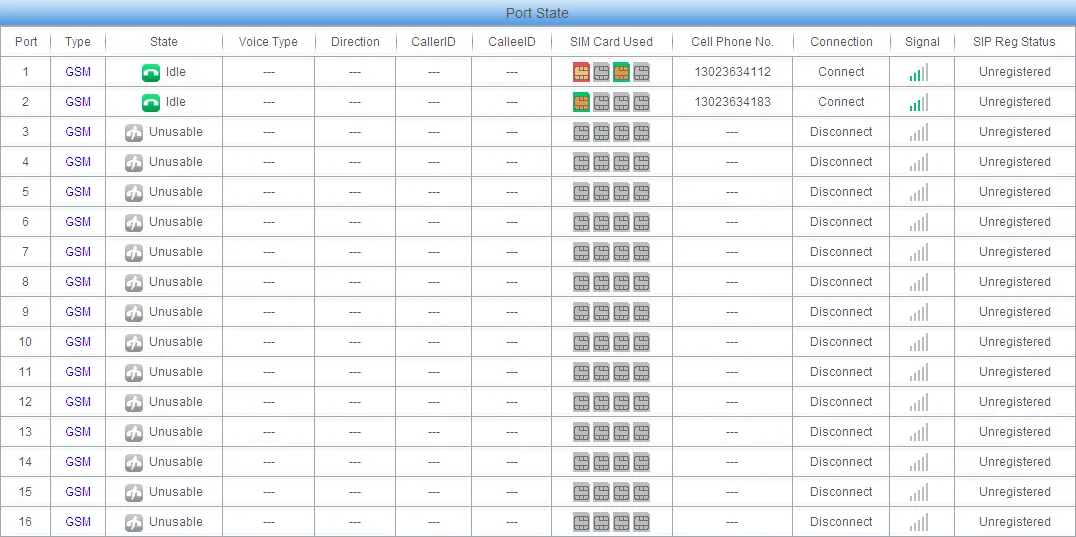 Screenshot: Synway SMG Series Wireless Gateway User Manual v1.8.0, p. 19.
Everything about checking is in the overview, section “How to check”.
Factory reset#
A reset is needed if you forgot the web password or the gateway's address, the gateway came with someone else's settings, or it behaves unpredictably. Before resetting a working gateway, save its settings: System Tools → Backup & Upload → Backup (to restore — same place, Upload; after uploading the file the gateway restarts by itself).
With the Reset button. On SMG4000 hold the Reset button for 3 seconds — the gateway returns to factory settings. On SMG4004/4008 the button is on the front panel, on SMG4016/4032 — on the back. For SMG1000-D and the digital SMG2000/3000 the manual only says “long press”, without an exact time.
From the web interface. System Tools → Factory Reset → Reset — “restore all configurations on the gateway to factory settings”. Do not confuse it with the Reset button at the bottom of settings pages: that one only reverts unsaved form changes.
What is erased: all settings — group and port accounts, bound numbers, routes, network settings, the web password. What to do after: the gateway is reachable again at http://192.168.1.101 with admin / admin — start from step 1. The extension's login and password in the admin panel are not changed by resetting the gateway; if the extension password was not saved, issue a new one with “Reset password”. General notes on resetting gateways — in the overview.
If the gateway does not register#
- Registration is not enabled.
Unregisteredmeans the group has Register Port Group =No(the port — Register Port =No) or SIP Account and Password are not filled in: without both fields the gateway does not register. Failed— the server rejected the registration. SIP Account must hold the whole loginsip-…-<number>, not just the number and not the factory80XX; the password must be the latest one issued. Check Registrar Port =5060and SIP Transport Protocol =UDP(not TLS). Whether the gateway can see the server is shown by System Tools → PING Test: the Destination Address field accepts a domain name too. If the server name in Registrar IP Address does not work, enter the IP address (step 3.1).- Registration is green, but incoming calls are rejected. Check Set CallerID Position =
Displayname of From Field(step 3.3) and the group's Authentication Mode — notDo Not Register. - The caller hears “Please dial the extension number”. The port still has Connection Method =
Two Stages Dialing Mode— setStatic Bindingwith the group number (step 4). If the port settings have no Connection Method and Bound Number fields, the gateway has the SIP Station feature on (VoIP Settings section) — according to the manual it hides them. - The gateway is registered, but a call on the SIM or line does not reach the group. There is no Tel→IP rule or it has the wrong Destination IP / Destination Port; the number in Bound Number cannot be dialled from the PBX's phones. The called number can also be set with a Number Manipulation → Tel→IP CalleeID rule.
- SIM not on the network (SMG4000). The PIN is not removed or entered wrong (Wireless Settings → PIN Manage; after three wrong PINs you need the PUK), the antennas are not screwed on, the module is for another region, or 2G/3G are switched off in the country and the gateway is a 2G/3G version.
General causes (SIP ALG on the router, UDP 5060 blocked) — in the overview, section “If the gateway does not register”; on network and SIM — “Venue network, NAT and SIM card”.
Models in the family#
The letters after the channel count on SMG4000 are the radio module, chosen when ordering: G — GSM only (2G), W / WA / WT / WZ — 3G, C — CDMA, LE / LC / LT / LV — LTE for different regions.
| Model | Ports / channels | Network / line | Setup differences |
|---|---|---|---|
| SMG4004 / SMG4008 | 4 / 8 SIMs, 2 LAN ports | GSM, 3G, CDMA or LTE — by module | desktop case, 12 V power; Reset button on the front; RJ45→DB-9 console |
| SMG4016 / SMG4032 | 16 / 32 channels, 4 SIMs per channel (64 / 128 SIMs) | same | 1U; SIM rotation (Wireless Settings → SIM Card) — for call centres; Reset on the back; mini-USB console |
| SMG4000 (1 Port) | 1 channel, 4 SIM slots, Wi-Fi | GSM / CDMA / UMTS | per a 2019 datasheet; no manual or product page — check with the supplier |
| SMG1000-D4O / D8O | 4 / 8 FXO (RJ-11), 2 LAN ports | analogue landline | mini case; ports — Port Settings → FXO, route — Tel to IP, network — System Tools → Network; codecs G.711 and G.729, no G.722 |
| SMG1000-D16O / D32O | 16 / 32 FXO | same | 1U, 100–240 V power; menus as on D4O |
| SMG1000-D2S2O … D16S16O | 2+2 … 16+16 FXS+FXO | lines + analogue phones | FXO — as above; phones on FXS are extensions, see “SIP phone setup” |
| SMG1000 (A/B/C-type) | 4–32 FXS/FXO | same | predecessors of the D series with the same web interface; whether they are still sold — check with the supplier |
| SMG2030 / 2060 / 2120 | 1 / 2 / 4 E1/T1 | ISDN PRI, SS7, R2 | SIP trunk with registration (block in step 3); not in Synway's current product list |
| SMG3000-B1 / B2 / B4, B1L / B2L, C1L | 1 / 2 / 4 E1/T1 | ISDN PRI, SS7, R2 | same; SMG3008…3064 (8–64 E1) are operator class |
For a venue with 1–4 mobile numbers, the SMG4004/4008 in an LTE version (LE or LT) fits; for analogue lines — the SMG1000-D4O/D8O. Do not buy G, W or C versions where 2G, 3G or CDMA networks are being switched off.
Which SMG4000 radio module to buy for your country
The bands are set by the module and cannot be changed in the field (manual v1.8.0, SMG4000 datasheet):
| Version | Bands | For |
|---|---|---|
G / GZ |
GSM 850/900/1800/1900 | 2G only |
W |
GSM 900/1800, UMTS 900/2100 | 3G: Europe, Asia, Africa |
WA |
GSM 850/900/1800/1900, UMTS 850/1900 | 3G: North and Latin America |
WZ |
GSM 850/900/1800/1900, UMTS 850/900/1900/2100 | 3G: worldwide |
LE |
LTE FDD B1/B3/B5/B7/B8/B20, TDD B38/B40/B41, WCDMA B1/B5/B8, GSM B3/B8 | Europe, Middle East, Africa |
LT |
LTE FDD B1/B2/B3/B4/B5/B7/B8/B28, TDD B40, WCDMA B1/B2/B5/B8, GSM B2/B3/B5/B8 | Australia, Latin America |
LV |
LTE FDD B4/B13 | Verizon-type US networks |
LC |
LTE FDD B1/B3, TDD B38–B41 and others | China |
Check the bands against those your operator uses. Whether the LTE versions carry voice over VoLTE cannot be established from the documents — ask the supplier and the operator before buying.
FAQ#
Can I call out from the PBX through this gateway using the SIM's or line's number?#
Not yet — with us the gateway only handles incoming calls. Synway itself can do outgoing calls (the IP→Tel/IP route), but our PBX does not yet send calls to a gateway extension as if it were a line. Outgoing calls from your own number go through a SIP provider.
How many extensions does a gateway with 4 or 8 SIMs need?#
One: put the ports into a group with Register Port Group = Yes and Authentication Mode = Register Port Group. An extension per port is needed only if it matters in the PBX which number was called.
Why does the caller hear “Please dial the extension number”?#
That is the port's factory mode Two Stages Dialing Mode: the gateway waits for the caller to dial an extension. Set the ports' Connection Method = Static Binding with the group number in Bound Number (step 4).
Will the gateway work where 2G and 3G have been switched off?#
You need an LTE version for your region (LE, LT, LV), and the operator must let it into the voice network. Synway's documents do not confirm whether the module calls over VoLTE — check with the supplier and the operator. G, W and C versions will not take calls on such a network.
Why is the caller's number not shown in the panel?#
The gateway does pass the number (in the display name), but our PBX currently shows the call as coming from the gateway's extension. This is a PBX limitation, not a gateway setting. Do not switch Set CallerID Position back to Username of From Field — calls would stop being accepted.
What are IMEI Modify, BS Select, SIM Bank and SIM rotation?#
These are tools of bulk traffic-termination operators. Do not enable them in a venue: operators block SIMs for such behaviour, and changing the IMEI is illegal in many countries. SMS, USSD and balance checks are handled by the gateway itself: Wireless Settings → Short Message / USSD, Call Management → Balance. About SIMs in gateways in general — “Venue network, NAT and SIM card”.
Sources#
Synway documents, accessed 10 September 2026:
- SMG Series Wireless Gateway User Manual SMG4004/4008/4016/4032 (v1.8.0, 10.2017) — https://www.synway.net/Download/Manual/UserManual/SMG_Wireless_Gateway_Manualv1.8.0.pdf
- SMG-D Series Analog Gateway User Manual SMG1004D/1008D/1016D/1032D (v2.0.0, 04.2019) — http://www.synway.net/Download/Manual/UserManual/SMG_D-type_Analog_Gateway_ManualV2.0.0.pdf
- 三汇 SMG 系列 D 型模拟网关用户手册 SMG1000-D4O…D16S16O (Chinese manual v2.0.1, 10.2020) — https://www.synway.cn/uploads/20250110/53dc24a1f2963d10163e97fae3f8c358.pdf
- SMG Series Digital Gateway User Manual SMG2030/2060/2120, SMG3000 (v1.8.0) — http://www.synway.net/Download/Manual/UserManual/SMG_Digital_Gateway_ManualV1.8.0.pdf
- SMG4000 Wireless VoIP Gateway Datasheet — https://www.synway.net/Download/Brochure/SMG4000-Datasheet.pdf
- SMG4000 Wireless VoIP Gateway (1 Port) Datasheet (30.12.2019) — https://www.synway.net/Download/Brochure/SMG4000%20datasheet20191230.pdf
- SMG1000-D4O Datasheet (published 31.03.2026) — https://www.synway.net/uploads/20260331/4958473068febed4cbfde128bf3ecc01.pdf
- SMG1000-D4O — product page — https://www.synway.net/product_detail/SMG1000_D4O_4_Ports_FXO_Analog_VoIP_Gateway.html
- SMG4000-4G1 — wireless series product page — https://www.synway.net/index.php/product_detail/SMG4000-4G1.html
- Synway SBC & VoIP Gateway — catalogue (01.2018) — https://www.synway.net/uploads/20220920/22fbeb9de45becee45afabcf2559d69b.pdf
- wiki.synway.net → SMG1000 FAQ — https://wiki.synway.net/index.php?title=SMG1000_FAQ
- wiki.synway.net → SMG2000 FAQ — https://wiki.synway.net/index.php?title=SMG2000_FAQ
- wiki.synway.net → User Manual (list of manuals with versions) — https://wiki.synway.net/index.php?title=User_Manual
- wiki.synway.net → How to configure Synway Gateway for a connection with Elastix System — https://wiki.synway.net/index.php?title=How_to_configure_Synway_Gateway_for_a_connection_with_Elastix_System