AddPac AP-GS1001/1002/1004/GS2000 — setup for our PBX
AddPac VoiceFinder AP-GS are GSM gateways from the Korean company AddPac Technology: the desktop AP-GS1001, AP-GS1002 and AP-GS1004 for 1, 2 and 4 SIM cards, and the rack-mount AP-GS2000 chassis for up to 12 SIMs. You insert an operator's SIM into the box, and calls to its number reach an IP PBX over SIP. The gateways run AddPac's own OS, APOS: they have the Smart Web Manager web interface and a Cisco-style command line (console or telnet).
Two important limitations. First, these models work only on 2G (GSM) networks: where the operator has switched 2G off, the gateway will not register on the network (see “By country”). Second, the vendor's documentation dates from 2010–2012, and the firmware is not publicly available. So this page is for venues that already have such a gateway installed. For a new purchase, look at gateways with LTE and VoLTE, for example Yeastar TG.
To our PBX the gateway is an extension. The gateway itself dials an incoming SIM call through to a ring group or an operator. What is the same for all gateways (credentials, where to send incoming calls, network, limitations) is in the overview “GSM gateways and landlines”. This page is the step-by-step guide for AddPac AP-GS, with screenshots from the manufacturer's manuals.
What you need#
- Extension credentials. In the admin panel: Telephony → Operators → create an operator for the gateway (for example, “GSM gateway AddPac”) → “Reset password” → the “Extension credentials” window: SIP server, Extension number, Login, Password, Port
5060, TransportUDP. The password is shown once — copy it into the gateway right away. Details — “Extension credentials for the gateway”. The simplest option is one extension for the whole gateway; if you want to tell the SIMs apart in the PBX, create an extension for each SIM. - The number the gateway will send incoming calls to: a ring group number (Telephony → “Ring groups”, numbers from 700) or an operator's extension number.
- A SIM card with a voice plan on a network where 2G still works. It is best to remove the PIN in a phone beforehand; if you keep it, enter it in the gateway (Advanced → GSM PINs).
- An antenna. The AP-GS1001 and AP-GS1002 have one per channel. The AP-GS1004 and the chassis' AP-N1-GSM4 modules use one antenna for four channels (through a built-in combiner).
- The power supply from the box (AP-GS1001 — 5 V/2 A, AP-GS1004 — 12 V/3.4 A), a network cable, a computer and a mobile phone to call the gateway's SIM. For the AP-GS1004 you may need a console cable RS-232C (RJ45 connector on the gateway) — see step 1.
Step 1. Find the gateway's IP address#
The gateway has two network ports with different factory settings:
| Port | Out of the box | Used for |
|---|---|---|
| LAN1 | static address 192.168.10.1, mask 255.255.255.0 |
first login from a computer over a cable |
| LAN0 / WAN | DHCP: the address comes from the venue's router | the working connection to the network and the PBX |
AP-GS1001, AP-GS1002 and the chassis (AP-GS1200/1500/2000):
- Screw on the antenna, insert the SIM, connect power.
- Give the computer an address in the same network, for example
192.168.10.10(mask255.255.255.0), and connect it with a cable to the LAN1 port (the manual shows a crossover cable). - Open
http://192.168.10.1in a browser and go on to step 2. - Connect the LAN0/WAN port to the venue's router. Look up the address the gateway gets via DHCP in the router's DHCP lease list. In System → Network Setup you can also set a static address (
Static IP), PPPoE, or keepDHCP; pressApply.
AP-GS1004 — it has one Ethernet port, and according to the manual the 192.168.10.1 method does not apply to it. First look for the gateway in the router's DHCP lease list. The documentation does not say whether the port uses DHCP out of the box; if it is not in the list, set the address from the console (below).
From the console (AP-GS1002, AP-GS1004, chassis; the AP-GS1001 has no console port). Terminal settings: 9600 baud, no parity, 1 stop bit, no flow control; log in with root / router. To set the address:
GSM> enable
GSM# configure terminal
GSM(config)# interface FastEthernet 0/0
GSM(config-if)# ip address <IP address> <mask>
GSM(config-if)# exit
GSM(config)# ip route 0.0.0.0 0.0.0.0 <router address>
GSM(config)# write
The show interface command shows the current address. AddPac has no network discovery utility and no “tell me the IP” voice menu.
Step 2. Log in to the web interface#
| What | Value |
|---|---|
| Address | http://<gateway IP> (port 80) |
| Login | root |
| Password | router |
The same root / router pair works for the console, telnet and FTP. The web interface language is set in System → Language (English or Korean). Each page is saved with its own Apply button.
Change the factory password right away. The gateway does not require it, and one factory password covers everything — anyone who reaches the gateway gets access to the SIM cards. The web interface description has no password-change item; the vendor describes it with commands (console or telnet — there is a Telnet icon on the web interface's tool bar):
GSM# configure terminal
GSM(config)# user change root <old password> <new password>
GSM(config)# write
The show user command displays passwords in clear text — do not leave its output on screen. Access to the web, telnet and FTP can be limited to a list of addresses: Advanced → Filtering (HTTP Filter, Telnet Filter, FTP Filter).
Step 3. Enter the PBX credentials#
In the vendor's manuals this section is called VoIP Setup; in the web interface menu it is in the Basic block.
1. Protocol. Basic → Protocol — SIP (the factory default).
2. Server. Basic → Server SIP:
Use SIP Server— Yes;Primary SIP Server— the server address from the credentials window,5060in the port field next to it;Secondary SIP ServerandLocal Domain Name— empty;SIP Signaling Port—5060(the gateway's own port; changing it requires a reboot);Register Expiration—60(the factory default; 60–300 seconds works for our PBX);Apply.
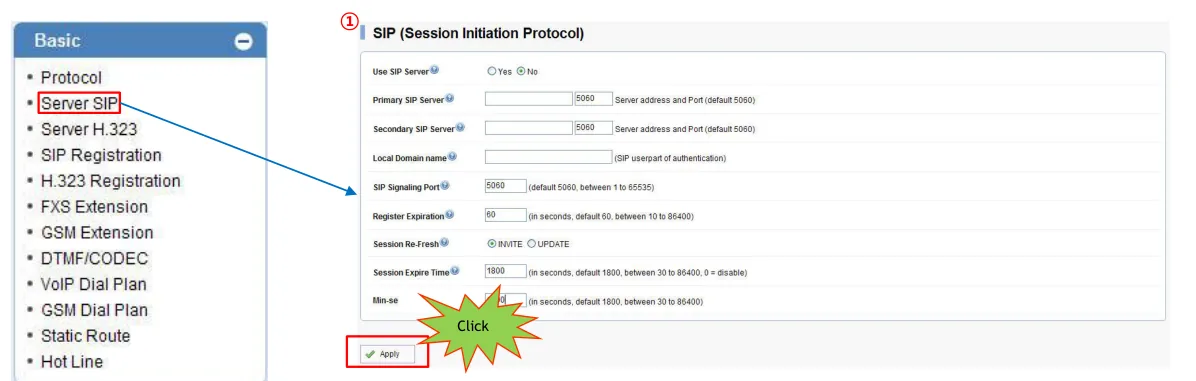 Screenshot: GSM Gateway WEB Setup Guide AP-GS1001/1002/1004 (2012), p. 21.
The manuals ask for an IP address in Primary SIP Server, but the CLI manual also allows a server name — provided the gateway has a DNS server set. If the gateway gets its address via DHCP, DNS usually comes from the router; with a static address, set it in System → Network Setup or with the command dnshost nameserver <DNS server IP>.
3. Account. Basic → SIP Registration — a table with one row per port. Fill in the port's row:
| In the admin panel (“Extension credentials”) | Field in the gateway (Basic → SIP Registration) |
|---|---|
Login sip-…-<number> |
E.164 Number and User Name — the whole string in both fields |
| Password | Password |
| SIP server | not here — Primary SIP Server on the Server SIP page |
Port 5060 |
the port field next to Primary SIP Server |
Transport UDP |
no choice: the vendor's documentation describes UDP only |
| Extension number | not entered — just remember which extension the gateway uses |
| — | DisplayName — any name; Reg — ✓ (without it the gateway does not register); HuntStop — ✓ (the vendor recommends it) |
Press Apply, then refresh the page (F5) — the registration status appears in the Information panel on the right (screenshot in step 5).
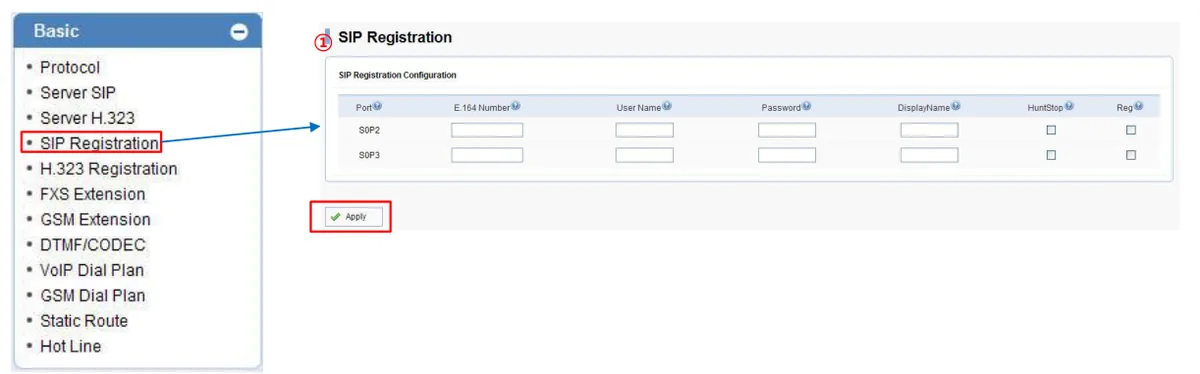 Screenshot: GSM Gateway WEB Setup Guide AP-GS1001/1002/1004 (2012), p. 22.
Why the login also goes into E.164 Number. An AddPac gateway puts the number from the E.164 Number field into the registration request (the From/To addresses) and sends the User Name only during authentication — that is how the message exchange looks in the vendor's training guide. Our PBX identifies the extension by its login, so digits alone in E.164 Number are not enough: registration will fail. If the field does not accept letters and hyphens, or the table has no row for the port you need (in the vendor's AP-GS1002 example only the FXS ports S0P2 and S0P3 are listed), set up registration from the command line — below.
Registering by user name from the command line (user-register mode)
The vendor's training guide (AddPac VoIP Gateway Training Guide, slides 52–55) describes two registration modes. The normal one (register e164) registers the port number, while user-register mode registers the port's user name (user-name); that is the one matching how our PBX expects the login. Connect via the console or telnet (root / router) and find the dial-peer voice <N> pots block for the GSM port (port 0/0, 0/1…) in show run. Then:
GSM# configure terminal
GSM(config)# dial-peer voice <N> pots
GSM(config-dialpeer-pots-N)# user-name sip-xxxxxxxx-NNN
GSM(config-dialpeer-pots-N)# user-password <extension password>
GSM(config-dialpeer-pots-N)# exit
GSM(config)# sip-ua
GSM(config-sip-ua)# user-register
GSM(config-sip-ua)# sip-server <server address>
GSM(config-sip-ua)# register e164
GSM(config-sip-ua)# exit
GSM(config)# write
- APOS supports the
user-name/user-passwordpair in a dial-peer from version 7.0. - If a global
sip-username/sip-passwordis set undersip-ua, the dial-peer pair is ignored — the global setting takes priority (APOS Quick Operation Guide). Remove the global pair withno …insip-uamode. - Registration status — the
show sipcommand.
Codecs, DTMF, NAT, protection against unwanted calls
- Codecs — Basic → DTMF/CODEC →
Voice CODEC:Preference 1—g711alaw(Europe, CIS, Asia),Preference 2—g711ulaw(North America). Our PBX does not use G.729, G.723.1 or G.726; the gateway has no G.722 — G.711 is enough. - DTMF — same page,
DTMF Relay mode: chooseDTMF relay by RTP payload defined by RFC 2833. The factory default isOut-of-band signal— with it a voice menu or bot will not understand digits dialled during the call. The CLI manual also says that only RFC 2833 is fully supported for SIP. - NAT. The gateway has no separate keep-alive checkbox; the short
Register Expiration(60 s) keeps the connection through the router open by itself. No port forwarding is needed; turn off SIP ALG on the router. - Advanced → Security.
SIP Shutdown— the vendor writes that this item must allow SIP signalling for SIP to work.IP Filtering,War Dialing Filtering,Allow digit Lengthrestrict calls from the IP side — they are not needed for incoming SIM calls. - Encryption. TLS and SRTP are not listed in the documentation — our PBX does not offer them for extensions either.
Step 4. Send incoming calls to the PBX#
Unconfigured, the gateway answers a call to the SIM with a second dial tone and waits for the caller to dial an extension (“two-stage dialling”). Guests do not know the extensions, so the call must go straight to the PBX. AddPac does this with Hot Line (a direct connection from a port to a number):
- Open Basic → Hot Line (in the manuals — GSM Setup → Hot Line).
- In the row of the GSM port (
S0P0(G),S0P1(G)… —Gmeans GSM,Smeans FXS) enter a number in our PBX in Hot Line Number: a ring group number (from 700) or an operator's extension number. According to the manual, the gateway forwards every incoming call on the GSM port to this number. Digit Input Timeoutapplies to FXS ports only — leave it alone for GSM. PressApply.
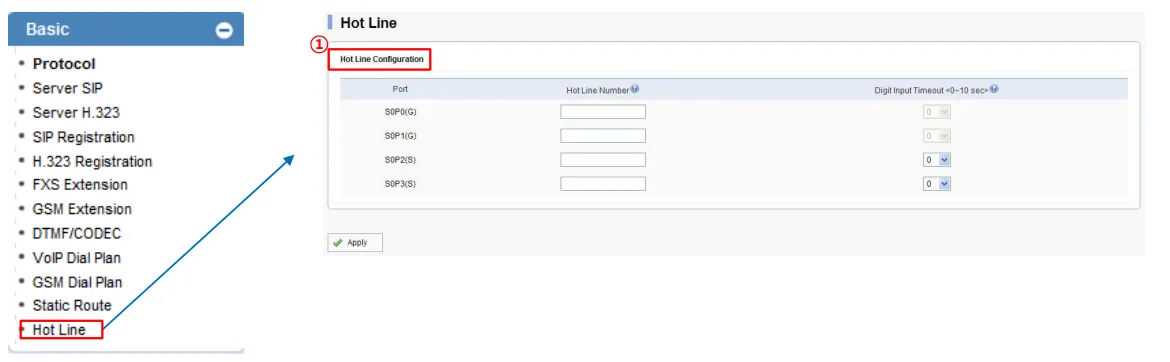 Screenshot: GSM Gateway WEB Setup Guide AP-GS1001/1002/1004 (2012), p. 17.
- For the dialled number to go to our server, Basic → VoIP Dial Plan must have a prefix served by the SIP server in the Prefix Table: add the exact number from Hot Line (for example,
701) orT(any number),PlanIndex—N.A.(no number conversion),Apply. AddPac patterns:T— any digits,.— one digit,[ ]— a range; for example,7..means three-digit numbers starting with 7.
Caller number. The gateway detects the caller's number (Advanced → Gain & CID → Caller-ID), but the documentation does not say where it puts it in the SIP call. Be prepared for the call to appear in the operator panel as coming from the gateway's extension. The routing rules for provider numbers (schedule, voice menu) do not apply to calls from a gateway — a ring group covers the same need (see “Where to send incoming calls”).
Outgoing calls. Calling out from the PBX through this gateway's SIM cards is not possible yet: the PBX's outgoing rule only leads to a SIP provider line. The AddPac itself can make outgoing calls (GSM Extension, GSM Dial Plan, LCR), but leave those pages alone for our PBX. For outgoing calls from your own number use a SIP provider; details — “Outgoing calls through a gateway — not yet”.
Step 5. Check registration and a call#
- SIM on the network. Miscellaneous (Monitoring in the 2012 manual) → GSM Status: GSM network registration status, signal strength, SIM number. No registration — check the PIN, the antenna and whether your operator still runs 2G.
- Registration in the gateway. After
Applyon the SIP Registration page, pressF5: the Information panel on the right should showStatus : Registered. More detail — Miscellaneous → System Status (SIP client state) and Alarm Status (SIP register fail counter— the count of failed attempts). - Registration in the admin panel. Telephony → “Operators” tab — the gateway's extension shows a green dot.
- A call. Call the SIM number from a mobile phone — the operators of the group (or the operator) from Hot Line should ring.
- Audio — the
*43echo test. Registration says nothing about audio. Temporarily enter*43in Hot Line Number (and the same prefix in the Prefix Table), pressApplyand call the SIM from a mobile: the PBX plays a short beep and then returns your voice with a delay — talk for about ten seconds. You hear the beep and yourself — audio works both ways; the beep but not yourself — audio does not get from the gateway to the PBX; not even the beep — audio does not get from the PBX to the gateway. The test result is visible in the call log. If the gateway does not save the asterisk in the number field, check audio with a live conversation with an operator of the group. After the check, put the group or operator number back.
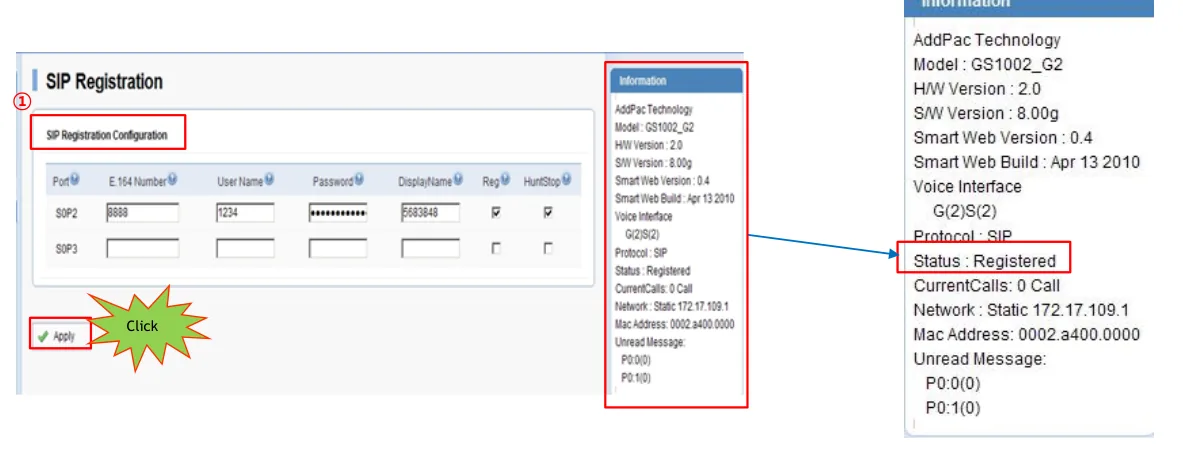 Screenshot: GSM Gateway WEB Setup Guide AP-GS1001/1002/1004 (2012), p. 23.
Everything about checking is in the overview, section “How to check”.
Factory reset#
A reset is needed if the gateway came with someone else's settings, the password is unknown, or the gateway behaves unpredictably. The documentation has no factory-reset button: the RST button on the AP-GS3000 chassis only restarts the gateway, and the manuals for the desktop models describe no reset button.
From the web interface. The Smart Web Manager tool bar (Tool Bar, the icons at the top right) holds System Update, Configuration Backup, Initialization, Restart and Telnet. Save the configuration first (Configuration Backup), then choose Initialization.
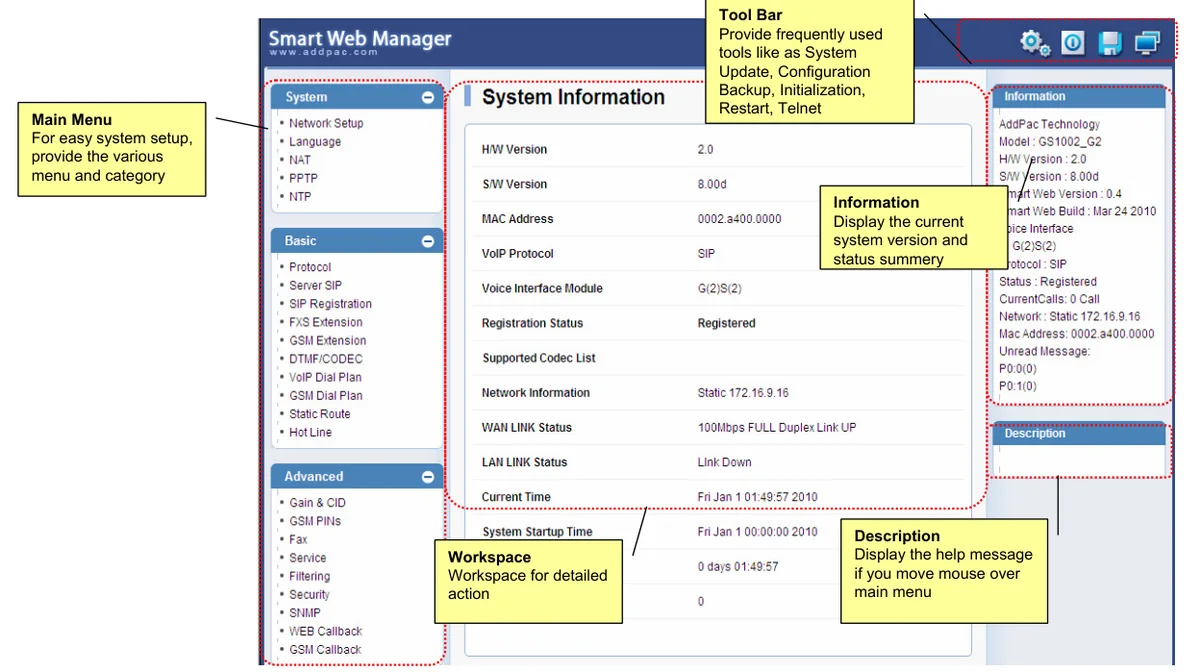 Screenshot: Smart Web Manager for GSM Gateway Series (2010), p. 3.
From the boot loader over the console (AP-GS1002, AP-GS1004, chassis). Restart the gateway (reboot or power) and, while it starts, alternately press Ctrl-C and Ctrl-X until the BOOT# prompt appears. Then:
BOOT# erase
Do you want to ERASE configuration ? [y|n] y
Erasing configuration....done
If the root password is forgotten. Boot loader version 2.0 and later asks for the root password itself. Without it, log in to the boot loader as guest / guest, then config → password router router. The vendor warns that this erases the configuration. Older boot loaders let you in without a password and show it (BOOT# show password). The AP-GS1001 has no console — the documentation does not say how to reset it with a lost password; contact your supplier or AddPac support.
What is erased: the whole gateway configuration — the PBX account, Hot Line, dial plan, SIM PIN codes, network settings. What to do next: LAN1 is 192.168.10.1 again, WAN uses DHCP, login root / router; repeat steps 1–4 and change the password. Resetting the gateway does not change the extension's login and password in the admin panel; if you did not keep the password, issue a new one with “Reset password”. General notes on resetting gateways — in the overview.
If the gateway does not register#
- Only digits in
E.164 Number. Our PBX looks up the extension by login, and the gateway registers exactly theE.164 Number. Enter the whole loginsip-…-<number>there (and inUser Nametoo); if the field does not accept it — useuser-registermode from the command line (step 3). - Registration is not enabled.
Use SIP Server=Noon the Server SIP page, theRegbox is not ticked in the port's row, H.323 is selected in Basic → Protocol, or the page was not saved withApply. - The server address cannot be resolved. If
Primary SIP Serverholds a name, the gateway needs a DNS server (step 3). You can check the connection to the server on the Ping page (Miscellaneous / Monitoring). - Registered, but calls do not arrive. An empty
Hot Line Number(the caller hears a second dial tone), no Prefix Table entry for the dialled number, or a non-existent group number. Check that the group number can be dialled from any PBX phone. - The SIM is not on the network. GSM Status shows no registration: the PIN is not removed, the antenna is not connected, or 2G is switched off in the country — then this gateway will not work with any SIM.
- Registration drops or audio is one-way. Turn off SIP ALG on the router and do not raise
Register Expirationabove 300 seconds.
General causes (SIP ALG on the router, UDP 5060 blocked) — in the overview, section “If the gateway does not register”; on network and SIM — “Venue network, NAT and SIM card”.
Models in the family#
The web interface, SIP account and Hot Line are the same on all models; they differ in the number of SIMs, network ports and whether there is a console. All models are 2G GSM only (bands are chosen in Advanced → GSM Band, Auto by default).
| Model | SIMs / channels | Network and ports | Setup differences |
|---|---|---|---|
| AP-GS1001 | 1 / 1 | 2G GSM; 2× Ethernet (LAN0 = WAN, LAN1); Model A — no analog port, B — 1 FXS, C — 1 FXO | no console: web and telnet only; first login via LAN1 |
| AP-GS1002 | 2 / 2 | 2G GSM + 2 FXS; 2× Ethernet; 2 antennas | RS-232C console; the vendor uses it to show Asterisk integration |
| AP-GS1004 | 4 / 4 | 2G GSM, 1 antenna for 4 channels; Model A — no analog ports, B — 4 FXS, C — 4 FXO | one Ethernet port, no 192.168.10.1 access — address from the router's DHCP or from the console (RJ45) |
| AP-GS1004I | 4 / 4 | like AP-GS1004, but 4 separate antennas | like AP-GS1004 |
| AP-GS1200 | up to 4 | chassis, 1 slot: AP-N1-GSM4 module (or analog modules) | Multi-Port web guide; console |
| AP-GS1500 | up to 8 | chassis, AP-N1-GSM4 modules | like AP-GS1200 |
| AP-GS2000 | up to 12 | 19″ 1U, 3 slots: up to 3× AP-N1-GSM4 or 8 GSM + 8 FXS/FXO; optional E1/T1 | like AP-GS1200; SIP Registration has a Group column for E1 |
For a café or salon with one or two mobile numbers, an AP-GS1001 or AP-GS1002 is enough. The larger chassis (AP-GS2500…AP-GS5000, Multi-SIM for hundreds of SIM cards) are equipment for traffic carriers; a venue does not need them.
The AP-3G100x 3G series and the AP-4GV1002B 4G model
- AP-3G1001 / AP-3G1002 / AP-3G1002H / AP-3G1004 — the same APOS, but a 3G network (UMTS/HSPA) with fallback to GSM. The 3G frequency pair is chosen when ordering: Band I (2100) + VIII (900) or Band II (1900) + V (850). They do not work where 3G is switched off too. Our set of vendor documents has no manuals for this series — check the details with your supplier.
- AP-4GV1002B — not a gateway for a SIM number: LTE is only its internet link, and voice goes over SIP to two analog phones (FXS). It does not bring the SIM card's number into the PBX; its analog ports are connected as ordinary extensions — see “SIP phone setup”.
- VoLTE (voice over 4G) is not supported by any AddPac model.
FAQ#
Can I call out from the PBX through this gateway using the SIM's number?#
Not yet — with us the gateway handles incoming calls only. The AddPac itself can make outgoing calls (GSM Extension, GSM Dial Plan, LCR), but our PBX does not yet send calls to a gateway extension as if it were a line. For outgoing calls from your own number, use a SIP provider.
Will the gateway work in my country?#
Only if the operator still runs a 2G network: the AP-GS1001/1002/1004/GS2000 use no other networks. In many countries 2G is already switched off fully or partly — check the “By country” page before going on site.
Why does the caller hear a second dial tone instead of an operator?#
The GSM port has no Hot Line Number — without it the gateway works in two-stage dialling mode and waits for the caller to dial an extension. Set up Hot Line (step 4).
Where do I get new firmware?#
The firmware is not publicly available: the downloads section of the AddPac site has no working files for GSM gateways, and updates go over FTP/TFTP through vendor support. Everything our PBX needs (SIP, G.711, RFC 2833) is already described in the 2010–2012 manuals.
What about SMS and the SIM balance?#
The gateway handles them itself: incoming and outgoing SMS — the SMS section of the web interface, balance — Advanced → GSM USSD. Leave cell selection (BTS) on Auto: holding or changing cells manually is a tool of bulk traffic termination, and the operator may block the SIM for it. On SIM cards in gateways in general — “Venue network, NAT and SIM card”.
Sources#
AddPac Technology documents (www.addpac.com), accessed 10.09.2026:
- GSM Gateway WEB Setup Guide — AP-GS1001 / AP-GS1002 / AP-GS1004 (2012) — https://www.addpac.com/addpac_eng2/downf.php?file=GSM%20SOHO%20Gateway%20WEB%20Operation%20Guide.pdf
- Multi-Port GSM Gateway WEB Operation Guide — AP-GS1500/2000/2500/3000/5000 (2011) — https://www.addpac.com/addpac_eng2/downf.php?file=GSM%20Multi-Port%20Gateway%20WEB%20Operation%20Guide.pdf
- VoiceFinder GSM Gateway CLI Manual V1.01 (2011) — https://www.addpac.com/addpac_eng2/downf.php?file=GSM%20CLI%20Manual%20Guide_Eng.pdf
- Smart Web Manager for GSM Gateway Series (2010) — https://www.addpac.com/addpac_eng2/down.php?file=326_f6.pdf
- Asterisk Free-PBX Interworking GSM Gateway (AP-GS1002, 2012) — https://www.addpac.com/addpac_eng2/down.php?file=326_f115.pdf
- AddPac VoIP Gateway Training Guide (register e164 and user-register modes) — https://www.addpac.com/addpac_eng2/downf.php?file=AddPac_VoIP_Gateway_training_guide.pdf
- APOS Quick Operation Guide [Voice over IP] Release 1.00 (boot loader, BOOT# erase, user-name in a dial-peer) — https://www.addpac.com/addpac_eng2/downf.php?file=APOS_eng.pdf
- FAQ: Password Recovery — https://www.addpac.com/addpac_eng2/supportdownload_faq_view.php?selection=&pg=1&faq_id=2
- FAQ: User account Management — https://www.addpac.com/addpac_eng2/supportdownload_faq_view.php?selection=&pg=1&faq_id=3
- VoiceFinder AP-GS3000 Operation (Installation) Guide v1.00 (RST button) — https://www.addpac.com/addpac_eng2/downf.php?file=AP-GS3000%20Installation%20Guide_v1.0.pdf
- Technical specifications: AP-GS1001 — https://www.addpac.com/addpac_eng2/down.php?file=327_f200.pdf, AP-GS1004 — https://www.addpac.com/addpac_eng2/down.php?file=329_f200.pdf, AP-GS1004 Model B/C — https://www.addpac.com/addpac_eng2/down.php?file=329_f111.pdf, AP-GS1004I — https://www.addpac.com/addpac_eng2/down.php?file=329_f126.pdf, AP-GS2000 — https://www.addpac.com/addpac_eng2/down.php?file=332_f131.pdf
- GSM Gateway catalogue — https://www.addpac.com/addpac_eng2/addpac_product_list.php?sel_class_id=97; model pages: AP-GS1001 — https://www.addpac.com/addpac_eng2/addpac_product_view_detail.php?class_id=97&item_id=327, AP-GS1002 — https://www.addpac.com/addpac_eng2/addpac_product_view_detail.php?class_id=97&item_id=326, AP-GS1004 — https://www.addpac.com/addpac_eng2/addpac_product_view_detail.php?class_id=97&item_id=329, AP-GS2000 — https://www.addpac.com/addpac_eng2/addpac_product_view_detail.php?class_id=97&item_id=332