Poly OBi 110/212/300 (FXO/FXS) — setup for our PBX
Your venue has a landline number on an ordinary copper line, and a small OBi box sits next to the router — made by Obihai Technology, later Polycom and Poly (Poly has belonged to HP since 2022). Three models have a landline port LINE (FXO): the OBi110, the OBi212 and the OBi312 from the OBi300 series. Each has one LINE port for the landline and one PHONE port for an analog phone. The OBi300 and OBi302 from the same series are only adapters for analog phones and cannot connect a landline. These adapters sold in large numbers in the US and Canada, and in cafés they are often left over as "the box from the previous provider".
To our PBX the gateway is just another extension: it registers on the PBX server with the extension's credentials, and dials an incoming landline call through to a ring group or an operator by itself. What is the same for all gateways is in the overview “GSM gateway, landline or ISDN in your PBX”. This page is the step-by-step for OBi, with screenshots from the Obihai documentation.
If you already have an OBi, connect it: the setup is well documented and takes about 15 minutes. We do not recommend buying one for a new site: vendor support for the OBi110 and OBi212 has ended, the OBiTALK cloud portal has been closed since November 1, 2024, and according to Poly's documents the OBi312 is certified only for the US and Canada. For new sites Grandstream HT841/HT881 or Yeastar TA FXO are a better fit.
What you need#
- Extension credentials from the admin panel: Telephony → Operators → create an operator for the gateway ("Landline") → "Reset password" → the "Extension credentials" window: SIP server, Extension number, Login, Password, Port
5060, TransportUDP. The password is shown only once. Usually one extension per box is enough: the gateway's single SIP account (SP1) serves both the landline and the phone in the PHONE port. If you need a separate extension for the phone, create a second one for SP2. Details — “Extension credentials for the gateway”. - The number the gateway will call inside the PBX — a ring group number (Telephony → "Ring groups", numbers from 700) or an operator's extension number. You need it in step 4.
- The landline — into the LINE port. ⚠️ Not into PHONE: Poly warns that a PHONE port connected to a telephone company jack may damage the gateway.
- An analog phone in the PHONE port — the voice menu works through it: it reads out the IP address, opens access to the web interface and performs the reset.
- The gateway on the venue network: the cable from the router goes into the INTERNET port.
- A computer with a browser on the same network (for the OBi212/OBi312 you may need a cable into the gateway's LAN port, see step 1).
- Your line's country. The factory settings are for the US — the section “Tune the line for your country” is mandatory.
Step 1. Find the gateway's IP address#
Out of the box the INTERNET port gets its address via DHCP from the venue router.
By voice, through the phone in the PHONE port (all models): pick up the handset and dial *** — the configuration voice menu answers. Press 1 — the gateway reads out its IP address and whether DHCP is on. You can also find the address in the router's client list.
OBi110 — one network port, no built-in router: the web interface opens at the address read out right away.
The OBi212 and OBi312 work as a router out of the box. The INTERNET port is their outside (WAN) side; the LAN port is a separate subnet with the gateway at 192.168.10.1 and its own DHCP. The main trap: the web interface is disabled on the WAN side by default. A laptop on the venue network will not open the page at the address from *** → 1. Three ways out:
- Enable access from the venue network by voice: pick up the handset, dial
***0, then30#(Enable Web Management Access from WAN port) and1, hang up — the gateway reboots. - A laptop cabled into the gateway's LAN port — it gets an address from the gateway, and the page opens at
http://192.168.10.1. - Switch the gateway to bridge mode (a second router behind the venue router is not needed):
***0→31#(Router/Bridge).
OBi voice menu codes
Main menu — ***, then a digit: 1 — IP address and DHCP, 2 — DNS and NTP, 3 — DHCP on/off, 4 — set a static address, 5 — voice menu password (digits only), 8 — factory reset, 9 — reboot, 0 — advanced options.
The menu does not read out the advanced options — you dial them by code: ***0, the code, #:
| Code | What it does |
|---|---|
30# |
web interface from the INTERNET port side (1 — on, 0 — off) |
31# |
router or bridge mode (OBi212, OBi312, OBi302) |
90# |
enable/disable the LINE port |
91# |
LINE port status |
92# |
Ring Through Delay — delay for landline calls |
101# |
SP1 registration state |
Step 2. Log in to the web interface#
Open http://<gateway IP> (or http://192.168.10.1 from the LAN port) — the browser asks for a login and password.
| Value | |
|---|---|
| Administrator (all settings) | login admin, password admin |
| User (some settings) | login user, password user |
If admin/admin does not work, the password was set by the provider the gateway came from (through its auto-provisioning or the old OBiTALK portal). All that is left is a reset.
Change the administrator password right after setup: System Management → Device Admin → AdminPassword.
On the left is the section tree: Status, System Management, Service Providers (ITSP Profile A, B…), Voice Services (SP1 Service, SP2 Service…), Physical Interfaces (PHONE Port, LINE Port), Codecs, Tone Settings, Star Codes and others. Rules of the road:
- Save every page with the Submit button at the bottom — without it, changes are lost when you move to another page.
- Most changes take effect after a reboot — the Reboot button at the top right. One reboot after all your edits is enough.
The OBi110 also has a Setup Wizard page — server, login, password and inbound routes on one screen (see step 3).
Step 3. Enter the PBX credentials#
On an OBi the SIP account is split across two pages: "where to register" lives in the provider profile, "with which login" lives in the SP1 service.
1. Service Providers → ITSP Profile A → SIP — our PBX address:
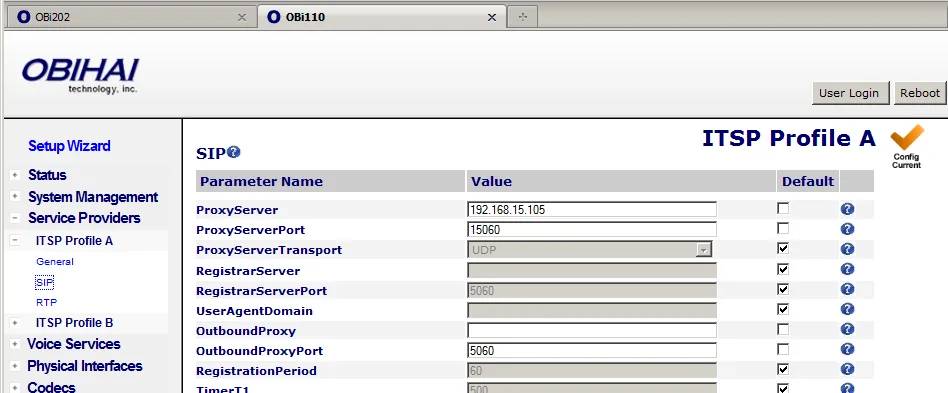
Screenshot: OBi Device Administration Guide, Obihai Technology, version 01092013, p. 100. The server address and port in the picture are an Obihai example; for our PBX ProxyServerPort = 5060 and OutboundProxy stays empty.
2. Voice Services → SP1 Service — login and password (the SIP Credentials section at the bottom of the page):
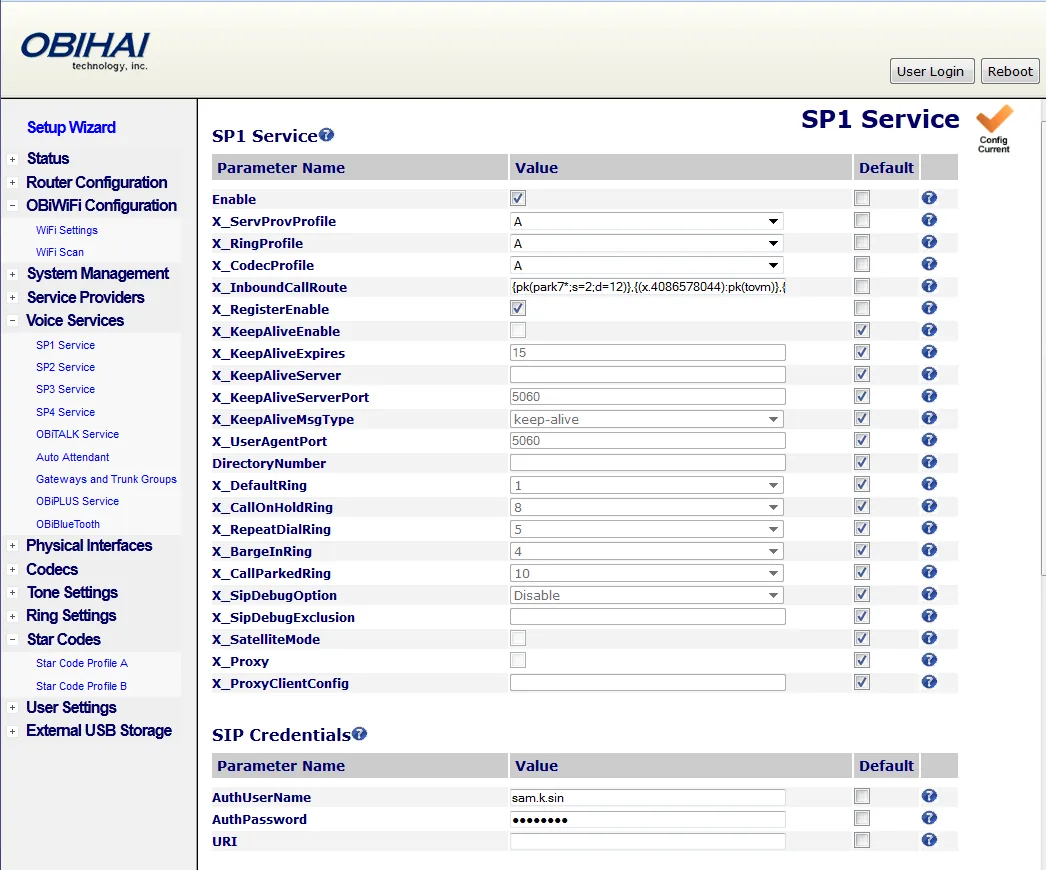
Screenshot: OBi Device Administration Guide, Obihai Technology, version 01092013, p. 110 (OBi202 web interface — the OBi212 runs on the same platform). The login and route in the picture are an Obihai example.
| Field in the "Extension credentials" window | Value | Where it goes in the gateway |
|---|---|---|
| SIP server | our PBX address | ITSP Profile A → SIP → ProxyServer |
| — | empty | RegistrarServer — when empty, registration goes to ProxyServer |
| — | empty | OutboundProxy |
| Port | 5060 |
ProxyServerPort (factory 5060) |
| Transport | UDP |
ProxyServerTransport = UDP (factory) |
| Login | sip-…-<number> — in full |
SP1 Service → AuthUserName |
| — | empty | URI — when empty, the gateway takes the user name from AuthUserName and the domain from ProxyServer: exactly what our PBX needs |
| Password | the extension password (shown once) | AuthPassword |
| Extension number | a label for yourself | SP1 Service → CallerIDName (Calling Features section) |
| — | A |
X_ServProvProfile — the profile holding the server (factory A) |
| — | enabled | Enable, X_RegisterEnable (factory — enabled) |
Press Submit on each of the two pages, then Reboot.
⚠️ Close the SIP account to strangers. Out of the box SP1 accepts SIP calls from any address on the internet, and SP1 inbound calls ring the PHONE port — SIP port scanners wake it up with "ghost calls". Set SP1 Service → X_AcceptSipFromRegistrarOnly = true (accept SIP only from the registration server's address; factory — off) or fill in X_AccessList in ITSP Profile A → SIP. Do not forward the gateway's SIP ports on the router and do not expose the web interface to the internet.
Codecs, DTMF, NAT, a second account and the OBi110 Setup Wizard
- Codecs — Codecs → Codec Profile A: give G711A (Europe, CIS, Georgia) or G711U (North America) Priority 1; G729 —
Enable = No. No OBi model has G.722 — calls run in G.711, which is exactly the quality of a landline. Our PBX does not use G.729, G.726, iLBC or OPUS — do not put them first. - DTMF — ITSP Profile A → General → DTMFMethod =
RFC2833(factoryAuto). - NAT. Behind an ordinary router the gateway works without port forwarding, and STUN is not needed. Registration every 60 seconds (RegistrationPeriod, factory 60) keeps the path through the router open by itself. If registration still drops — SP1 Service → X_KeepAliveEnable =
true. Turn off SIP ALG on the router. An OBi212/OBi312 left as a router behind the venue router works too. - TLS and SRTP — do not enable them: our PBX does not have them.
- A second account. A separate extension for the PHONE port or for the line goes into SP2 Service (the same ITSP Profile A or its own ITSP Profile B). The accounts use different local ports: SP1 — 5060, SP2 — 5061 (X_UserAgentPort) — that is expected. The OBi110 has only two SIP accounts (SP1, SP2); the OBi212 and OBi312 have four.
- OBi110 Setup Wizard — the same fields on one page: ITSP SIPProxyServer (= ProxyServer), ITSP SIPProxyServerPort, ITSP AuthUserName, ITSP AuthPassword, ITSP URI, and below them POTS-line InboundCallRoute (the landline inbound route, step 4).
Step 4. Send incoming calls to the PBX#
Out of the box the gateway sends a landline call only to the PHONE port (rule ph) — our PBX never sees it. You need the gateway to dial the ring group through SP1 by itself. That is one rule on the Physical Interfaces → LINE Port page, identical on the OBi110, OBi212 and OBi312:
| Where | Field | What to set |
|---|---|---|
| LINE Port | InboundCallRoute | {sp1(700)}, where 700 is the ring group number (or an operator's extension number). To ring the PHONE port together with the group: {ph,sp1(700)} |
| LINE Port | RingDelay | factory 5500 ms — the pause after the first ring during which the gateway receives the caller's number. You can reduce it, but at 0 the number will not arrive in time |
| SP1 Service | X_InboundCallRoute | leave the factory ph: calls from the PBX to the gateway's extension will ring the PHONE port |
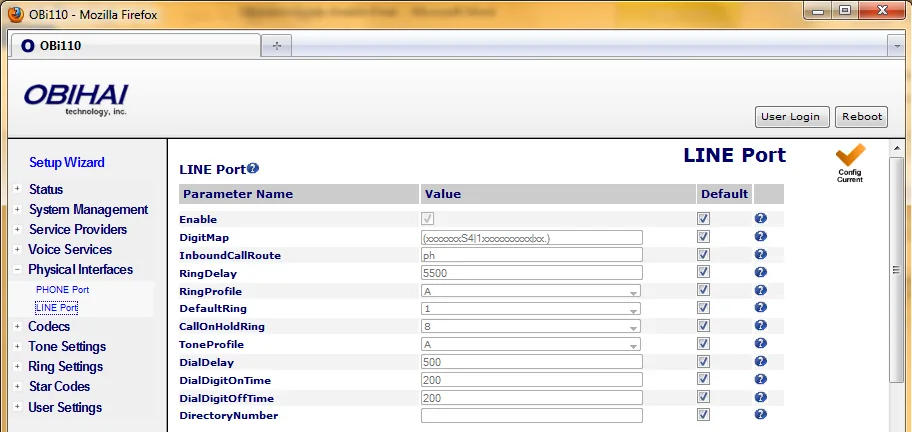
Screenshot: OBi Device Administration Guide, Obihai Technology, version 01092013, p. 150. The picture shows the factory ph; for our PBX InboundCallRoute gets {sp1(700)}.
Press Submit and Reboot. On the OBi110 the same rule can go into the POTS-line InboundCallRoute field on the Setup Wizard page.
The gateway picks up the landline as soon as it starts the call into the PBX — before anyone in the group answers. For the caller the call starts at that moment, even if the group then does not answer. The provider-number routing rules (schedule, voice menu) do not apply to calls from the gateway — the group is chosen by the number in the rule, and time-based options and fallback live in the group itself, see “Where to send incoming calls”. Do not put the gateway's auto attendant (aa) into the line rule: a caller from the street would get access through it to the SIP account and to the line itself.
Caller's number. Leave ITSP Profile A → SIP → X_SpoofCallerID at the factory No. The call arrives in the panel as a call from the gateway's extension; the landline caller's number is not shown. With Yes the gateway puts the caller's number into the From field instead of the login — and our PBX identifies the extension precisely by the login, so the call is rejected.
About outgoing calls — honestly. Calling out of the PBX through this gateway's landline is not possible right now: the outbound rule only leads to a SIP provider line, and to the PBX the gateway is an extension. The OBi itself can route SIP → landline calls, but outgoing calls like that are not supported on the PBX side — do not set them up. Today an OBi is a way to receive calls on a landline number; outgoing calls go through a SIP provider number, see “Outgoing calls through the gateway — not yet”.
Step 5. Check registration and a call#
- Registration in the gateway. Status → System Status → the SP Service Status section: SP1 shows
Registered (server=…; expire in …). On error, the server's response code is shown there. By voice:***0→101#. - Registration in the admin panel. The gateway's extension on the "Operators" tab should show a green dot.
- A call. Call the landline number from a mobile — within a few seconds the ring group or operator from step 4 should ring. Hang up on the mobile: the operator's call must end within a few seconds. If it "hangs" — disconnect detection is not set up, see the next section.
- Audio — the
*43echo test. Registration says nothing about audio: it travels as a separate stream. Temporarily put the rule{sp1(*43)}into LINE Port → InboundCallRoute, press Submit and Reboot, and call the landline number: the PBX answers and starts playing your own voice back with a short delay. If you hear yourself, audio flows both ways. After the test, put the group number back.
Everything about checks — in the overview, section “How to check”.
Tune the line for your country#
OBi has no regional firmware: out of the box the LINE port is set up for the US network — 600 Ω line impedance, the American busy tone, the American caller ID format. On a line in any other country this step is mandatory: otherwise the gateway does not notice that the caller has hung up, and the group keeps ringing. All fields are on the Physical Interfaces → LINE Port page (described in the Obihai guide; Poly's guide has no separate table of these fields for the OBi312).
- Line impedance — Port Settings section → ACImpedance (factory
600). Which value is needed in which country is not stated in the Obihai documentation — ask your line operator. Echo and hiss during calls are a sign of a wrong value. In the same place, CurrentLimitingEnable limits the line current to 60 mA per the European TBR21 standard (factoryNo); whether your line needs it, also ask the operator. - Disconnect detection — PSTN Disconnect Detection section. DetectCPC (loss of loop current) and DetectPolarityReversal are on from the factory — keep them. DetectDisconnectTone is also on, but the tone itself, DisconnectTonePattern, is American:
480-30,620-30;10;(.25+.25). Enter your country's busy tone in the same syntax (frequencies with level, tone and pause durations); the guide has no values for Russia and the CIS — ask the operator. The safety net is DetectFarEndLongSilence with a SilenceTimeThreshold of 60 s: a call in complete silence drops by itself. - Caller's number from the line — CallerIDDetectMethod: factory
FSK(Bell202); alsoFSK(V.23),DTMF(Finland, Sweden),DTMF(Denmark). The Russian "AON" system that queries the number is not on the list. The gateway receives the number only if RingDelay is longer than its delivery time (step 4).
Other line fields
- ChannelTxGain / ChannelRxGain — volume towards the line and from it (−15…15 dB; factory 0 and 5).
- TipRingVoltageAdjust (3.5 V; "low-voltage countries should use lower"), OnHookSpeed, MinOperationalLoopCurrent (10 mA).
- LineInUseVoltageThreshold (25 V) / LineInUseCurrentThreshold (12 mA) — when the gateway decides a parallel phone has taken the line.
- Ring Detection — ring signal frequency and voltage, RingerImpedance (High or Synthesized — the latter, per the guide, for countries such as Poland, South Africa and Slovenia).
- Lifeline. On power failure the OBi312 connects the PHONE port directly to LINE — the phone works as an ordinary landline phone. For the OBi110 and OBi212 the documentation does not say.
Factory reset#
You need a reset if the admin password does not work, the gateway came from a provider or a previous owner, or the configuration is hopelessly tangled.
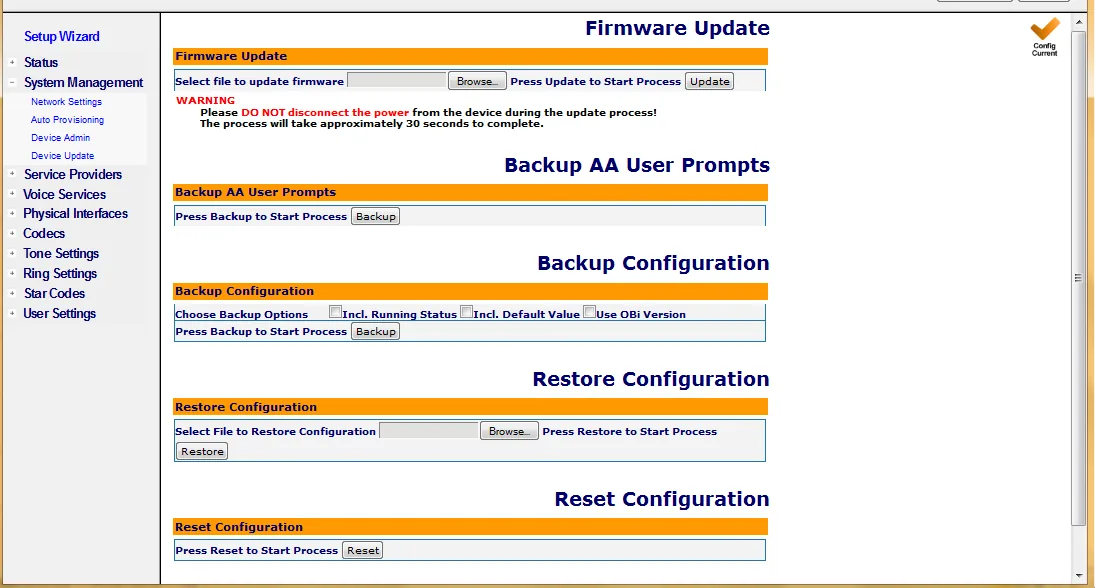
Screenshot: OBi Device Administration Guide, Obihai Technology, version 01092013, p. 43.
- With the button (OBi212, OBi312). Power the unit on. On the bottom, find the Factory Reset hole — round, slightly larger than the others, just above and to the left of the model ID on the label. Press the button inside with a paper clip and hold it for 15 seconds until the Power LED flashes red. Release — the gateway is reset.
- With the button (OBi110). The reset button is on the bottom of the case; hold it for 10 seconds: the Power LED blinks green, first slowly, then fast, and the gateway reboots.
- By voice (all models): phone in PHONE, pick up the handset,
***→8(Restore Factory Default) →1to confirm. - From the web interface: System Management → Device Update → Reset Configuration → Reset, confirm in the pop-up — the gateway reboots by itself.
What gets erased: the whole configuration (server, accounts, routes, country settings), call history and statistics. A gateway from a provider may bring back some of its settings: according to Poly, a provider may restrict some settings from being reset.
What to do afterwards: the web password is admin/admin again; the OBi212 and OBi312 are back in router mode with access from the INTERNET side closed (step 1). Go through steps 1–5 and the country section again. Issue a new extension password — it is shown once: Telephony → Operators → "Reset password". General notes on resetting gateways — in the overview.
If the gateway does not register#
- The server is in the wrong profile. SP1 takes the server from the profile chosen in X_ServProvProfile (factory
A). If the address is in ITSP Profile B while SP1 looks at A, there will be no registration. - The login is not complete or is in the wrong field. AuthUserName takes the whole
sip-…-<number>string; leave URI empty. - Submit was not pressed or there was no Reboot. Changes without Submit are lost; most apply only after a reboot.
- ProxyServerTransport = TCP or TLS — set
UDP. - Settings "roll back" after a reboot. An OBi bought from a provider may pull its configuration from the provider's server and overwrite your fields. The cure is a reset.
- Registered, but landline calls do not arrive. LINE Port → InboundCallRoute still has the factory
ph(only the PHONE port rings), or X_SpoofCallerID =Yesis on (the PBX rejects the call). Check that the number in the rule can be dialed from any PBX phone.
General causes (SIP ALG on the router, an outdated password, UDP 5060 blocked) — in the overview, section “If the gateway does not register”; about the network — “Venue network, NAT and the SIM card”.
Models in the family#
| Model | Ports | Network | Status | Setup differences |
|---|---|---|---|---|
| OBi110 | 1 × FXO (LINE) + 1 × FXS (PHONE), RJ-11 | 1 × RJ-45 INTERNET 10/100, no router | discontinued: Obihai announcement 2016-08-10, support until 2017-12-31 | web open right away; 2 SIP accounts; Setup Wizard page; button reset 10 s |
| OBi212 | 1 × FXO (LINE) + 1 × FXS (PHONE), RJ-11; USB 2.0 | RJ-45 INTERNET (WAN) + LAN; router by default | end of sale 2021-12-18, support until 2023-12-18 | web closed from the INTERNET side (step 1); 4 SIP accounts; button reset 15 s |
| OBi312 | 1 × FXO (LINE) + 1 × FXS (PHONE), RJ-11; USB 2.0 | RJ-45 INTERNET (WAN) + LAN; router by default | no end-of-life notice in the documents | as OBi212; 4 SIP accounts (SP1–SP4); PHONE↔LINE lifeline without power; FCC and Industry Canada certification |
| OBi300 | 1 × FXS (PHONE); USB | RJ-45 INTERNET | — | no landline port — phone only; connects as an extension through SP1 Service (step 3) |
| OBi302 | 2 × FXS (PHONE 1/2); USB | RJ-45 INTERNET + LAN; router by default | — | no landline port; the same closed web from the INTERNET side as the OBi212 |
On the OBi300 and OBi302, step 4 and "Tune the line for your country" do not apply: only analog phones connect to them.
Related models and what to buy instead
OBi100, OBi200, OBi202 — only analog phone ports. OBi504/OBi508 — 4/8 phone ports; per Poly's documentation their "PSTN Failover" port works only during a power outage, so it is not an FXO gateway. OBiLINE — an Obihai USB adapter that, per the 2013 guide, added a LINE port to the OBi200/202/300/302 (line access code **70 instead of **8); whether the Poly-generation OBi300/302 support it, Poly's documentation does not say.
Polycom's OBi212 data sheet wrongly lists "Phone (FXS): 2 x RJ-11" and does not mention LINE — trust the installation guide: the OBi212 has LINE, PHONE, USB, LAN and INTERNET ports.
For a new site with landline numbers, take Grandstream HT841/HT881 or Yeastar TA FXO. And if the landline number can be moved to a SIP provider, that is more reliable than any gateway: “Connecting a provider number”.
FAQ#
The OBiTALK portal is closed — can the gateway be set up at all?#
Yes. The OBiTALK cloud service has been down since November 1, 2024, but the gateway is fully configurable locally — through the web interface and the voice menu, as described on this page. Our PBX does not need the cloud. The "Set Up a Polycom OBiTALK Account" card in the box and calls through OBiTALK (**9) no longer work — do not waste time on them.
How many extensions does one OBi need?#
Usually one: SP1 serves both the landline and the phone in the PHONE port. If the PHONE port should be a separate staff member in the PBX, create a second extension on SP2.
Can I call out through the landline via the PBX?#
Not yet. Through this gateway our PBX can only receive calls from the line; outgoing calls go through a SIP provider number. Details — “Outgoing calls through the gateway — not yet”.
The call arrives but does not end when the guest hangs up#
Disconnect detection is not tuned for your country: the factory busy tone is American. Go through “Tune the line for your country”: DisconnectTonePattern and ACImpedance per your operator's data.
Why is the caller's number not shown in the panel?#
The gateway hands the call over from its own extension. Do not enable X_SpoofCallerID: the caller's number would replace the login, and the PBX would reject the call.
Why is G.722 missing from the codec list?#
No OBi model has it — calls run in G.711. For a landline that is exactly the quality the line itself delivers.
Sources#
Documentation from Obihai, Polycom and Poly. The obihai.com and obitalk.com sites are closed, so some links point to Internet Archive copies. Accessed 2026-09-10.
- OBi Device Administration Guide (OBi100/110, OBi200/202, OBi300/302), Obihai Technology, version 01092013 — the OBi110 LINE port, LINE Port parameters (InboundCallRoute, RingDelay, ACImpedance, DisconnectTonePattern, CallerIDDetectMethod), Setup Wizard, voice menu, admin/admin, 10 s reset button. Source of all screenshots on this page.
- Poly OBi Devices OBi3 and OBi5 Series — Administrator Guide, 3725-85483-003A, July 2020 — OBi300/302/312, the OBi312 LINE port, voice menu (
30#,31#,90#–92#,101#), router mode and web closed on the WAN side,192.168.10.1, ITSP Profile and SPn Service, X_SpoofCallerID, X_AcceptSipFromRegistrarOnly, codecs without G.722, reset from the web interface. - Polycom OBi312 Installation and Configuration Guide, 1725-85475-001C (Poly document hosted by the provider Lumen) — ports,
***→1, admin/admin, 15 s button reset, the PHONE port warning. - Polycom OBi212 Installation & Configuration Guide, 1725-85342-001 — LINE/PHONE/USB/LAN/INTERNET ports,
***→1, 15 s button reset. - Data Sheet Polycom OBi212, 33381-0318 — 4 VoIP services, WAN + LAN, USB 2.0 (with the port error, see "Models in the family").
- Poly OBi Voice Adapters — Safety and Regulatory Notices, 3725-49156-001A — OBi300/302/312 certification, OBi312 lifeline.
- Polycom OBi300 Installation and Configuration Guide, 1725-85343-001C — OBi300 without a LINE port.
- OBiTALK: OBi212 page with Polycom's end-of-life notice for OBi200/202/212 and Obihai blog: End of Life Announcement: OBi100 and OBi110 — end-of-sale and end-of-support dates.
- obitalk.com — HP's notice that the OBiTALK service closed on 2024-11-01.