TELES iGATE / vGATE (GSM/ISDN) — setup for our PBX
TELES is a Berlin manufacturer of mobile gateways. The rack-mounted iGATE holds 4 to 32 SIM channels (GSM, 3G UMTS or CDMA), optionally with two ISDN PRI or four BRI ports. The compact ECOTEL and CELLX take 4 SIM cards, and vGATE is not a gateway at all but a SIM card server that hands out cards to gateways over the network. All of them run the same firmware, and it is configured in an unusual way: with text files pabx.cfg, route.cfg and ip.cfg. They are edited in the Windows program GATE Manager, over FTP or, since version 14, partly in the web interface.
Before you start. In 2023 TELES AG sold its telecom business and became a pharmaceutical company; teles.com now redirects to another domain. There are no new devices, firmware or support, and the documentation survives only in copies at distributors and in the FCC archive. The family also has no LTE/VoLTE — only 2G, 3G and CDMA: where these networks are switched off, the gateway will not work. This page is for a venue where an iGATE, ECOTEL or CELLX is already installed. Do not buy one for a new installation: the family table in the overview has gateways with VoLTE.
To our PBX the gateway is just another extension: it registers on the PBX server and, when someone calls the SIM card, dials a ring group or an operator by itself. What is the same for all gateways (credentials, where to send incoming calls, network, limitations) is in the overview “GSM gateways and landlines”. This page is the step-by-step guide for TELES, with screens and examples from the manufacturer's documentation.
What you need#
- Extension credentials from the admin panel: Telephony → Operators → create an operator for the gateway (for example, “TELES gateway, SIM”) → “Reset password” → the “Extension credentials” window: SIP server, Extension number, Login, Password, Port
5060, TransportUDP. The password is shown once — copy it into the gateway configuration right away. Details — “Extension credentials for the gateway”. - How many extensions: one for the whole gateway. By default the gateway keeps one registration, and different SIM cards can be sent to different ring groups with a single extension (see step 4).
- The number the gateway will send incoming calls to: a ring group number (Telephony → “Ring groups”, numbers from 700) or an operator's extension number.
- A SIM card on a 2G or 3G network (CDMA for the iGATE CDMA), preferably with the PIN removed (do it in any phone). If the PIN stays, it goes into the port's
Subscriberline inpabx.cfgbefore the SIM holder is inserted — except for cards with no PIN or with PIN0000. - A computer on the same network. Windows is the most convenient: the Quickstart and GATE Manager tools are on the CD that came with the gateway. Without Windows, an FTP client and a text editor are enough.
- A mobile phone to call the gateway's SIM card.
Step 1. Find the gateway's IP address#
As long as there is no ip.cfg file on the device, the gateway runs on the factory address 192.168.1.2 — this is how it ships: “The default configuration with the IP address 192.168.1.2 is active when this file is not on the system”.
- Quickstart (Windows) searches the network for TELES gateways by broadcast and shows the serial number, IP address and number of VoIP modules. A grey icon means the device is not configured, a green one — configured. A double click (or right click → Configure) opens the IP Settings window: address, mask, default gateway. In version 17 it has a DHCP checkbox — the router will assign the address. Finish — the gateway restarts on the new address.
- Without Windows: give the computer an address in
192.168.1.0/24(for example,192.168.1.10), connect it to the gateway directly and open192.168.1.2over FTP (step 2).
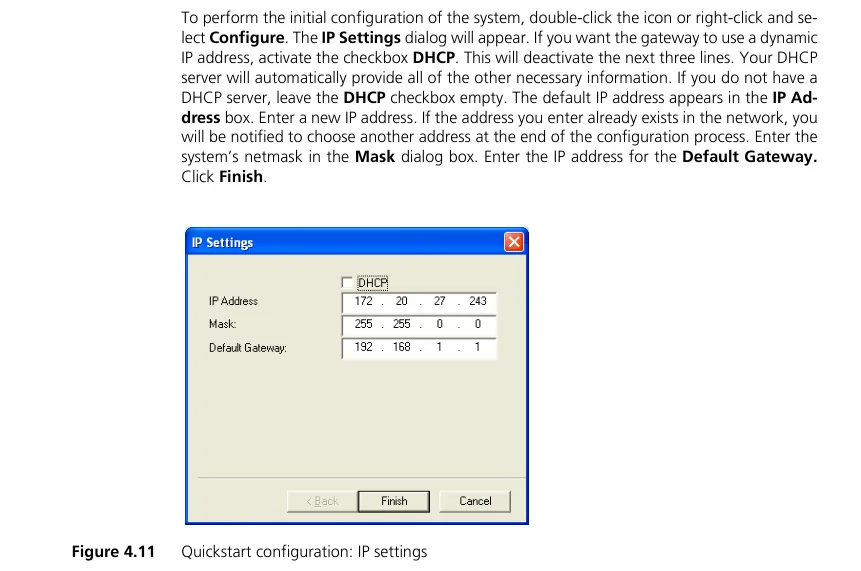 Screenshot: iGATE Reference Manual, software version 17.0 (2012), p. 35, figure 4.11.
Temporary address, clock and DNS
- Right click on the icon in Quickstart → Temporarily Configure IP Address temporarily changes the address and mask of the first Ethernet port only — handy for reaching the gateway once from another network.
- The gateway's clock does not survive a power cut: after a restart the time falls back to the factory value. Set a time server with
NtpServer=inpabx.cfg, otherwise the call log and night schedules will be wrong. - DNS. For the gateway to find the PBX server by name,
pabx.cfgmust containNameServer=<DNS address>(the manufacturer's example usesNameServer=8.8.8.8). Changes inpabx.cfgandip.cfgtake effect only after a restart.
Step 2. Log in to the web interface#
TELES has three ways in, and all of them have open factory access:
| Access | Address | Login | Password |
|---|---|---|---|
| FTP (always available) | ftp://<gateway IP address> |
teles |
tcs-ag |
| GATE Manager (Windows, TCP 4445) | gateway IP address | — | no password until RemotePassword is set in pabx.cfg |
| Web interface (since version 14, if installed) | http://<gateway IP address> → Login |
teles-admin (full access) · teles-user (read only) |
tcs-admin · tcs-user |
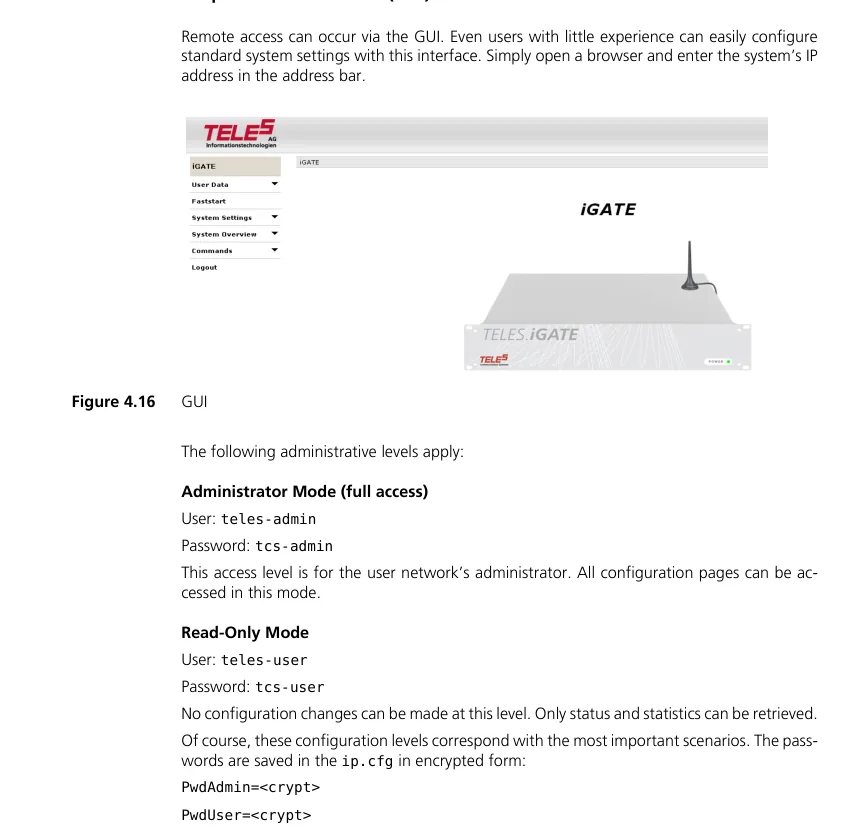 Screenshot: iGATE Reference Manual, software version 17.0 (2012), p. 41, figure 4.16.
Web interface menu: User Data (passwords, language) · Faststart (wizard) · System Settings → IP Settings / Port Settings / VoIP Settings / Telephony Routing · System Overview · Commands (Activate configuration, restart). The manual recommends Internet Explorer 6/7/8.
The web interface may be missing. It is a separate module (httpd files in the /boot directory): if it is not installed or its version does not match the firmware, the page will not open. The CELLX Box has no web interface at all. That is why everything below is done with files — this path always exists, and the web interface, when it works, writes to the same files (“the files will be adjusted automatically”).
Close the factory access after setup: the GATE Manager and FTP password — with the line RemotePassword=<cipher> in the [System] section of pabx.cfg (GATE Manager produces the cipher: Edit → Encode Password…), the web interface password — in User Data. Do not forward the gateway's ports (21, 23, 80, 4445) to the outside on the router: with factory passwords anyone could reconfigure the gateway and make calls through it.
Step 3. Enter the PBX credentials#
On a TELES the SIP account is two profiles in the route.cfg file:
[Registrar:<name>]— the gateway's registration on the PBX server (“Registrar profiles are used to register the iGATE with a SIP registrar”);[Voip:<name>]— where to send calls, which codecs and which DTMF. The lineVoipRegistrar=<name>links it to the registration.
How to edit the file. First save copies of pabx.cfg and route.cfg — the manufacturer recommends it. In GATE Manager: Directory → right click on route.cfg → Download From System → edit in a text editor → right click → Upload To System; GATE Manager asks whether to activate the new configuration — OK. Over FTP: download /boot/route.cfg, edit it, upload it back and issue site xgact. Format rule: comments start with ;, and the file ends with an empty line.
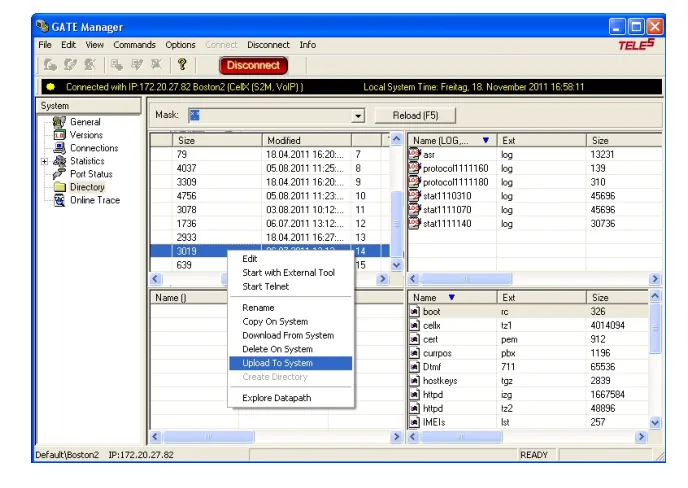 Screenshot: CELLX Box Systems Manual, software version 17.1 (2014), p. 44.
| In the admin panel (“Extension credentials”) | TELES parameter | What to enter |
|---|---|---|
| SIP server | RegId= and VoipPeerAddress= |
the server address from the window (a name needs NameServer= in pabx.cfg, see step 1) |
Login sip-…-<number> |
RegUser= and VoipUser=; RegOwnId= and VoipOwnAddress= |
the whole login; in RegOwnId and VoipOwnAddress — <login>@<SIP server>: the PBX recognises the extension by the From field |
| Password | RegPwd= and VoipPwd= |
the password from the window |
Port 5060 |
SipPort=5060 in pabx.cfg |
5060 is already the default — change nothing |
Transport UDP |
RegSignalling=1 and VoipSignalling=1 |
1 = SIP UDP. VoipSignalling is mandatory: its default is 0, which is H.323, and SIP will not work at all |
| Extension number | — | not entered; just remember which extension the gateway uses |
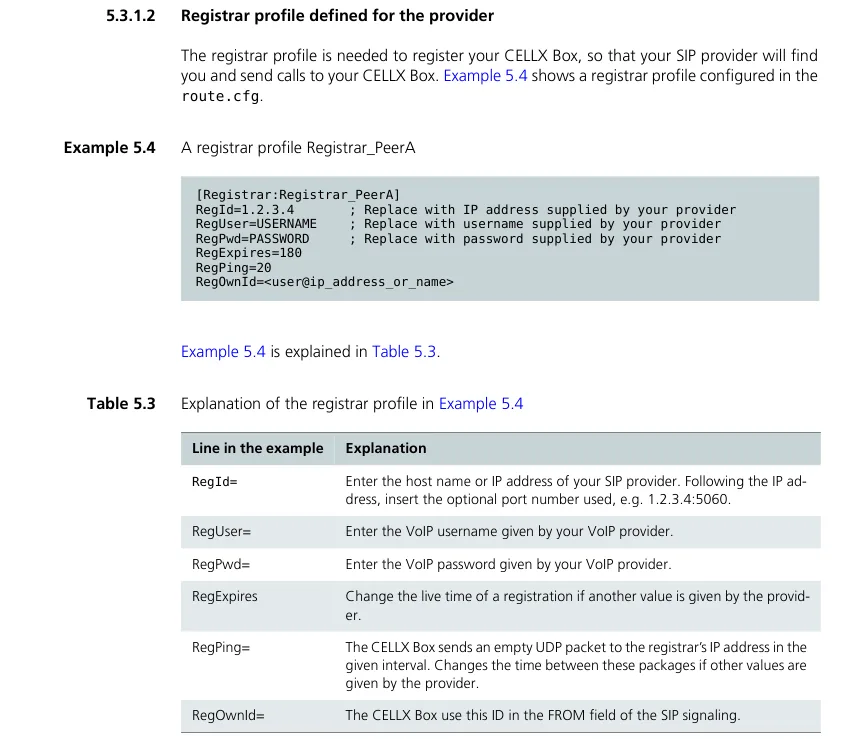 Screenshot: CELLX Box Systems Manual, software version 17.1 (2014), p. 49 — a registrar profile for a provider; enter the extension credentials instead of the provider's data.
A ready route.cfg fragment for our PBX (assembled from the manufacturer's examples; the profile names ats and ATS are arbitrary, angle brackets mark your data):
[Voip:ATS]
VoipDirection=IO
VoipPeerAddress=<SIP server>
VoipIpMask=0xffffffff
VoipSignalling=1
VoipCompression=g711a g711u
VoipSilenceSuppression=No
VoipDtmfTransport=3
VoipRFC2833PayloadType=101
VoipOwnAddress=<login>@<SIP server>
VoipUser=<login>
VoipPwd=<password>
VoipRegistrar=ats

[Registrar:ats]
RegId=<SIP server>
RegOwnId=<login>@<SIP server>
RegUser=<login>
RegPwd=<password>
RegExpires=300
RegPing=20
RegSignalling=1
Changes in route.cfg take effect with Activate configuration, without a reboot; add the incoming route from step 4 to the same file before activating.
Why these values: registration, NAT, codecs, DTMF
RegExpires=300. The default is0— an “infinite” registration: after our PBX restarts, the gateway will not renew it. 300 seconds is reliable.RegPing=20— every 20 seconds the gateway sends an empty UDP packet to the server so that the venue's router does not close the “hole” (as in the manufacturer's example). No port forwarding and no STUN are needed; turn off SIP ALG on the router. If the gateway is behind NAT and still loses registration, the registrar profile hasRegUseReceived=Yes(version 17).- Codecs.
VoipCompression=g711a g711u— G.711 only. TELES has no G.722, and G.729 and G.723, which come first in the manufacturer's examples, are not used by our PBX — remove them. - DTMF. The defaults are
VoipDtmfTransport=2(tones in the audio) and RFC 2833 payload type 96. Set3(RFC 2833) and101— otherwise voice menus and bots will pick up key presses unreliably. VoipIpMask=0xffffffff— accept SIP calls only from the server inVoipPeerAddress.- TCP. Since version 17,
1can be replaced with2(SIP TCP) — our PBX accepts it too. We have no TLS (3).
Step 4. Send incoming calls to the PBX#
A TELES routes an incoming call from the SIM card with two lines in the [System] section of route.cfg:
[System]
Restrict20=IN 01
MapAllIN=40ATS:<group number>
Restrict20=IN 01— all voice calls (service indicator01) from the mobile channels (20is the number of the mobile controllers in standard configurations, see theControllerNN=20 GSMlines inpabx.cfg) get the labelIN. SMS and USSD (05,06) are not affected.MapAllIN=40ATS:<group number>— calls labelledINgo to VoIP controller40through theATSprofile from step 3 and dial<group number>: a ring group number (for example,701) or an operator's extension number.
Then — Activate configuration (web interface → Commands, GATE Manager or FTP site xgact).
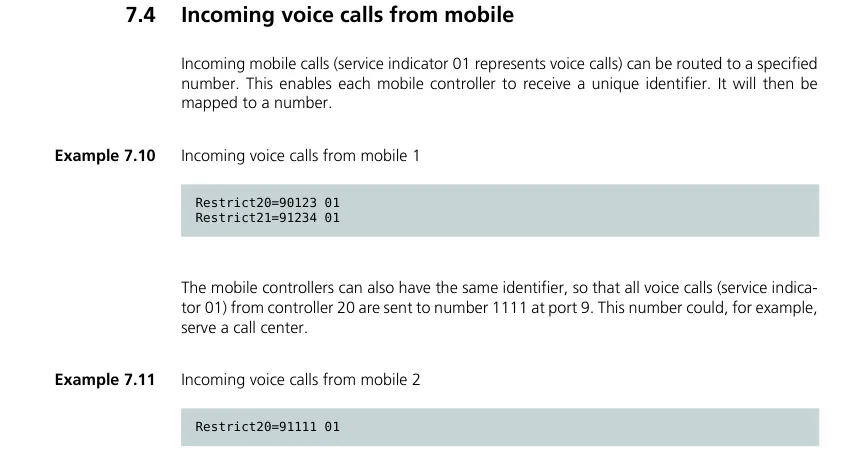 Screenshot: iGATE Reference Manual, software version 17.0 (2012), p. 106. In the manufacturer's example calls go to number 1111 on ISDN port 9; for our PBX the target is the VoIP profile and the group number, as in the lines above.
Different SIM cards to different groups
The route can also be set per port: in the CELLX Box manual each SIM is sent to its own analogue port this way (Restrict*04*20=TOFXS01 + MapAllTOFXS01=10, where 04 is the physical port). Following that pattern, the SIM in port 04 goes to group 701 and the one in port 05 to 702:
Restrict*04*20=SIM1
MapAllSIM1=40ATS:701
Restrict*05*20=SIM2
MapAllSIM2=40ATS:702
This route needs the CHINSERT key in the mobile port's Subscriber line in pabx.cfg. The extension stays the same — only the dialled numbers differ.
Caller number. By default the gateway puts the caller's number from the SIM into the From field, but the VoipOwnAddress=<login>@… line from step 3 fills that field with our login — without it the PBX would not recognise the extension. To still pass the caller's number, add VoipOwnDisplay=MSN to the [Voip:ATS] profile — according to the documentation it sends the caller's number as the display name. Check with a test call whether it shows up in the call card. If the caller hides the number, the call arrives without one. Routing rules for provider numbers (schedule, voice menu) do not apply to calls from the gateway — a ring group with its own time-based options covers the same need (see “Where to send incoming calls”).
Outgoing calls. Calling out of the PBX through this gateway's SIM cards is not possible yet: the PBX's outgoing rule only leads to a SIP provider line. The TELES itself can do the reverse direction (MapAll…=20… rules into the mobile channels), but do not set it up for our PBX. Outgoing calls from your own number go through a SIP provider; details — “Outgoing calls through a gateway — not yet”.
Step 5. Check registration and a call#
- SIM cards on the network. The SIM LEDs on the mobile boards are steady — the card is registered. Blinking slowly — registration in progress; blinking fast — the SIM is blocked or the signal is weak.
- Registration in the gateway. GATE Manager → Statistics → VoIP Statistics, the Registration State column for the
ATSprofile.not registered,deniedortimeout— check the login, password and server address. The same is visible inprotocol.log: the lineregistrar ats: registration donemeans success. - Registration in the admin panel. Telephony → “Operators” tab — the gateway's extension has a green dot.
- A call. Call the gateway's SIM card from a mobile — the operators of the group (or the operator) from the
MapAllINline should ring. - Audio — the
*43echo test. Registration says nothing about audio. Temporarily replace the group number with*43(MapAllIN=40ATS:*43), run Activate configuration and call the SIM: the PBX plays a short beep and then returns your voice with a delay — speak for about ten seconds. You hear the beep and yourself — audio works both ways; beep but no voice — audio does not get from the gateway to the PBX; not even a beep — it does not get from the PBX to the gateway. The test result appears in the call log. The asterisk is a special character in TELES rules: if the line with*43is not accepted, check audio with a call to an operator's extension instead. After the test, put the group number back.
Everything about checking — in the overview, section “How to check”.
Factory reset#
TELES has no reset button, and the documentation shows no “factory reset” item in the web interface or GATE Manager either. The factory state is the absence of ip.cfg plus the sample pabx.cfg and route.cfg, so the reset is done with files:
- Connect to the gateway over FTP (
teles/tcs-ag, if the password has not been changed) or with GATE Manager. - In the
/bootdirectory delete or renameip.cfg— the gateway returns to192.168.1.2. - Replace
pabx.cfgandroute.cfgwith the samples from the manufacturer's CD (theConfigfilesdirectory:carrier,corporate,umts_system,bri_system). - Restart the gateway with the FTP command
site xgbootor by cutting the power (a CELLX Box takes up to 3 minutes to reboot).
What is erased: network settings (address, mask, gateway), registrar profiles and routes, PIN codes and other SIM settings in pabx.cfg, the RemotePassword.
The gateway reboots every ~2 minutes (usually after a bad edit of pabx.cfg): over FTP rename the *.tz1 system file in /boot — the reboots stop; find the error in pabx.cfg, restore the *.tz1 name and restart the gateway.
Password forgotten or FTP does not open at all. There is no documented password reset: RemotePassword can only be removed by editing pabx.cfg, which requires access. The manufacturer then sends you to a service partner, and since the manufacturer has left telecom, what remains is repair by those who still service these gateways.
What to do afterwards: the gateway is back on 192.168.1.2; start from step 1 and close the factory access (step 2). A gateway reset does not change the extension's login and password in the admin panel; if the extension password was not saved, issue a new one with “Reset password”. General notes on resets — in the overview.
If the gateway does not register#
- The SIP profile speaks H.323.
VoipSignalling=1is missing — the default is0, which is H.323. - The server name does not resolve.
pabx.cfghas noNameServer=, or the gateway was not restarted after adding it. - The configuration is not activated. After uploading
route.cfgthere was no Activate configuration (site xgact) — the gateway runs on the old rules. Changes topabx.cfgneed a restart. deniedin VoIP Statistics. The loginsip-…-<number>must be complete inRegUserandVoipUser, andRegOwnIdandVoipOwnAddressmust hold<login>@<SIP server>;RegPwdandVoipPwd— the latest issued password.- Registered, but calls do not arrive. The SIM is not on the network: the LED blinks fast (PIN not entered, SIM blocked), or the GSM module searches in the wrong band — quad-band modules have no default, the band is set by
BAND(<n>)in theSubscriberline (BAND(6)= 900/1800 for Europe). Or 2G/3G are already switched off in the country — then the gateway cannot be revived. - Calls arrive, but the menu does not hear key presses. DTMF is still “in the audio”: set
VoipDtmfTransport=3andVoipRFC2833PayloadType=101.
General causes (SIP ALG on the router, UDP 5060 blocked) — in the overview, section “If the gateway does not register”; about the network and SIM — “Venue network, NAT and SIM card”.
Models in the family#
All models are discontinued. The firmware is shared, so the [Registrar:] and [Voip:] profiles and the incoming route are the same everywhere; what differs is the mobile part and the way in.
| Model | Ports / channels | Network / line | Setup differences |
|---|---|---|---|
| iGATE GSM, 2 HU (4/8/12/16) | up to 4 boards of 4 SIM channels; 2× PRI (option); 2× Ethernet | GSM 850/900/1800/1900 | SIM4 holder (one SIM per channel) or SIM24 (up to 6 SIMs per channel) |
| iGATE GSM, 4 HU (up to 32) | up to 8 boards of 4 = 32 channels; 2× PRI | GSM | antennas combined into two by a splitter board |
| iGATE BRI | 4× BRI S0 + 1–2 boards of 4 SIM channels | GSM + ISDN BRI | TE/NT by DIP switches; ISDN is not needed for our setup |
| iGATE 3G / UMTS | up to 32 channels | UMTS 2100 + GSM | module band via BAND or BNDS/BNDU, depending on the module |
| iGATE CDMA | up to 32 channels | CDMA 800/1900 | US version; CDMA networks there are shut down |
| iGATE GSM 32 VoIP US | 32 channels | GSM 850/1900 | US version; 2G is switched off in the US |
| vGATE (Control Unit + SIM Unit) | up to 600 SIMs per unit, up to 10 units | — | not a gateway: a SIM card server for TELES gateways; does not connect to the PBX |
| ECOTEL GSM / ECOTEL 3G (formerly VoIPBOX GSM / UMTS) | up to 4 mobile and 8 VoIP channels; variants with BRI, FXS or FXO | 2G or 3G | same firmware (since version 16.1) |
| CELLX GSM-4 / 3G-4 (+FXS, +BRI-2), “CELLX Box” | 4 SIM channels; option 4× FXS or 2× BRI; 2× Gigabit Ethernet | 2G or 3G | no web interface — only Quickstart, GATE Manager and FTP |
| CellX 4 (USA) | 4 channels + 4× FXS | CDMA or 2G/3G | US line; these networks are switched off in the US |
The FXS ports of CELLX and ECOTEL connect analogue phones to the gateway itself, not to our PBX. Analogue phones as PBX extensions — see “SIP phone setup”.
FAQ#
Can I call out of the PBX through this gateway?#
Not yet — with us the gateway handles incoming calls only. The TELES itself can call out to the mobile network, but our PBX does not yet send calls to a gateway extension as a line. Outgoing calls from your own number go through a SIP provider.
Should I buy a used iGATE or CELLX?#
No. The manufacturer has left telecom, there is no firmware or support, and the family has no LTE/VoLTE at all — with every 2G and 3G shutdown in a country the gateway turns into a dead box. This page is for those who already have one. Where 2G and 3G still work and where they are off — “By country”.
Can I configure the gateway without Windows?#
Yes. The factory address 192.168.1.2 and FTP (teles / tcs-ag) are always there: download route.cfg and pabx.cfg, edit them in any text editor, upload them back and issue site xgact (for pabx.cfg — a restart with site xgboot).
The web interface has VoIP Settings — why does the guide use files?#
The web interface is optional (the CELLX Box has none), is designed for Internet Explorer 6/7/8 and writes to the same files. Files work on every model and firmware version, so the guide uses them.
Do I need G.722?#
No. TELES has no G.722; our PBX works perfectly with G.711 (A-law and µ-law).
I have a vGATE — how do I connect it?#
You don't, and you don't need to: a vGATE is a SIM card store that hands the cards to iGATE, ECOTEL and CELLX gateways over the network. What connects to our PBX is the gateway in which those SIM cards work — following the steps on this page.
Sources#
TELES documents (the manufacturer's site no longer serves documentation; the links point to copies at distributors, the FCC archive and the Wayback Machine), accessed 10.09.2026:
- iGATE Reference Manual, software version 17.0 (01.06.2012) — https://100ports.wordpress.com/wp-content/uploads/2014/06/teles_igate_17-0_referencemanual.pdf
- TELES.iGATE Systems Manual, software version 14.0 (12.06.2008) — https://www.tkc.kiev.ua/sites/default/files/teles.igate_14.0.pdf
- CELLX Box Systems Manual, software version 17.1 (20.03.2014, FCC ID L4Q-GSM04VOIPUS) — https://fccid.io/pdf.php?id=2293360
- iGATE — Mobile gateway for GSM, 3G UMTS, and CDMA, datasheet — https://innovators.gr/files/ds-igate.pdf
- vGATE — Centralized SIM card storage and management, datasheet — http://www.innovators.gr/files/ds-vgate.pdf
- Productbrochure Mobile Gateways (02.2015) — https://web.archive.org/web/20170830003043id_/http://www.teles.com/fileadmin/templates/pdf/Produktbrosch%C3%BCren/Productbrochure_Mobile_Gateways_EN_web.pdf
- CellX 4 Datasheet — https://web.archive.org/web/20170828235759id_/http://www.teles.com:80/fileadmin/templates/pdf/Datasheets/Datasheet_CELLX4.pdf
- “Mobile Gateways” page on teles.com (snapshot 03.09.2014) — https://web.archive.org/web/20140903171905/http://www.teles.com/produkte/mobile-gateways.html
- TELES Aktiengesellschaft: Sale of the telecommunications segment (29.09.2023) — https://live.deutsche-boerse.com/news/TELES-Aktiengesellschaft-Sale-of-the-telecommunications-segment-TELES-Carrier-Solutions-null
- FCC ID L4QGSM32VOIPUS (iGATE GSM 32 VoIP US) — https://fccid.io/L4QGSM32VOIPUS